
 Nazmoon Munny 7 min read
WooCommerce event registration: collect details for every attendee
Set up WooCommerce event registration that asks every attendee for a name, email and your own questions, then see where the answers go and what limits apply.
Priya Shah wants an XL T-shirt at the Spring Pottery Workshop. I know because her attendee record says so, under Custom Fields.
She’s a made-up friend on my test store, and I bought her ticket along with mine. Checkout gave her a section of her own and asked for her name, email and size before I could pay.
I was glad to find it there. A plain WooCommerce order keeps only the buyer’s details, so a host knows who paid but not who’s coming.
The form comes from Evenzo, the free event plugin we build. I set it up on version 1.1.2 and placed two orders: a paid one for the pottery workshop and a free one for a winter fair.
TLDR
Turn on Collect attendee info on the ticket product and add your own questions, like Dropdowns. Checkout then asks each person for their name, email and answers, on paid and free tickets. The answers show on each attendee’s admin page and in the CSV export, not in emails.
If you haven’t made an event and its ticket product yet, my guide to setting up a WooCommerce events calendar covers that first. This post picks up at the registration form.
Turn on attendee details#
I started on the ticket product. Its Event Ticket tab has a Collect attendee info checkbox, labeled “Require attendee details for each ticket.” I ticked it.
There’s also a site-wide switch under Events > Settings > Tickets, in the Attendee Information section, which the settings docs cover. I stuck with the product setting, because a pottery class and a winter fair don’t need the same questions.
Add your own registration fields#
Ticking the box opens a fields table with four columns: Label, Type, Auto-fill and Required. First Name, Last Name and Email are already in it. Each click on + Add Field adds a row.
The six types are Text, Email, Phone, Textarea, Dropdown and Checkbox, as the attendee fields docs list them. For the workshop I added two Dropdowns:
- T-Shirt Size, with S, M, L and XL, required.
- T-Shirt Colour, with Red, Blue and Green, optional.
I typed the choices into one box next to the type, split with a pipe: S | M | L | XL. The help text under the table says a Dropdown with no choices gets asked as a plain text box.
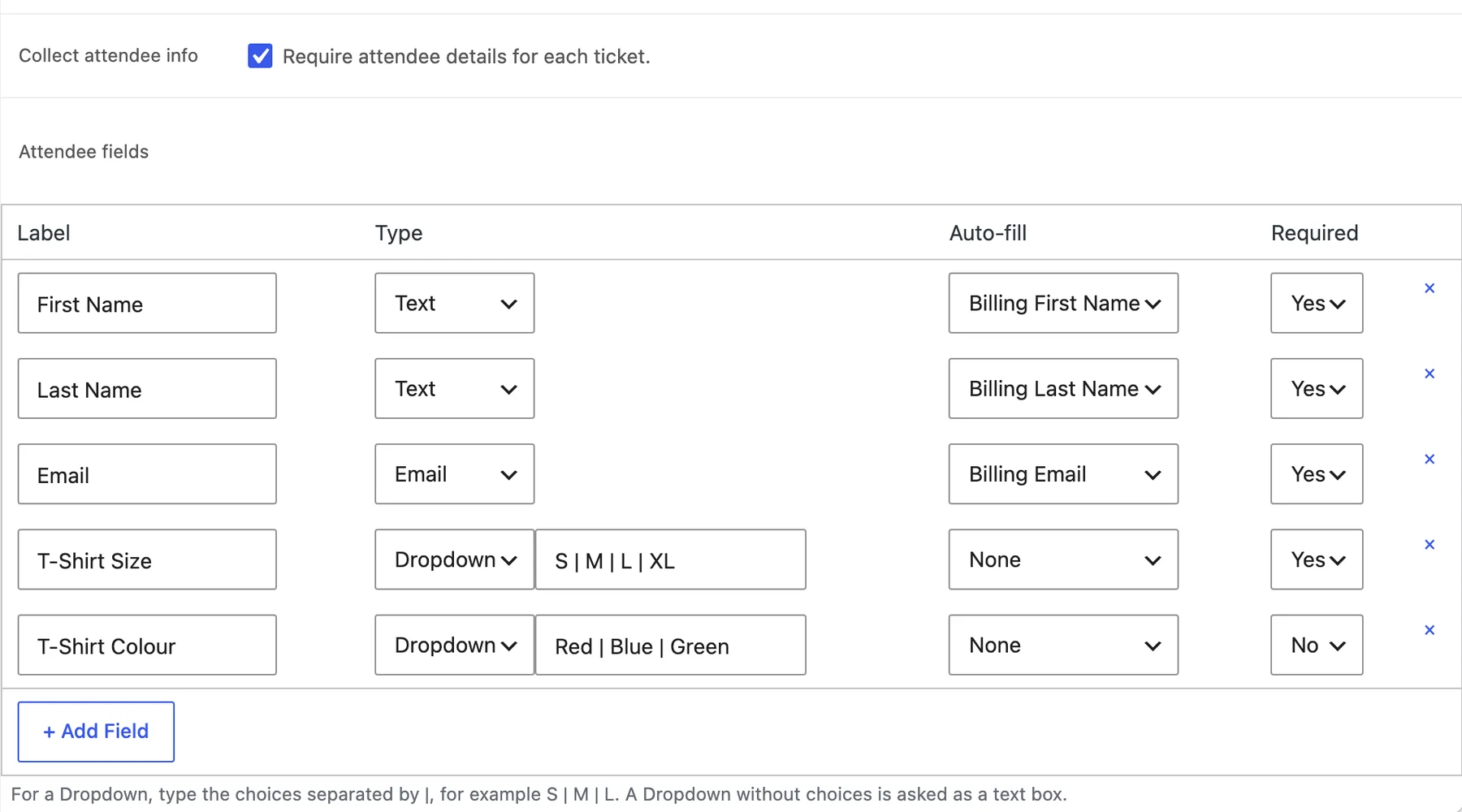
A buyer answers every required question once per person before they can pay, so I stopped at two.
What I saw at checkout#
I put two workshop tickets in the cart. Checkout showed one section per ticket holder, each labeled with the event name and date.
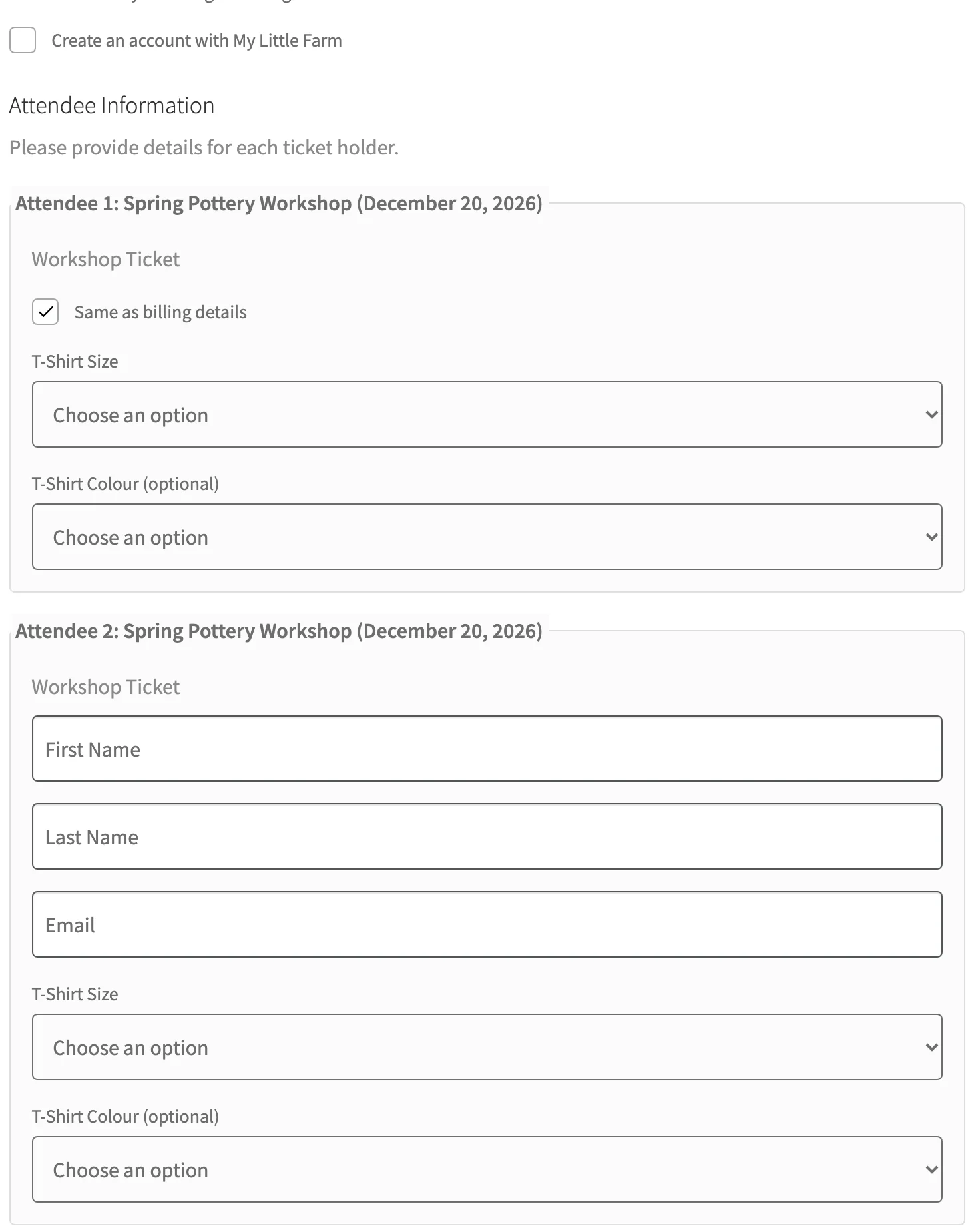
The first section had Same as billing details ticked, so it hid my name and email. My questions still showed there, so I picked a size for myself too. The second section, Priya’s, asked for everything.
My store uses the Checkout block, and the attendee sections sat inside the contact step. Optional questions get “(optional)” after the label, like the color here. The classic checkout, going by the plugin’s code, puts them after the order notes.
The count follows people, not tickets. The ticket product has a Persons per ticket setting, and in the 1.1.2 code checkout multiplies it by the quantity. One family ticket set to four people asks for four sets of details.
If you take Apple Pay or another express payment, check this before launch. When a ticket has a required custom question, Evenzo turns express checkout off and sends buyers to the normal form so they can answer. I didn’t have an express payment to test, so that one comes from the block checkout code.
Where the answers end up#
Each person gets an attendee record under Events > Attendees. When I opened Priya’s, my questions were in a Custom Fields section.
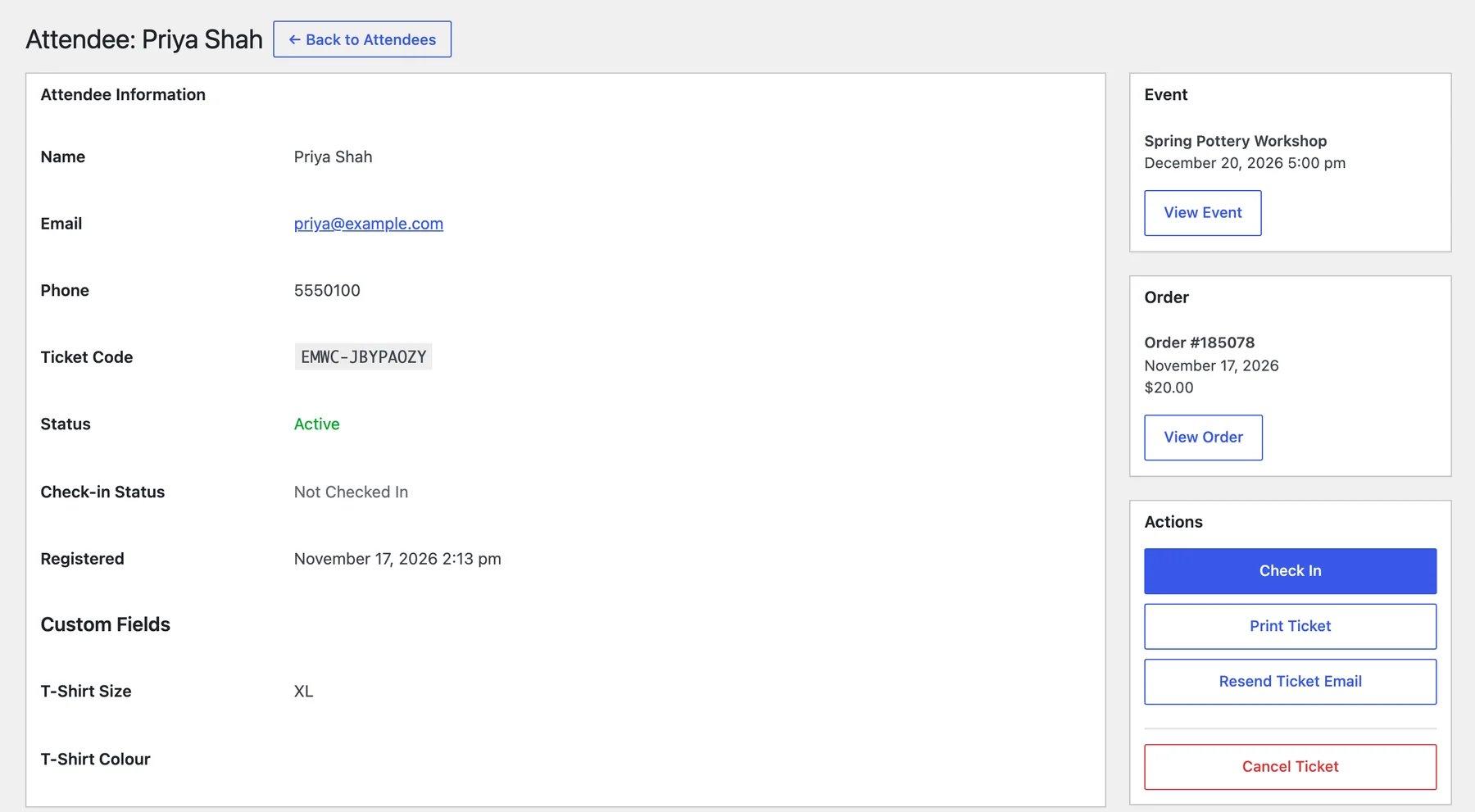
I’d left her color empty, and that row sat blank on her page. Evenzo stored nothing at all for that question, so a blank row is the only sign someone skipped it.
The attendees list itself doesn’t show the answers. For a sizing list, I’d use Export CSV on the same screen.
It gives one column per question, named by its label, next to name, email and ticket code. The attendee management docs list every column.
The answers aren’t in the emails either. I went through the 1.1.2 email templates, and none of the ticket or reminder emails include them. The order emails do link to an Edit attendee details page, which is also in My Account, with a note that buyers can change their answers there until the event starts.
Set capacity and a registration deadline#
Both are on the event, in its settings box. In the 1.1.2 code, an empty or 0 Capacity means no limit. A set one counts people the same way checkout does, quantity times persons per ticket.
Registration Deadline takes a date with no time. Evenzo’s sales check closes it at 23:59:59 that day, in the event’s time zone, or the site’s if the event has none. I’d need time to order T-shirts, so I’d set the workshop’s deadline a few days early, not on the day.
The product also has Minimum per order and Maximum per order fields. They looked useful, so I checked whether anything enforces them in 1.1.2.
Nothing does. Both save, but add to cart and checkout ignore them, so I set the limit with capacity instead.
Free registration#
I tested this on a second event, a winter fair with a ticket priced at 0. I turned on attendee details for it and added one required Dropdown, Session, with Morning and Afternoon.
With two tickets in the cart, the total was $0.00 and checkout had no payment section at all. I filled in both attendee sections, picked Morning for me and Afternoon for Priya, and placed the order under my test billing name, Jamie Rivera.
It went straight to Completed. Both tickets were made right away, one per person, each with its own code.
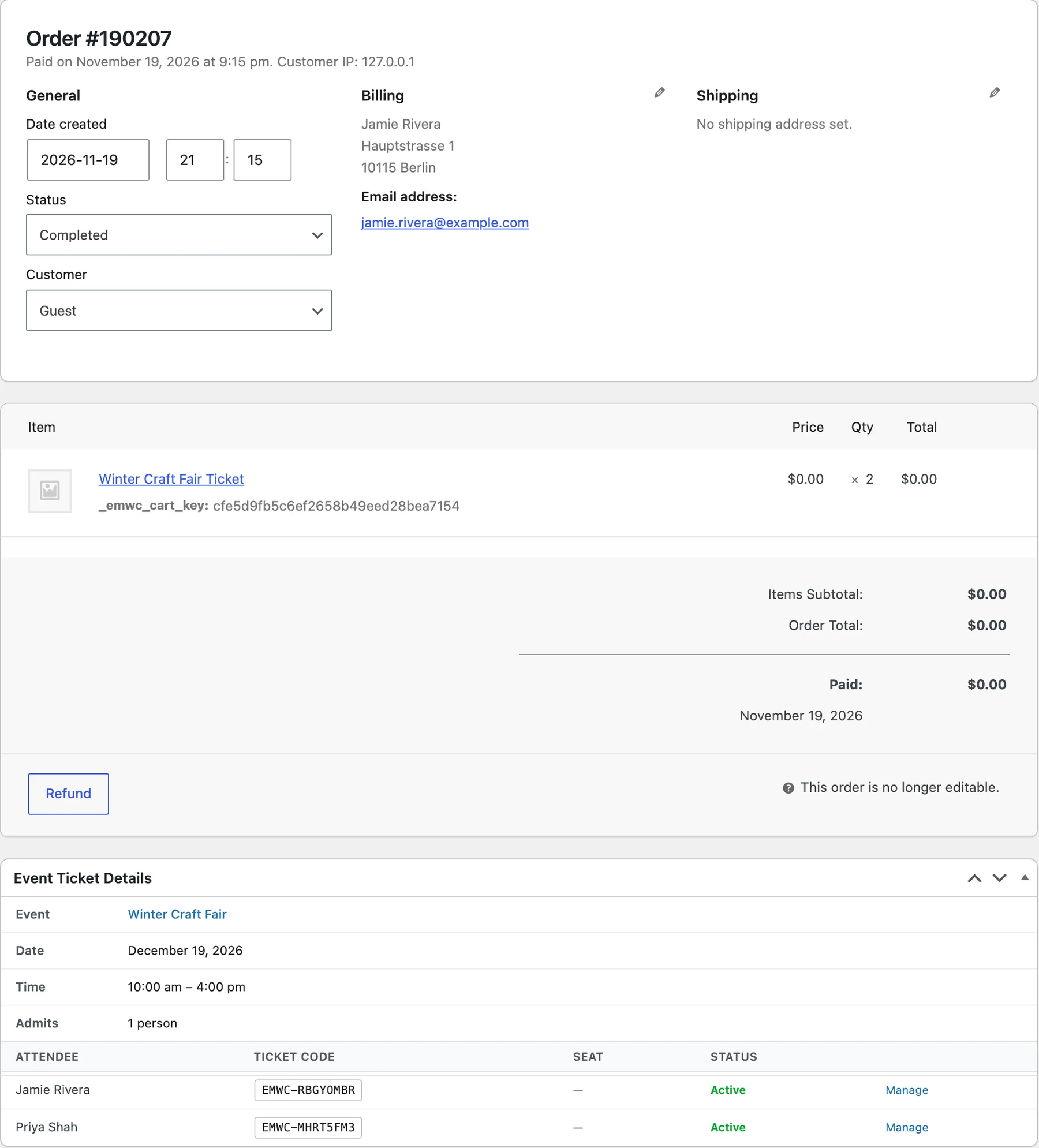
The session answers saved the same way as on the paid order: Morning on my record, Afternoon on Priya’s.
Tickets can’t share a cart with other products, though.
I tried adding a serving bowl after a ticket, then a ticket after the bowl. Both times I got “Event tickets cannot be purchased with other products.”
So a free workshop can’t go in one order with a paid starter kit. If you’re still deciding whether to charge at all, I wrote about how to price event tickets.
Gaps to know in 1.1.2#
On my paid test orders, every attendee record came in with my billing phone, 5550100, Priya’s included. Evenzo copies the buyer’s phone to each person.
A row labeled “Phone” won’t fix it. I ran the plugin’s field code on two rows. “Phone” shares a key with the built-in phone, so it gets dropped and checkout never shows it.
“Mobile number” stayed a normal question. The same code also drops any row set to auto-fill from billing name, email or phone. So label it “Mobile number” and leave Auto-fill on None.
Renaming the three default rows does nothing either. In the code, First Name, Last Name and Email keep their standard labels and stay required, even if you change the label or untick Required.
Where I’d start#
I’d add one Dropdown to a ticket on a staging copy and place an order for two. Give the second person different answers, then open both attendee records and run the export.
For check-in at the door, my guide to managing events in WooCommerce picks up from here. Evenzo is free on WordPress.org, where version 1.1.2 is listed under the slug evenzo-events-manager, if you want to try the same test. And if your event needs a question type it doesn’t have yet, I’d like to hear what it is.
Plugin we built for this
We didn't just write about it. We built something for it.
Keep reading
How to run an instant win competition in WooCommerce
Set up a WooCommerce instant win competition: turn on the module, pick probability or guaranteed odds, cap the winners, and see what buyers get after checkout.
Read more →
How to customize your WooCommerce PDF invoice template
Customize your WooCommerce PDF invoice template: branding fields and four layouts with no code, then theme overrides, extra CSS and a Weight column.
Read more →
HPOS and Block Checkout: what store owners need to know
What HPOS and Block Checkout change in WooCommerce, how to check your plugins before you switch, and the safe way to move your orders without losing data.
Read more →