
Bouncer - reCAPTCHA & Fraud Protection for WooCommerce
Stop spam orders, carding attacks, and fraudulent checkouts. 5 CAPTCHA providers, fraud scoring, geo-blocking, and PayPal Payments compatibility.
- 5 CAPTCHA providers in one plugin
- Cloudflare Turnstile support
- Google reCAPTCHA v2 & v3
- hCaptcha integration
- 7-layer self-hosted honeypot
- Order fraud scoring with 9 configurable rules
- Disposable email detection (780+ domains)
- Custom email blacklist with wildcard patterns
- Proxy/VPN detection via proxycheck.io
- Auto-hold or cancel risky orders
- Country-based CAPTCHA exclusion
- Geo-blocking (block entire countries)
- Built-in rate limiting (per-form + global)
- IP whitelist & blacklist (CIDR + wildcard)
- Role-based CAPTCHA skip
- 19 protected form types + shortcode
- Elementor Pro forms integration
- WooCommerce Bookings protection
- Block Checkout & Classic Checkout
- Checkout CAPTCHA position selector
- Guest-only or logged-in checkout toggle
- PayPal Payments auto-detection
- Apple Pay, Google Pay & Amazon Pay handling
- Product Vendors compatibility
- Subscriptions & Memberships support
- recaptcha.net domain for blocked regions
- 30+ language support for CAPTCHA widgets
- In-admin API key verification
- Per-order fraud score meta box
- Dashboard security widget
- Failsafe mode with honeypot fallback
- Settings export & import
- 19 developer hooks
- HPOS compatible
Your WooCommerce order list is full of garbage. Fake names, gibberish addresses, dozens of “Failed” orders from bots testing stolen credit cards against your checkout. Every fake order wastes your time, messes up your analytics, and every successful carding attempt triggers chargebacks that cost $20-100 each.
Bouncer stops this. Five CAPTCHA providers, a 9-rule fraud scoring engine, disposable email detection, proxy/VPN blocking, geo-blocking, and automatic WooCommerce PayPal Payments compatibility. One plugin, every form protected, no conflicts.
Why store owners choose this plugin#
- Stop fake orders and carding attacks: Bots can’t submit orders when CAPTCHA, fraud scoring, rate limiting, and IP blocking work together. Even the “Failed” orders from card testing bots stop filling your order list.
- Catch fraud CAPTCHA can’t: Bots are only half the problem. The fraud scoring engine flags disposable emails, proxy/VPN connections, billing/IP country mismatches, and suspicious order patterns. Auto-hold or cancel high-risk orders before they ship.
- 5 providers, one plugin: Cloudflare Turnstile, Google reCAPTCHA v2, reCAPTCHA v3, hCaptcha, and a 7-layer self-hosted honeypot. More providers than any competing plugin. Switch anytime without changing plugins.
- Works with WooCommerce PayPal Payments: The plugin reads PayPal Payments’ own reCAPTCHA settings and automatically skips CAPTCHA for PayPal methods. No double verification, no broken checkouts, no manual configuration.
- Protects 19 form types: Every WordPress and WooCommerce form, plus Elementor Pro forms, WooCommerce Bookings, Product Vendors, Subscriptions, and Memberships. Drop a shortcode to protect any custom form.
- Block entire countries: Geo-block specific countries from accessing your site, or skip CAPTCHA for trusted regions. Both use GeoIP lookup with WooCommerce’s built-in geolocation.
- GDPR-friendly option: The self-hosted honeypot sends zero data to third parties. No API keys needed.
Who is this for?#
- WooCommerce store owners tired of cleaning up fake orders and failed carding attempts every morning.
- Stores hit by fraud that need more than just CAPTCHA. The fraud scoring engine evaluates 9 risk signals per order and can auto-hold suspicious ones before they ship.
- Stores using WooCommerce PayPal Payments that need a CAPTCHA plugin that won’t break PayPal checkout. We’re the only one that auto-detects PayPal’s own reCAPTCHA.
- Multi-vendor marketplaces using WooCommerce Product Vendors. We’re the only CAPTCHA plugin that protects vendor registration forms.
- Subscription and membership sites dealing with spam signups. We protect checkout, early renewal, plan switch, and change payment method forms.
- Stores using Elementor Pro that need CAPTCHA on their custom forms without installing a separate plugin.
- Privacy-conscious stores in the EU, UK, or Australia that need GDPR-compliant spam protection without external API calls.
- High-security sites that need rate limiting, IP management, geo-blocking, and layered defense beyond basic CAPTCHA.
- Stores under active carding attacks that need to block bots immediately with rate limiting, IP blocklists, and proxy/VPN detection.
- International sellers who need CAPTCHA widgets in their customers’ language, or stores in regions where google.com is blocked (China, Iran) that need recaptcha.net support.
Choose your CAPTCHA provider#
Five providers, each suited to different needs:
| Provider | Best for | Privacy | User experience |
|---|---|---|---|
| Cloudflare Turnstile | Most stores | Privacy-focused | Usually invisible |
| Google reCAPTCHA v3 | High-traffic sites | Standard | Invisible (score-based) |
| Google reCAPTCHA v2 | Maximum visible security | Standard | Checkbox challenge |
| hCaptcha | Privacy-conscious stores | Privacy-focused | Challenge-based |
| Self-Hosted Honeypot | GDPR strict compliance | No external data | Completely invisible |
Our recommendation: Start with Cloudflare Turnstile. It’s free, privacy-focused, usually invisible to users, and stops most bots. If Turnstile ever goes down, the plugin automatically falls back to the honeypot so your forms stay protected.
Turnstile also supports three appearance modes: always visible, interaction-only (shows only when needed), or invisible. Pick what fits your store.
For stores in China or other regions where google.com is blocked, the plugin supports loading reCAPTCHA from recaptcha.net instead. CAPTCHA widgets can also be set to display in 30+ languages to match your store’s audience.
All 19 protected forms#
WordPress core (5 forms)#
- Login page
- User registration
- Lost password
- Reset password (set new password form)
- Comment forms (guest and logged-in)
WooCommerce (9 forms)#
- Checkout (both Classic and Block-based)
- My Account login
- My Account registration
- My Account lost password
- My Account reset password
- Pay for Order page
- Product reviews
- Order tracking
WooCommerce extensions (5 forms)#
- Product Vendors registration (the only CAPTCHA plugin that supports this)
- Subscriptions checkout, early renewal, plan switch, and change payment method
- Memberships registration
- Bookings add-to-cart (only on bookable products)
- Elementor Pro form widget
Custom forms#
Drop [cfwc_captcha] into any page or template to protect custom forms. The shortcode renders your active CAPTCHA provider and includes an AJAX verification endpoint for third-party form builders.
All extension forms load conditionally. If you don’t use Product Vendors, Subscriptions, Bookings, or Elementor Pro, those hooks never fire.
Checkout flexibility#
Two settings most CAPTCHA plugins don’t offer:
- Position selector: Place the CAPTCHA widget before the submit button, after order notes, or after customer details. Useful when payment gateways inject elements that conflict with the default position.
- Guest vs logged-in toggle: Show CAPTCHA to everyone, only guests, or only logged-in users. Returning customers who’ve placed 10 orders shouldn’t solve CAPTCHAs.
Order fraud scoring#
CAPTCHA stops bots. Fraud scoring catches humans.
The built-in fraud engine evaluates every order against 9 configurable rules and assigns a weighted risk score from 0 to 100. Each rule can be enabled or disabled individually, and their weights are adjustable.
The 9 fraud rules#
| Rule | What it checks | Default weight |
|---|---|---|
| Disposable email | Checks billing email against 780+ known disposable domains (mailinator, guerrillamail, etc.) | 30 |
| Custom email blacklist | Matches billing email against your wildcard patterns (e.g., *@tempmail.*) | 35 |
| IP/billing country mismatch | Compares the visitor’s IP country with their billing country | 25 |
| Order velocity | Multiple orders from the same email or IP in a short window | 20 |
| High order amount | Flags orders above a configurable dollar threshold | 15 |
| First-time customer | No previous completed orders from this email | 10 |
| Billing/shipping mismatch | Different countries for billing and shipping addresses | 10 |
| Free email on high-value order | Gmail, Yahoo, or Outlook used on orders above a threshold | 5 |
| Proxy/VPN detected | IP flagged as proxy or VPN by proxycheck.io | 30 |
Risk levels and automatic actions#
The total weighted score maps to four risk levels:
| Score | Level | Default action |
|---|---|---|
| 0-25 | Low | None |
| 26-50 | Medium | Flag (order note added) |
| 51-75 | High | Hold (order set to on-hold) |
| 76-100 | Very high | Cancel (order cancelled) |
Thresholds and actions are fully configurable. You can also skip fraud scoring for returning customers who have a configurable number of completed orders.
Per-order fraud breakdown#
Every scored order gets a meta box on the admin order screen showing:
- Color-coded risk badge (low, medium, high, very high)
- Score out of 100
- Table of every rule that fired, its individual risk contribution, weight, and weighted score
- CAPTCHA verification status
No need to guess why an order was held. The breakdown shows exactly which signals triggered.
Disposable email detection#
Fraudsters and spam bots use throwaway email addresses from services like Mailinator, Guerrilla Mail, and Temp Mail. The plugin ships with a curated list of 780+ disposable email domains and blocks them at checkout.
Three configurable actions when a disposable email is detected:
- Block: Prevent the order entirely with a clear error message.
- Warn: Add a WooCommerce notice but let the order through.
- Flag: Silently add an order note for manual review.
Custom email blacklist#
Beyond the built-in disposable list, you can define your own patterns using wildcards:
*@tempmail.comblocks any email at tempmail.com*@*.xyzblocks all .xyz domain emailsspam*@*blocks any email starting with “spam”
Same three actions: block, warn, or flag.
Proxy/VPN detection#
Proxy and VPN connections are a strong fraud signal. The plugin integrates with proxycheck.io to detect proxy/VPN traffic.
- Results are cached for 24 hours per IP, so the API isn’t hit on every page load.
- proxycheck.io’s free tier allows 1,000 lookups/day, enough for most stores.
- Detection feeds into both the fraud scoring engine and can be used standalone.
Geo-blocking and country exclusion#
Two complementary features based on GeoIP lookup:
Block countries#
Block visitors from specific countries from accessing your entire site. Blocked visitors see a configurable 403 message. Uses WooCommerce’s built-in country selector, so you pick countries from a searchable dropdown instead of typing country codes.
Skip CAPTCHA by country#
If you know your customers come from specific trusted countries, skip CAPTCHA for those visitors. Reduces friction for legitimate buyers without lowering security for everyone else.
Both features use WooCommerce’s geolocation system when available and fall back to ip-api.com for IP-to-country resolution.
Beyond CAPTCHA: layered security#
CAPTCHA is the first line of defense. This plugin adds several more.
Rate limiting#
Bots don’t try once. They try hundreds of times. Two layers of rate limiting protect your forms:
Per-form rate limiting:
- Block IPs after a configurable number of failed attempts (default 5, range 3-50).
- Configurable lockout duration (default 15 minutes, up to 24 hours).
- Configurable tracking window (default 60 minutes, up to 24 hours).
- Works on all protected forms, not just checkout.
- Cloudflare and proxy aware via WooCommerce’s IP detection.
- Auto-cleanup of expired lockouts.
Global rate limiting:
- Site-wide burst detection across all forms combined.
- Configurable max total submissions and max failures within a rolling time window.
- Catches distributed attacks that rotate across forms to stay under per-form limits.
Even if a bot passes CAPTCHA (using human-solving services), it can’t brute-force your forms.
IP blocklist and whitelist#
Block known bad actors before they even see your CAPTCHA:
- Exact IPs: Block or whitelist specific addresses.
- CIDR ranges: Block entire subnets, like
192.168.1.0/24or IPv6 ranges. - Wildcards: Match patterns like
192.168.1.*. - Comments: Add notes to your IP lists with
#for organization. - Blocklist runs first: Blocked IPs are rejected before CAPTCHA validation even starts.
Username blocking#
Block login attempts using specific usernames, with wildcard support. Stops bots that target common usernames like admin, administrator, or test*.
Role-based skip rules#
Your team shouldn’t solve CAPTCHAs on their own site:
- Skip all logged-in users: One checkbox, all logged-in users bypass CAPTCHA.
- Skip specific roles: Choose which roles skip, like administrators and shop managers, while keeping CAPTCHA for customers and subscribers.
Smart payment gateway handling#
Payment gateway conflicts are the #1 reason CAPTCHA plugins break WooCommerce checkouts. This plugin handles it properly.
WooCommerce PayPal Payments auto-detection#
The WooCommerce PayPal Payments plugin has its own built-in reCAPTCHA that protects PayPal’s payment endpoints. Most CAPTCHA plugins don’t know this. They add a second CAPTCHA on top, causing double verification that breaks the checkout.
This plugin reads PayPal Payments’ reCAPTCHA settings directly from the database. When PayPal’s reCAPTCHA is active, it automatically skips CAPTCHA for:
- PayPal Standard (Smart Buttons)
- PayPal Advanced Card Processing
- PayPal Card Button
- PayPal Fastlane / Accelerated Checkout
- Local payment methods (iDEAL, Bancontact, EPS, BLIK, Przelewy24, Multibanco, MyBank, Trustly, OXXO)
No manual configuration. An admin notice on the settings page confirms the detection.
Express payment handling#
Express payment methods have their own fraud protection built in. Adding CAPTCHA on top just breaks them. This plugin automatically detects and skips:
- Apple Pay (WooPayments, Stripe, PayPal)
- Google Pay (WooPayments, Stripe, PayPal)
- Amazon Pay
- Stripe Link
- WooPayments express checkout
12+ payment method IDs are recognized, plus pattern matching catches any variation. Developers can extend the list via the cfwc_express_payment_methods filter.
Dashboard security widget#
See your protection stats at a glance from the WordPress admin dashboard:
- Today’s blocked attempts and this week’s blocked attempts
- Currently locked IPs (with warning styling when lockouts are active)
- Active CAPTCHA provider status
- Rate limiting and honeypot status
- Total blocked across CAPTCHA and honeypot combined
No need to dig through logs. Open your dashboard and see if bots are hitting your store.
The honeypot: not a hidden field#
Most honeypot implementations add a hidden form field and call it a day. Bots figured that out years ago. Ours uses seven verification layers:
- JavaScript-injected field: The honeypot field only exists if JavaScript executes. No JS = bot.
- Visible trap field: A decoy field that bots fill, thinking it’s real. Must be empty.
- Timestamp validation: Verifies the form isn’t submitting impossibly fresh or stale data.
- Nonce verification: Prevents replay attacks with a unique nonce tied to the field name and timestamp.
- Minimum time check: Forms submitted in under 3 seconds are rejected. Configurable.
- Maximum age check: Forms older than 24 hours are rejected as expired.
- JavaScript math challenge: A random math problem (
a * b + c) encoded in base-36. Proves a real browser executed the JavaScript.
Each WordPress installation gets a unique, randomly generated field name. If a field name is ever compromised, it can be regenerated.
In-admin API key verification#
Not sure if your API keys are working? The settings page includes a live verification widget that renders an actual CAPTCHA challenge right in your admin panel. Solve it and the plugin confirms your keys are valid. No guessing, no “save and hope it works”.
Failsafe mode#
What happens when Cloudflare, Google, or hCaptcha has an outage?
- Fall back to honeypot (recommended): The plugin automatically switches to the 7-layer honeypot. Protection continues with zero external dependencies.
- Block submissions: Maximum security, but forms won’t work during the outage.
- Allow submissions: Forms always work, less secure during outages.
The honeypot requires no API keys and no external services. It’s always available as a fallback.
Settings export and import#
Moving from staging to production? Migrating to a new site? Export your settings as JSON and import them on the new site. The export automatically strips your API secret key for security. The import merges with existing settings, preserving any secret key already configured.
See Bouncer Features and Settings#
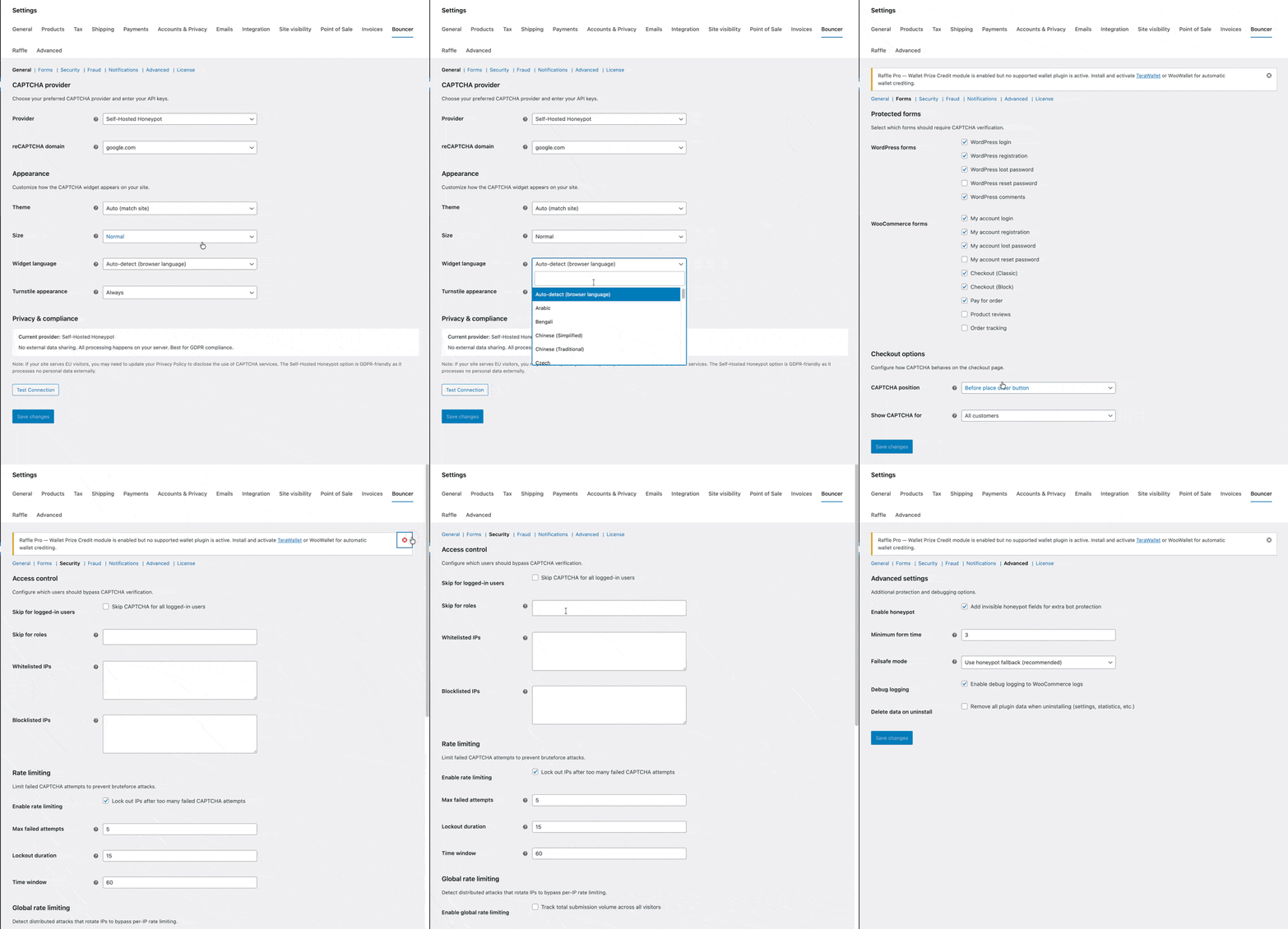
Setup takes 2 minutes#
- Install and activate the plugin.
- Activate your license key.
- Choose your CAPTCHA provider.
- Enter your API keys (free from each provider, or skip this step for Honeypot).
- Select which forms to protect.
- Save. You’re protected.
Scripts only load on pages with protected forms. Your other pages stay fast.
Getting your free API keys#
Each provider offers free API keys:
- Cloudflare Turnstile: Get keys from Cloudflare dashboard. Unlimited requests, free forever.
- Google reCAPTCHA: Create keys at Google reCAPTCHA admin. Free up to 1M assessments/month.
- hCaptcha: Register at hCaptcha dashboard. Free tier available.
For developers#
19 filters and actions for deep customization:
cfwc_skip_verification- skip CAPTCHA based on custom conditionscfwc_skip_for_payment_method- skip for specific payment methodscfwc_supported_forms- register custom forms for protectioncfwc_register_providers- add custom CAPTCHA providerscfwc_express_payment_methods- extend the express payment detection listcfwc_paypal_protected_methods- modify which PayPal methods are skippedcfwc_error_message- customize error messages per providercfwc_blocked_ip_message- customize the blocked IP rejection messagecfwc_honeypot_min_time- adjust minimum form submission timecfwc_recaptcha_v3_threshold- adjust the reCAPTCHA v3 score thresholdcfwc_should_load_assets- force-load CAPTCHA assets on specific pagescfwc_before_render,cfwc_after_render- hook around the CAPTCHA widgetcfwc_before_verify,cfwc_verified,cfwc_failed- hook into verification lifecyclecfwc_fraud_rules- register custom fraud rulescfwc_fraud_score_result- modify or extend fraud score resultscfwc_geoip_country_code- override GeoIP country resolutioncfwc_should_block_request- hook into global rate limiting decisionscfwc_after_verification- run logic after any CAPTCHA verification
All CAPTCHA widgets include proper accessibility attributes: role="group", aria-labelledby, and screen-reader text.
Privacy and compliance#
Important for GDPR/CCPA compliance: When using external providers (Turnstile, reCAPTCHA, hCaptcha), user data including IP addresses is transmitted to third-party servers. You should:
- Disclose CAPTCHA usage in your privacy policy.
- Consider your regional compliance requirements.
- Use the Self-Hosted Honeypot option if you need zero external data transmission.
When fraud scoring features are enabled, additional services may be contacted:
- GeoIP lookup uses WooCommerce’s built-in geolocation (MaxMind local database when configured) with ip-api.com as a fallback. Only the visitor’s IP address is transmitted.
- Proxy/VPN detection uses proxycheck.io when an API key is configured. Only the visitor’s IP address is transmitted.
All debug logs are stored locally using WooCommerce’s logging system. Nothing is transmitted externally. Clean uninstall removes all plugin data from your database when you choose to.
Frequently asked questions#
Will this slow down my checkout?#
No. Scripts only load on pages with protected forms. Modern providers like Cloudflare Turnstile run in the background without visible delay. Your product pages, category pages, and homepage are never affected.
Does it work with the new WooCommerce Block Checkout?#
Yes. The plugin has a dedicated Block Checkout integration using WooCommerce’s Store API. It’s not a hack on top of Classic Checkout. Both checkout types are supported as first-class citizens.
Does it work with WooCommerce PayPal Payments?#
Yes. The plugin auto-detects when PayPal Payments has its own reCAPTCHA enabled and skips CAPTCHA for PayPal payment methods, including Fastlane and local payment methods like iDEAL and Bancontact. You’ll see a confirmation notice on the settings page. No manual configuration needed.
What if a real customer fails the CAPTCHA?#
With providers like Turnstile or reCAPTCHA v3, most legitimate users never see a challenge. If someone does fail, they can retry immediately. The error messages are clear and helpful.
How is the fraud scoring different from WooCommerce Anti-Fraud?#
Both evaluate orders for risk. Bouncer’s fraud scoring is tightly integrated with its CAPTCHA layer, so you get bot protection and fraud detection in one plugin instead of two. The 9 rules cover the most common fraud signals (disposable emails, proxy/VPN, geo mismatch, velocity, amount thresholds), and every rule weight and threshold is adjustable. Orders that score above your thresholds are automatically held, cancelled, or flagged.
Can I protect custom forms?#
Yes, two ways. Developers can use the cfwc_supported_forms filter to register custom form types, or use the [cfwc_captcha] shortcode to drop a CAPTCHA widget into any page or template. The shortcode includes an AJAX verification endpoint for custom form handlers.
Does it work with Elementor Pro?#
Yes. When Elementor Pro is active, the plugin can protect Elementor’s form widget. Enable it in the settings and every Elementor form gets CAPTCHA protection.
Does it work with WooCommerce Bookings?#
Yes. When WooCommerce Bookings is active, the plugin protects the booking add-to-cart form. Only bookable products are affected. Regular product pages are untouched.
Is it compatible with caching plugins?#
Yes. CAPTCHA verification happens server-side after form submission, so page caching works normally.
Do I need coding skills to use this?#
Not at all. Choose your provider, paste in your free API keys, select which forms to protect, and save. Most store owners are protected within 2 minutes. Fraud scoring and geo-blocking have sensible defaults that work out of the box.
What’s the difference between this and free CAPTCHA plugins?#
Free CAPTCHA plugins typically offer one provider, cover basic WordPress forms, and treat WooCommerce as an afterthought. Bouncer does more:
- 5 CAPTCHA providers (Turnstile, reCAPTCHA v2, v3, hCaptcha, honeypot) vs. 1 in most free plugins.
- 19 protected form types including Product Vendors, Subscriptions, Memberships, Bookings, and Elementor Pro. The only CAPTCHA plugin supporting Product Vendors.
- 9-rule fraud scoring engine that catches fraudulent orders CAPTCHA can’t stop.
- Disposable email detection with 780+ known domains.
- Proxy/VPN detection via proxycheck.io.
- Geo-blocking and country-based CAPTCHA exclusion.
- PayPal Payments auto-detection that prevents double verification. No other CAPTCHA plugin does this.
- Built-in rate limiting with per-form and global thresholds.
- IP blocklist with CIDR and wildcard support, not just basic IP matching.
- 7-layer honeypot with JavaScript challenges, not a simple hidden field.
- Per-order fraud meta box showing exactly why an order was flagged.
- Dashboard widget showing blocked attempts, locked IPs, and provider status.
- Failsafe mode that falls back to honeypot when your CAPTCHA provider is down.
- Settings export/import for staging-to-production workflows.
- Block Checkout support via the Store API, not a DOM hack.
- Checkout position selector and guest/logged-in toggle.
- 30+ languages and recaptcha.net domain support.
- 19 developer hooks for deep customization.
Is there a free trial?#
We offer a 30-day money-back guarantee. Try it risk-free. If it doesn’t stop your spam problem, get a full refund.
What about WooCommerce Subscriptions?#
Yes. We protect Subscriptions checkout, early renewal forms, plan switch forms, and the change payment method form. Not just the initial signup.
How is the rate limiter different from KoalaApps’ checkout rate limiter?#
Our rate limiter works across all 19 protected form types, not just checkout. Per-form rate limiting blocks IPs after configurable failed CAPTCHA attempts with adjustable thresholds (3-50 attempts), lockout duration (5 min-24 hours), and tracking window (5 min-24 hours). Global rate limiting adds a site-wide layer that catches distributed attacks rotating across forms. Whitelisted IPs are never rate-limited. Combined with the IP blocklist, fraud scoring, and proxy detection, it provides layered protection that goes well beyond checkout-only rate limiting.
Technical details#
- PHP Version: 7.4 or higher
- WordPress: 6.0 or higher (tested up to 6.9)
- WooCommerce: 8.0 or higher (tested up to 10.7.0)
- HPOS Compatible: Yes
- Block Checkout: Fully supported (Store API integration)
- Multisite: Compatible
- Uninstall: Clean removal of all plugin data (optional)
Ready to stop spam bots, carding attacks, and fraudulent orders? Get Bouncer for WooCommerce today. $29/year, 30-day money-back guarantee.
Risk-free
30 days. 100% refund. No questions asked.
We'd rather lose a sale than keep an unhappy customer. If a plugin doesn't work for you within 30 days, you get the money back. No back-and-forth. No "let us help you troubleshoot first" runaround.
Read the full refund policy →- 1
Email us
Send your order number to support@themology.com .
- 2
A human approves
No bots, no forms, no questions. Usually within hours.
- 3
Refund hits your card
Within 5-10 business days, depending on your bank.
More from Themology

Evenzo – Events & Tickets Manager for WooCommerce
Free WooCommerce event ticketing plugin from WordPress.org. Sell tickets, scan QR codes, manage attendees, seating charts, and calendar views. No platform fees.

Emboss - PDF Invoices and Packing Slips for WooCommerce
Free PDF invoices, receipts, packing slips, and credit notes for WooCommerce. Auto-attach to emails, smart Invoice/Receipt distinction, HPOS native, zero bloat.

SpeedForge
Free WordPress speed plugin with page caching, Critical CSS, JS defer/delay, WebP/AVIF conversion, and WooCommerce optimizations. No API keys or cloud fees.