
 Nazmoon Munny 8 min read
How to run an instant win competition in WooCommerce
Set up a WooCommerce instant win competition: turn on the module, pick probability or guaranteed odds, cap the winners, and see what buyers get after checkout.
I bought five tickets for a $5 test raffle on my staging store, and ticket 0005 won before I’d scrolled past the order details. I still grinned. It wasn’t luck, though: I had set the raffle to give away one prize for every five tickets sold, so one of my five had to win.
In an instant win competition, each ticket gets checked as soon as the order reaches Processing or Completed. With a card payment, that’s right at checkout. The buyer sees the result on the thank-you page. You can give every prize away that way, or keep a main draw on the end date too.
I set mine up in Raffle for WooCommerce, the raffle plugin we build, and wrote down every label from version 1.1.19. Then I made a second copy with a winner cap of 1 and bought past it, to see what losing looks like. The instant win fields don’t show on the product until you turn on a store setting, and it starts off.
TLDR
Turn on Instant Win under WooCommerce > Settings > Raffle > Modules, then tick Enable Instant Win on the raffle product. Pick odds of 1 in X per ticket or one winner per N tickets, and cap the prizes. Winners see it on the thank-you page.
If you haven’t built a raffle product before, start with my guide to running online raffles with WooCommerce. This post picks up once the raffle exists. It uses the hybrid setup, instant wins plus a main draw, which is the plugin’s default.
Step 1: turn on the Instant Win module#
Go to WooCommerce > Settings > Raffle and open the Modules section. Tick Instant Win and save.
This module starts off. I cleared the saved value on my test store to check, and the box came back unticked. While it’s off, the instant win fields stay hidden on every product.
I turned it off once on a product that already had instant win saved. The fields were gone from its Raffle Settings tab, and a red notice sat in their place: “This raffle has Instant Win enabled, but the global Instant Win module is turned off.” It links back to this setting.
Step 2: enable instant win on the raffle product#
Open your raffle product and go to the Raffle Settings tab. The instant win fields sit below the draw settings, with no heading over them. Look for the Enable Instant Win checkbox and tick it.
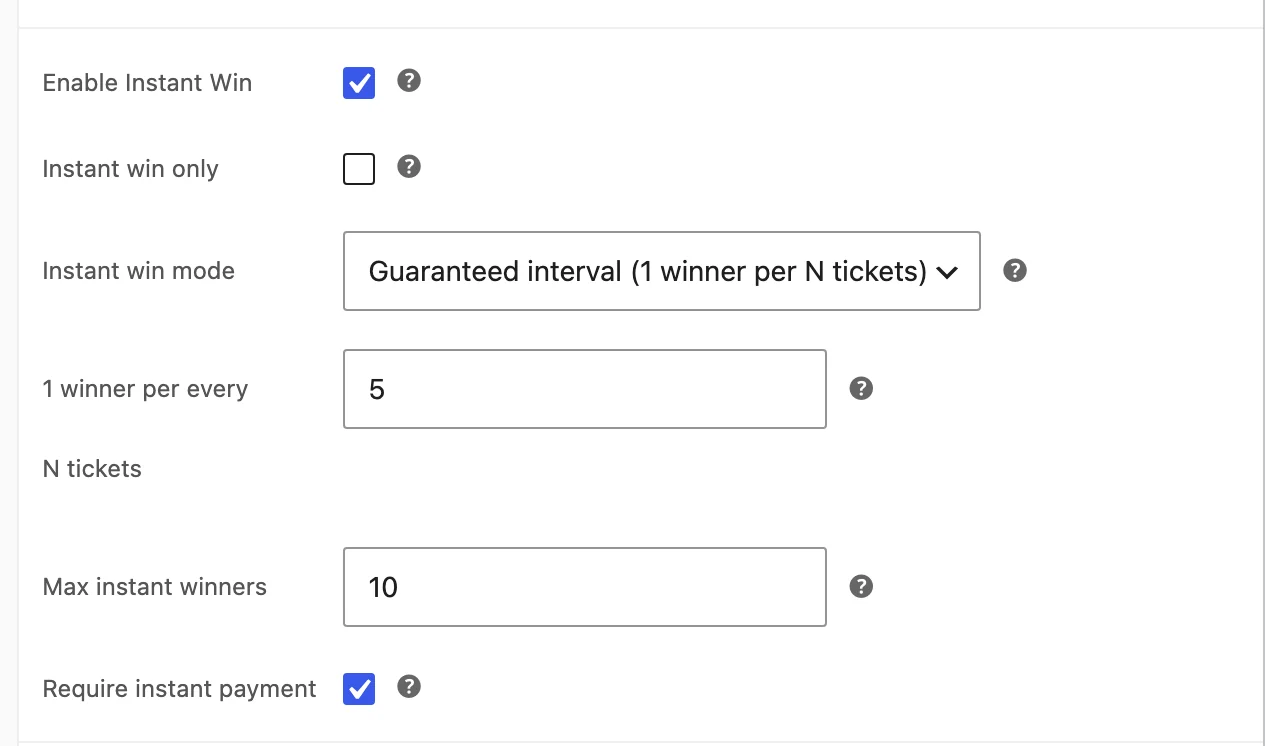
Below it, start with these two fields:
- Instant win only turns the main draw off. Tick it when every prize goes out at checkout.
- Instant win mode sets how the odds work. The next step covers both options.
Step 3: choose probability or guaranteed odds#
Probability-based (e.g. 1 in 50 chance) gives every ticket the same odds. You set Win probability (1 in X), and the default of 50 means a 2% chance per ticket. Over 500 tickets you’d expect about 10 winners, but the real count can land well above or below that.
Guaranteed interval (1 winner per N tickets) fixes the count instead. You set 1 winner per every N tickets, and the default is 25. For each block of N tickets, the plugin picks one winning spot, and whoever buys that spot wins.
My test used 5, which is why one of my five tickets had to win. The promise holds per full block, in the order tickets sell.
On a third copy with no cap, I bought 16 tickets over four orders. Tickets 0001, 0006 and 0012 won, one in each full block of five.
Ticket 0016 opened a fourth block and lost, because the spot the plugin had saved for that block was 3. If sales had stopped there, that block would have had no winner.
I’d pick guaranteed mode if you’ve priced the prizes against ticket revenue, because you know how many prizes go out per ticket sold. Probability fits a small prize, where a run of extra winners won’t hurt.
Both modes pick their numbers with PHP’s random_int, going by the plugin’s code. Random.org only appears in the main draw settings. My post on Random.org versus the built-in random draw covers that choice.
Step 4: cap the winners and keep payment instant#
Max instant winners stops the giveaway at a set number. Its help tip says to leave it empty or at 0 for unlimited, and my third copy, left empty, gave out three prizes.
I tested it on the second copy: guaranteed mode, an interval of 5 and a cap of 1. My first order of five won on ticket 0002. My second order of five covered the next full block, which would normally hold a winner, and all five tickets lost.
The raffle still checked and logged tickets 0006 to 0010. Each row says “not a winner”, the same as any other loss, so nothing in the log tells you the cap was the reason.
Set a cap with probability mode. Probability has no ceiling of its own, so a lucky run of buyers can hand out more prizes than the ticket sales cover.
Require instant payment is on by default, and I’d leave it that way. With the raffle in my cart, checkout offered only my card gateway. When I unticked the setting, Direct bank transfer, Check payments and Cash on delivery came back.
Bank transfer and check orders wait in On hold, and cash on delivery orders reach Processing before any money arrives.
Tickets only get checked once an order reaches Processing or Completed. I put a two-ticket order On hold, and the plugin made no tickets for it until I moved it to Processing. That’s when they got their result.
Those three were the only offline gateways on my store. If you run another one, put the raffle in your cart and check checkout, then add it to the product’s Disabled payment gateways field if it still shows.
Step 5: decide what the prize is#
In the free plugin, an instant winner gets the raffle’s main Prize type settings. In my test that was a $150 store credit.
That works when every prize is the same. In a hybrid raffle with a big main prize, it means instant winners get that same prize config, which is rarely what you want.
The Pro addon fixes that with its own IW prize type field, so instant prizes and the main prize stay apart. The Advanced Instant Win docs list the options. I’ve kept this guide to the free plugin.
What the buyer sees#
Before buying, the product page shows an “Instant Win!” badge with the line “Find out if you won immediately after purchase”. Once someone wins, a winners block lists them by name and ticket number.
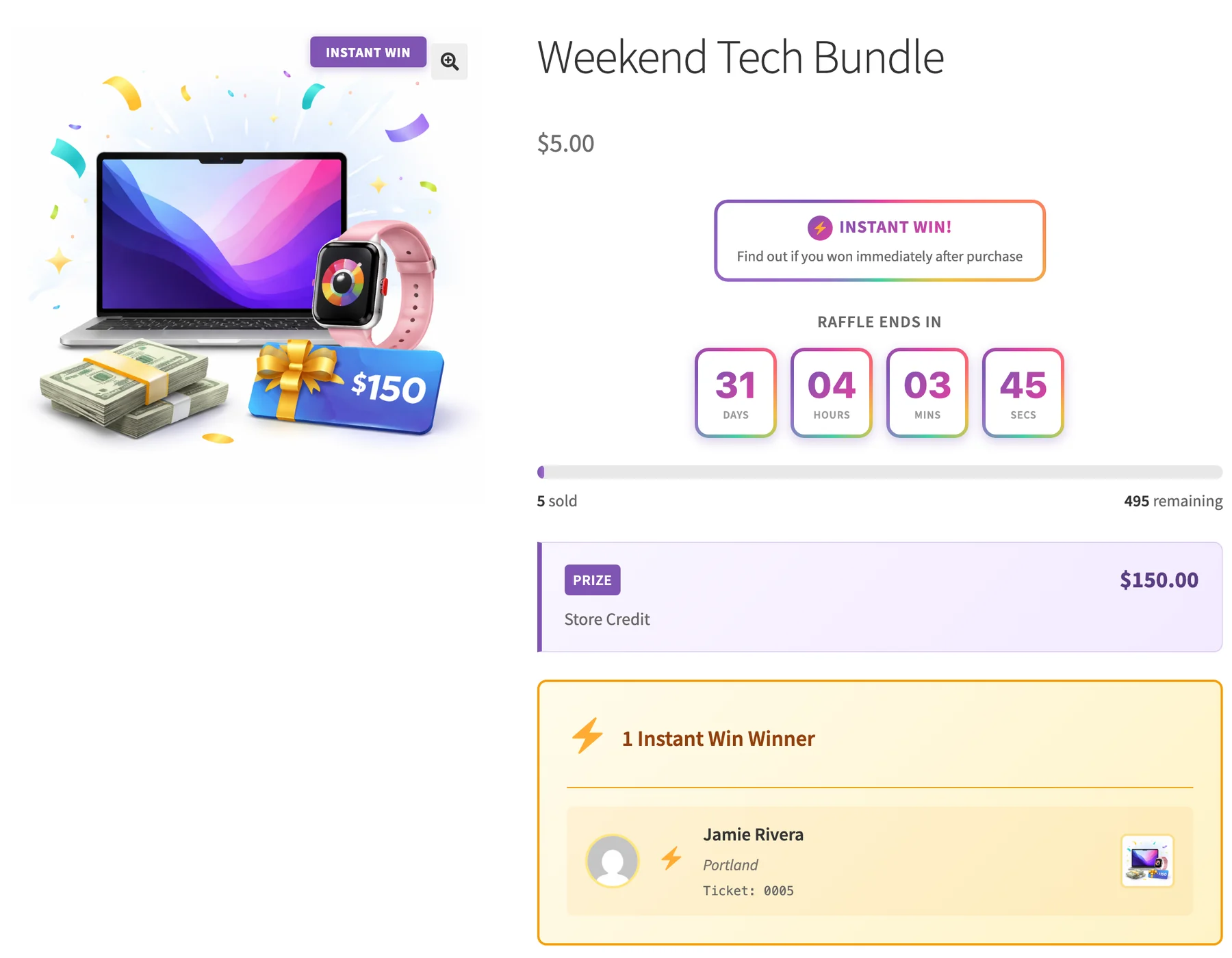
You can hide that block, or show it only after the raffle ends, under WooCommerce > Settings > Raffle > Display > Instant Win Winners Display. Its description says it covers the winners shortcode too.
I set it to Never show and made a page with [raffle_winners] for my second copy. The block left that product page, but the shortcode page still listed its winner, ticket 0002. In 1.1.19, keep the shortcode off your pages if you want winners hidden.
After checkout, a winner sees “Congratulations! You won!” on the thank-you page, with the winning ticket number and a note that prize details went to their email. In a hybrid raffle, the box also says how many of their other tickets are still in the main draw.

My second order, the one past the cap, got this box instead. Losing tickets aren’t listed one by one.

My winning order also sent the winner email with the prize details, and the store got an admin alert. The losing order sent only the ticket confirmation and the usual order email, with nothing about instant win.
One gap showed up in my test. The ticket confirmation email every buyer gets still lists a winning ticket as “Active”. The winner email arrives with it, so nobody misses the win, but a buyer comparing the two might ask.
Checking who won and why#
Every check writes a row to the raffle log with the ticket number, the mode, and “WINNER” or “not a winner”. The latest entries show in the activity log on the raffle Analytics page.
My test order left five rows, one per ticket, and only the row for ticket 0005 ended in WINNER. If a buyer ever questions a result, that row and its timestamp are what I’d send them.
Rules to check before you launch#
Instant win competitions sit close to lottery law in a lot of places. In the UK, for example, paid prize competitions usually need a real skill question or a free entry route. I’m not a lawyer, and no plugin setting makes a competition legal where it isn’t.
The plugin has a skill-testing question and a free entry option, covered in the compliance docs. If your competition raises money for a cause, my guide to running a charity raffle online covers licenses in the US, UK and Canada.
Before you go live#
I’d repeat my test on your own staging copy. Make a cheap raffle, use guaranteed mode with an interval of 5 and a cap of 1, and place two orders for five tickets. You’ll see the win, the winner email, the losing screen and the log rows.
Then switch to the real interval and prize, and set the cap. The plugin is free on WordPress.org if you want to try it, and if your first instant win raffle turns up something this guide missed, I’d like to hear about it.
Plugin we built for this
We didn't just write about it. We built something for it.
Keep reading
WooCommerce event registration: collect details for every attendee
Set up WooCommerce event registration that asks every attendee for a name, email and your own questions, then see where the answers go and what limits apply.
Read more →
How to customize your WooCommerce PDF invoice template
Customize your WooCommerce PDF invoice template: branding fields and four layouts with no code, then theme overrides, extra CSS and a Weight column.
Read more →
HPOS and Block Checkout: what store owners need to know
What HPOS and Block Checkout change in WooCommerce, how to check your plugins before you switch, and the safe way to move your orders without losing data.
Read more →