
How to Run a Charity Raffle Online Without Breaking the Law
Charity raffle laws vary by state and country. Here are the legal requirements for the US, UK, and Canada, plus a free WooCommerce setup walkthrough.

Every charity raffle organizer asks the same question first: “Is this even legal?”
The answer depends on where you are, what kind of organization you run, and how you sell the tickets. That’s not a cop-out. Raffle laws genuinely vary from state to state, country to country, and sometimes even city to city. Alabama bans them outright. The UK requires a free entry option. Canada wants a skill-testing question. And your neighbor’s golf club probably ignores all of it.
We’re not lawyers. We build WooCommerce plugins, and charity raffle organizers are some of the people who contact us most. Over the past year, we’ve gathered the rules, talked to dozens of organizations running raffles, and watched people get tripped up by the same issues over and over.
This guide covers what we’ve learned. The legal requirements across the US, UK, and Canada. The compliance features that most raffle platforms ignore. And a step-by-step setup if you’re using WooCommerce, which you probably are if you’re reading this.
Here’s the quick version: in the US, most states allow charity raffles with a permit ($15 to $500), but about a dozen states ban or restrict online ticket sales. In the UK, you need a free entry alternative to avoid Gambling Commission licensing. In Canada, a skill-testing question changes the legal classification of your raffle. We’ll cover each one in detail below.
What is a charity raffle?#
A charity raffle is a fundraising method where an organization sells numbered tickets and draws a winner to receive a prize. The ticket sales generate revenue for the charity’s cause. Online charity raffles work the same way but sell tickets through a website instead of in person, which lets organizations reach supporters beyond their local area.
The legal catch: in most countries, a raffle is classified as a form of gambling or lottery. That means regulations apply. The specific rules depend on where your organization operates and where your ticket buyers live.
Is your raffle legal?#
Short answer: probably, but you need to check your specific jurisdiction before doing anything else.
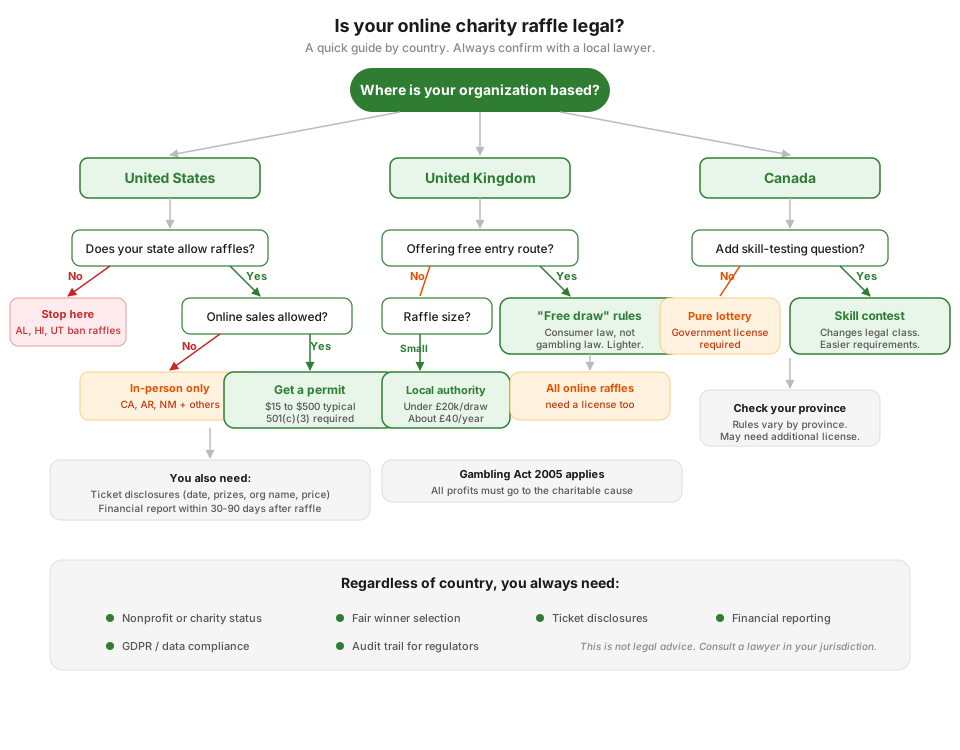
Here’s the general picture in the three markets where most of our users operate.
United States#
Raffle laws in the US are a patchwork. Each state has its own rules, and they don’t agree on much. According to US Charitable Gaming, 47 states allow some form of charitable raffle, but the conditions and restrictions are different in almost every one.
States that ban raffles entirely: Alabama, Hawaii, and Utah don’t allow them in any form. If you’re operating in one of these states, stop here and talk to a lawyer about alternative fundraising methods.
States that allow online raffle ticket sales: About 14 states currently let the general public buy charitable raffle tickets online. The number keeps growing as more states update their laws, but it changes year to year.
States with in-person only restrictions: Several states allow raffles but require tickets to be sold face-to-face. California, Arkansas, and New Mexico fall into this category. Running an online raffle from these states gets legally complicated.
Common requirements across most states:
- Your organization needs 501(c)(3) nonprofit status or similar designation
- You’ll need a permit or license (fees typically run $15 to $500)
- Some states require your nonprofit to have been operating for one to two years before running a raffle
- Financial reports are usually due within 30 to 90 days after the raffle ends
- Ticket materials need to show the drawing date, prize descriptions, ticket price, and your organization’s name
The most thorough state-by-state breakdown we’ve found is from Charity Auctions Today. Bookmark it.
United Kingdom#
UK raffles fall under the Gambling Act 2005, which classifies them as lotteries. The rules depend on the size of your raffle and how you run it.
The free entry exemption. This is the part most people miss. If you offer at least one genuinely free method of entry (an online form or postal entry), your raffle becomes a “free draw” regulated by consumer protection law rather than gambling law. The free entry option can’t be buried in fine print while you highlight the paid option. It needs to be equally visible.
When you don’t need a license:
- Private lotteries (closed to a specific group like employees or club members)
- Incidental lotteries (part of a physical event, tickets sold only at that event)
When you need to register with your local authority:
- Small society lotteries for charity with ticket sales under £20,000 per draw and £250,000 per year. Registration typically costs around £40 annually, according to the Gambling Commission.
When you need a Gambling Commission license:
- Any online lottery, including those run through social media, fundraising platforms, or your own website
- Society lotteries that exceed the £20,000/£250,000 limits above
All profits after costs and prizes must go to the charitable cause. You can’t retain profit for personal use.
The Fundraising Regulator has the complete guidelines.
Canada#
Canadian raffle law is a mix of federal criminal law and provincial regulation.
The skill-testing question. This is Canada’s distinctive requirement. Under the Criminal Code, a lottery where prizes are awarded purely by chance requires a government license. But if you add a “skill-testing” element, it often changes the legal classification. That’s why Canadian contests and raffles almost always include a math question or trivia question before entry.
Provincial rules add more layers. Some provinces require specific licenses, cap prize values, or restrict online ticket sales. Check your province’s gaming authority before proceeding.
The reality check#
No guide on the internet (including this one) replaces talking to someone who actually knows your jurisdiction’s laws. If your raffle involves real money and real prizes, spend an hour with a lawyer who handles nonprofit compliance. The consultation fee is cheaper than the fine.
What you need before selling a single ticket#
Before you pick a platform or install a plugin, work through this checklist. We’ve seen organizations skip these steps and regret it.
Legal and organizational:
- Confirm your organization type qualifies (501(c)(3) in the US, registered charity in the UK, etc.)
- Check whether your state or country allows online raffle ticket sales
- Apply for any required permits or licenses
- Decide whether you need a paid-only raffle or both paid and free entry (UK and Canada may require a free alternative)
- Determine your reporting requirements and deadlines
Raffle setup decisions:
- Set a clear prize, ticket price, and total number of tickets
- Choose your start date, end date, and draw date
- Decide how winners will be selected (manual, automatic, or third-party verified)
- Plan how you’ll handle refunds if the raffle is cancelled or fails to meet its goal
Technical requirements:
- A website with a proper payment checkout (not just a PayPal link)
- Email notifications for ticket confirmation, gift receipts, and winner announcements
- A way to generate and track ticket numbers
- PDF or printable tickets if you’re running a physical event alongside the online raffle
If you already have a WooCommerce store, you have most of the technical pieces in place. The checkout, payment gateways, email system, and order management are all there. You just need a raffle plugin on top.
Setting up your raffle with WooCommerce#
Most guides about online raffles push expensive SaaS platforms. GalaBid, RallyUp, Rafflr, and others charge monthly fees, per-ticket fees, or both. If you already run a WooCommerce store, you don’t need to pay for a separate platform. Your existing checkout handles payments, your email system handles notifications, and your order dashboard handles record-keeping.
Here’s how to set everything up from scratch using Raffle for WooCommerce, which is the plugin we built for exactly this use case. It’s free on WordPress.org.
Full disclosure: we made this plugin because charity organizers kept telling us nothing else did what they needed, specifically gift ticket purchasing and provably fair draws. If you want to compare it against other options first, we tested all the WooCommerce raffle plugins in a separate article.
Step 1: Install the plugin#
Go to Plugins > Add New in your WordPress admin, search for “Raffle for WooCommerce,” and install it. Or download the zip from WordPress.org and upload it manually.
After activation, head to WooCommerce > Settings > Raffle to configure your global options. The getting started guide covers every setting in detail.
Step 2: Create a raffle product#
Add a new product in WooCommerce and select Raffle as the product type. You’ll see a new Raffle Settings tab with these fields:
- Ticket price (this is the regular WooCommerce price field)
- Total tickets available (how many you want to sell)
- Start date and time (when ticket sales open)
- End date and time (when ticket sales close)
- Draw date and time (when the winner will be selected)
A live countdown timer and progress bar appear on the product page automatically. The timer shifts to an urgency color when less than three days remain.
See the full creating raffles documentation for all the options.
Step 3: Turn on gift purchasing#
This is the feature charity organizers ask for more than anything else. Supporters want to buy tickets for elderly relatives who can’t purchase online. Businesses want to buy entries for employees. Family members want to gift a chance to win. We covered the full case for why this matters in our deep dive on gift raffle ticket purchasing if you want the longer version.
Enable it globally in WooCommerce > Settings > Raffle > General by checking Enable Gift Purchase. You can also control it per-product if you only want gift options on certain raffles.
When gift purchasing is on, the checkout shows fields for each recipient’s name, email, and an optional personal message. The recipient gets an email with their ticket details. Their name goes into the draw, not the buyer’s.
The gift purchases documentation explains the full checkout experience for both WooCommerce Block Checkout and Classic Checkout.
Step 4: Set up compliance features#
This is where most raffle plugins fall short. If you’re running a charity raffle that needs to follow regulations, you need more than just ticket numbers and a random draw.
Skill-testing questions (for Canada and similar jurisdictions):
Go to WooCommerce > Settings > Raffle > Compliance and enable skill-testing questions. Build a question pool with text or multiple choice questions. When enabled, customers see a randomly selected question on the product page and must answer correctly before adding tickets to their cart.
Questions are pinned per product. Once a question is assigned to a raffle, it stays the same for every visitor. This matters for postal (free entry) participants who need to know which question to answer in their mail entry.
Free entry route (for UK and similar jurisdictions):
In the same compliance settings, enable the free entry option. This adds a “Paid Entry / Free Entry” tab interface on the raffle product page. Write your own postal entry instructions and use the [Your Address] placeholder to automatically insert your WooCommerce store address.
The compliance documentation covers all the configuration options.
Step 5: Choose your winner selection method#
You have three options:
-
Manual selection. You browse all tickets in the admin panel and pick the winner yourself. Useful for small, informal draws.
-
Automatic selection. The plugin picks a random winner when the raffle ends. No action required from you.
-
Random.org selection. The plugin requests certified random numbers from Random.org for the draw. This gives you provably fair results you can show to regulators, auditors, or skeptical participants. No customer data leaves your site. Only a request for random numbers is sent.
For charity raffles with any kind of compliance requirements, Random.org is the right choice. The proof metadata is saved in the audit trail.
See the winner selection documentation for setup details.
Step 6: Configure email notifications#
The plugin sends six types of email:
- Ticket Confirmation to the purchaser after buying tickets
- Gift Received to gift recipients with their ticket details
- Winner Notification to winners when they’re drawn
- Prize Claimed Confirmation to winners when their prize is marked as collected
- Admin Winner Alert to you when a winner is selected
- Admin Draw Failed Alert to you if an automatic draw fails
Toggle each on or off in WooCommerce > Settings > Raffle > Emails and customize the templates in WooCommerce > Settings > Emails.
Step 7: Test before going live#
This step is not optional. Run through the entire flow before real money is involved.
- Create a test raffle with a low ticket count
- Buy a ticket yourself (use WooCommerce test mode or a sandbox payment gateway)
- Try a gift purchase with a different email address
- Let the raffle end and test the winner selection
- Check that all emails arrived and look correct
- Export the ticket data and verify the CSV
If you’re using skill-testing questions or the free entry route, test those too. Every compliance feature needs to work before you go public.
Compliance features most platforms miss#
We keep coming back to compliance because it’s the part that trips people up. Here’s what to look for in any raffle platform, not just ours.
Gift ticket purchasing#
When someone buys a raffle ticket for a relative, friend, or colleague, the recipient’s name should appear on the ticket and in the draw. Not the buyer’s name. This sounds simple, but most raffle plugins don’t offer it at all.
For charities, this matters a lot. Elderly supporters who can’t manage online checkout. Corporate donors buying entries for staff events. Parents purchasing on behalf of children. If your raffle platform doesn’t support this, you end up managing it manually with spreadsheets, which is exactly the kind of thing that causes errors at draw time.
Provably fair winner selection#
“Random” is not the same as “provably random.” Any plugin can generate a random number. Few can prove to a regulator that the number was genuinely random and not manipulated.
Random.org provides certified random numbers generated from atmospheric noise. When you use this method, the proof metadata is logged. If anyone questions the fairness of your draw, you have documentation. Our technical comparison of Random.org vs built-in random methods explains the differences between the three selection methods and when each one matters.
For informal office draws, this probably doesn’t matter. For charity raffles subject to regulatory oversight, it matters a lot.
Audit trail#
Charity regulators want to see what happened and when. Who bought tickets. When the draw occurred. How the winner was selected. Whether any tickets were refunded.
A proper audit trail logs every action automatically. You shouldn’t need to reconstruct this from order emails and screenshots after the fact.
Refund handling for failed or cancelled raffles#
Raffles fail sometimes. You don’t sell enough tickets, or circumstances change and you need to cancel. When that happens, you need a way to refund ticket holders that doesn’t involve manually processing each order one by one.
Look for mass refund capabilities, refund method options (gateway refund, manual, or wallet credit), and clear record-keeping of what was refunded and how.
How different organizations use this#
These are based on real conversations with raffle organizers who use WooCommerce. Names and specific details are generalized.
Golf club members-only draw#
A golf club runs monthly prize draws for members. They set up a private raffle (members access it through a password-protected page) with automatic winner selection. No compliance features needed since it’s a private lottery. The countdown timer on the club’s homepage drives participation. Most members buy a couple of tickets during the month.
School PTA fundraiser#
A school PTA runs a holiday raffle with both online and in-person ticket sales. Online tickets go through WooCommerce. In-person tickets at school events are entered manually by the PTA treasurer through the admin panel. Gift purchasing is popular with grandparents who buy tickets for students. They use Random.org for the draw so no one questions whether the PTA picked their own kid.
Animal charity nationwide raffle#
A regional animal charity runs an online raffle to fund veterinary care. They enable the free entry route (postal entry) to comply with UK regulations. The skill-testing question isn’t needed since they’re UK-based. PDF tickets with QR codes let supporters show their entries at the charity’s annual gala. Winner selection uses Random.org, and the full audit trail goes into their annual compliance report.
Church community raffle#
A church runs a quarterly raffle to fund community programs. The biggest use of gift purchasing: church members buy tickets for elderly congregation members who don’t use computers. The church treasurer handles draw management. They use the analytics dashboard to report raffle results to the church council.
Promoting your raffle#
The best raffle setup means nothing if nobody knows about it. Here’s what we’ve seen work for small organizations.
Start with your existing audience. Email your supporter list, announce it in your newsletter, post it in your member groups. The people who already care about your cause are the easiest first buyers.
Use the countdown timer as urgency. The progress bar (“72% of tickets sold”) and countdown timer (“3 days left”) create natural urgency. Share screenshots of these on social media as the raffle progresses.
Put QR codes on physical materials. If you’re at events, print flyers or posters with a QR code that links directly to the raffle product page. People scan it, buy a ticket on their phone through your regular WooCommerce checkout.
Make it easy to gift. Remind supporters they can buy tickets for others. “Know someone who’d love to win this? Buy them a ticket.” This one prompt can significantly increase sales because it turns one buyer into multiple entries.
Embed raffles on other pages. Don’t rely on people finding the raffle in your shop. Use the raffle card shortcode to embed a raffle preview with image, countdown, and buy button on your homepage, blog posts, or landing pages.
Upgrade the experience. If you want pick-your-own-ticket number grids, animated winner reveal pages, PDF tickets emailed automatically, bonus ticket rewards, and a lucky wheel spin-to-win popup for email capture, those features are in the Raffle for WooCommerce Pro addon ($69/year).
Frequently asked questions#
Do I need a license to run a charity raffle online?#
In most US states, yes, you need a license or permit to run a charity raffle. License fees typically run $15 to $500, and you apply through your state’s attorney general, gaming commission, or local clerk’s office. In the UK, online lotteries need either local authority registration (about £40/year for small raffles) or a Gambling Commission license for larger ones. Three US states ban raffles entirely: Alabama, Hawaii, and Utah.
Can someone buy raffle tickets as a gift for another person?#
Yes, but only a few WooCommerce raffle plugins support gift ticket purchasing. Most don’t offer it at all. With Raffle for WooCommerce, gift purchasing is built into the checkout. The buyer enters recipient details, the recipient gets an email with their ticket, and the recipient’s name goes into the draw instead of the buyer’s.
What’s the cheapest way to run an online charity raffle?#
The cheapest way is using a free WooCommerce raffle plugin if you already have a WordPress site. SaaS raffle platforms like GalaBid and RallyUp charge monthly fees or per-ticket fees that eat into fundraising budgets. Raffle for WooCommerce is free with no ticket fees. We wrote a full comparison of WooCommerce raffle plugins if you want to weigh the options.
How do I prove a raffle draw was fair?#
The most reliable way to prove a raffle draw is fair is to use a third-party random number service like Random.org. Random.org generates certified random numbers from atmospheric noise rather than software algorithms. When you use this method, the proof data (random number, timestamp, request ID) is logged automatically. For charity raffles subject to regulatory oversight, having this audit trail matters.
Do I need to offer a free entry option for my raffle?#
It depends on your country. In the UK, yes. Offering a free entry route (postal entry or free online form) turns your raffle from a “lottery” under gambling law into a “free draw” under consumer law, which is a much lighter regulatory burden. In Canada, a skill-testing question serves a similar legal function. In most US states, free entry alternatives are not required for licensed charitable raffles, but check your state’s rules because some do require it.
What happens if my raffle doesn’t sell enough tickets?#
You can cancel the raffle and refund all ticket holders. Raffle for WooCommerce includes mass refund with three methods: standard refund (manual processing), refund via payment gateway (automatic for Stripe, PayPal, etc.), and refund to wallet (credits the customer’s balance). Failed raffles are tracked in the analytics dashboard.
Can I run an online raffle without a website?#
You can use SaaS platforms like GalaBid, RallyUp, or Rafflr that host everything for you. The tradeoff is cost. These platforms charge monthly fees or per-ticket fees that add up, especially for small charities. If you already have a WordPress site with WooCommerce, running the raffle through your own site with a free plugin is cheaper and gives you full control over your data.
What is a skill-testing question for raffles?#
A skill-testing question is a simple math or trivia question that raffle entrants must answer correctly before they can buy tickets. It’s a legal requirement in many Canadian provinces. Under Canada’s Criminal Code, a contest where prizes are awarded purely by chance requires a government license. Adding a skill element changes the legal classification, which is why you see “What is 5 x 3 + 2?” on so many Canadian contests. Most raffle plugins don’t include this feature.
What to do next#
If you’re planning a charity raffle, the legal homework comes first. Check your jurisdiction’s rules, get whatever permits you need, and decide whether you need compliance features like free entry or skill-testing questions.
Once the legal side is sorted, the technical setup with WooCommerce takes about 30 minutes. Install the plugin, create a raffle product, configure your compliance settings, and test everything before going public.
If you’re running a promotional giveaway rather than a licensed charity raffle, our WooCommerce giveaway guide covers the setup and promotion strategies for that format. If you’re still choosing between raffle platforms, we wrote a hands-on comparison of every WooCommerce raffle plugin available right now. And if you’re running events alongside your raffles, our guides on selling event tickets with WooCommerce and managing events in WooCommerce cover the rest.
For the complete setup with Raffle for WooCommerce, the documentation covers every feature and setting.
Plugins we built for this
We didn't just write about it. We built something for each.
Raffle for WooCommerce
Free WooCommerce raffle plugin. Unlimited raffles, gift tickets, QR codes, Random.org winner selection, Instant Win, and compliance tools.
Download free →Raffle for WooCommerce Pro
Premium addon for Raffle for WooCommerce. Ticket picker grids, lucky wheel, volunteer sales, winner reveal, recurring raffles, wallet prize credit, bonus tickets, and 17 countdown styles.
Get the plugin →Keep reading

Buying raffle tickets as a gift: why charities need this
Most raffle platforms assume the buyer is the entrant. For charities with elderly donors and corporate sponsors, that assumption costs ticket sales.
Read more →
Random.org vs Built-in Random: Which Raffle Draw Method Is Actually Fair?
We tested three random number methods used in WooCommerce raffle plugins. One is predictable, one is secure, and one is provably fair. Here's the technical breakdown with real test data.
Read more →
6 Best WooCommerce Raffle Plugins Compared (2026)
We tested 6 WooCommerce raffle plugins on a live store. Here's an honest comparison of features, pricing, and which one fits your use case.
Read more →