
Raffle for WooCommerce 1.0.3: Bug Fix to Full Security Audit
One user email kicked off a full security audit of Raffle for WooCommerce. Version 1.0.3 fixes race conditions, rebuilds gift checkout, and adds admin emails.

We just pushed version 1.0.3 of Raffle for WooCommerce. This is the biggest update since launch and it touches nearly every part of the plugin.
Here’s what changed and why.
How this update started#
A few days ago, one of our users reached out. The Winners tab wasn’t showing any results. They also asked for admin email notifications when a winner gets drawn or when a draw fails, and a way to search tickets from the admin page.
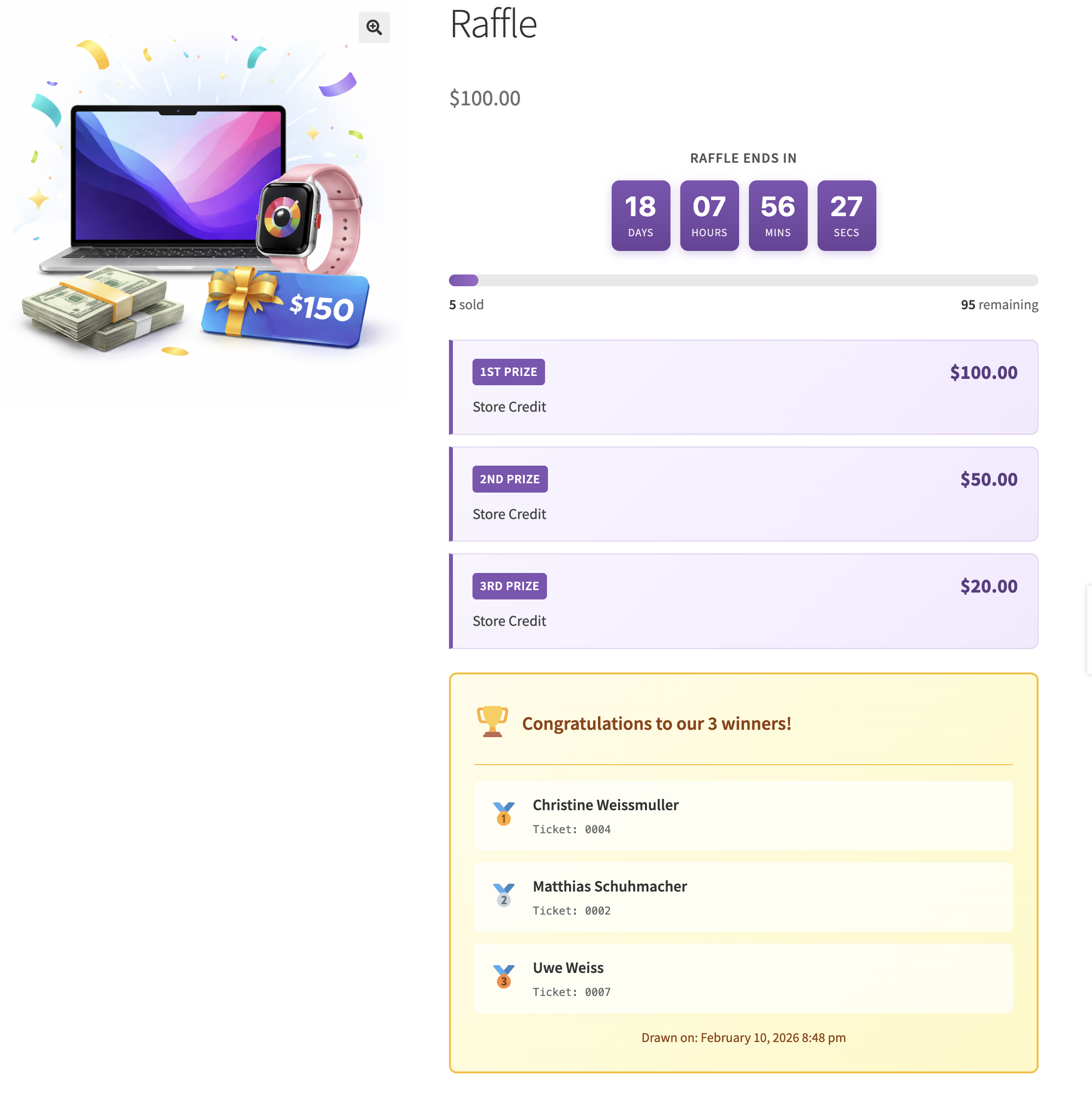
That single message kicked off a full review. We dug into the codebase, found the bug they reported, confirmed it, and then kept going. We audited everything. Security, data handling, the gift checkout flow, email delivery, the admin interface.
This is how we want to build this plugin. People tell us what’s broken or what’s missing, and we fix it. No waiting around. No ticket queues. If you take the time to write to us, we take the time to act on it.
The winners bug#
This one was embarrassing. When a winner was drawn, the plugin tried to set the ticket status to a value that didn’t exist in its own list of valid statuses. The status change was silently rejected, so winning tickets stayed marked as active. The Winners tab counted zero every time.
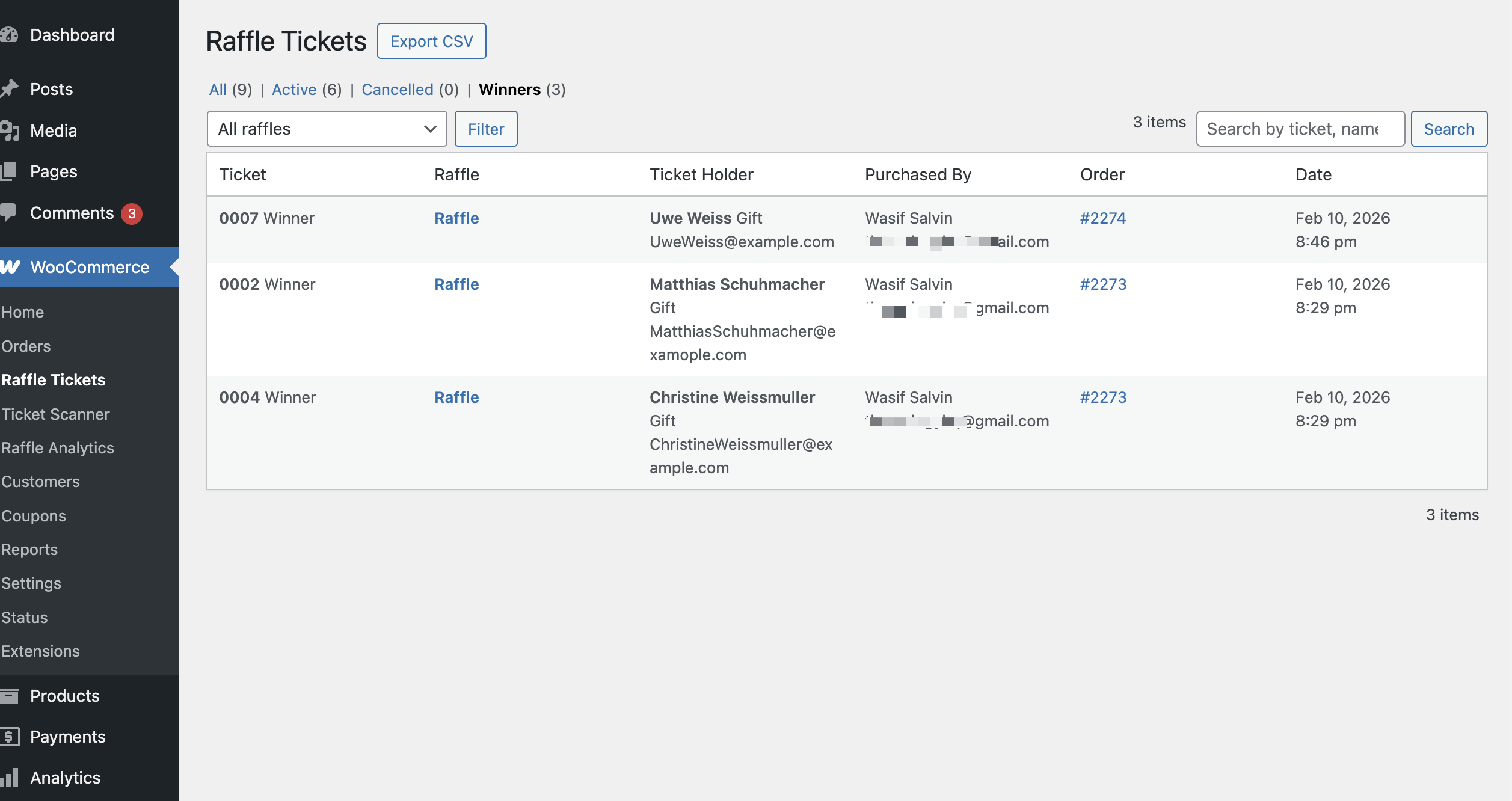
One line. Two files. That was the fix. But the consequences of that single mismatch were visible everywhere: the admin list, the customer account page, the ticket badges. All fixed now.
Admin email notifications#
There was already a checkbox in the settings for sending admin emails when a winner is drawn. It was there since day one. The problem? Nobody wired it up. The setting existed, but the email didn’t.
We built the full email. HTML template, plain text version, WooCommerce email integration, the works.
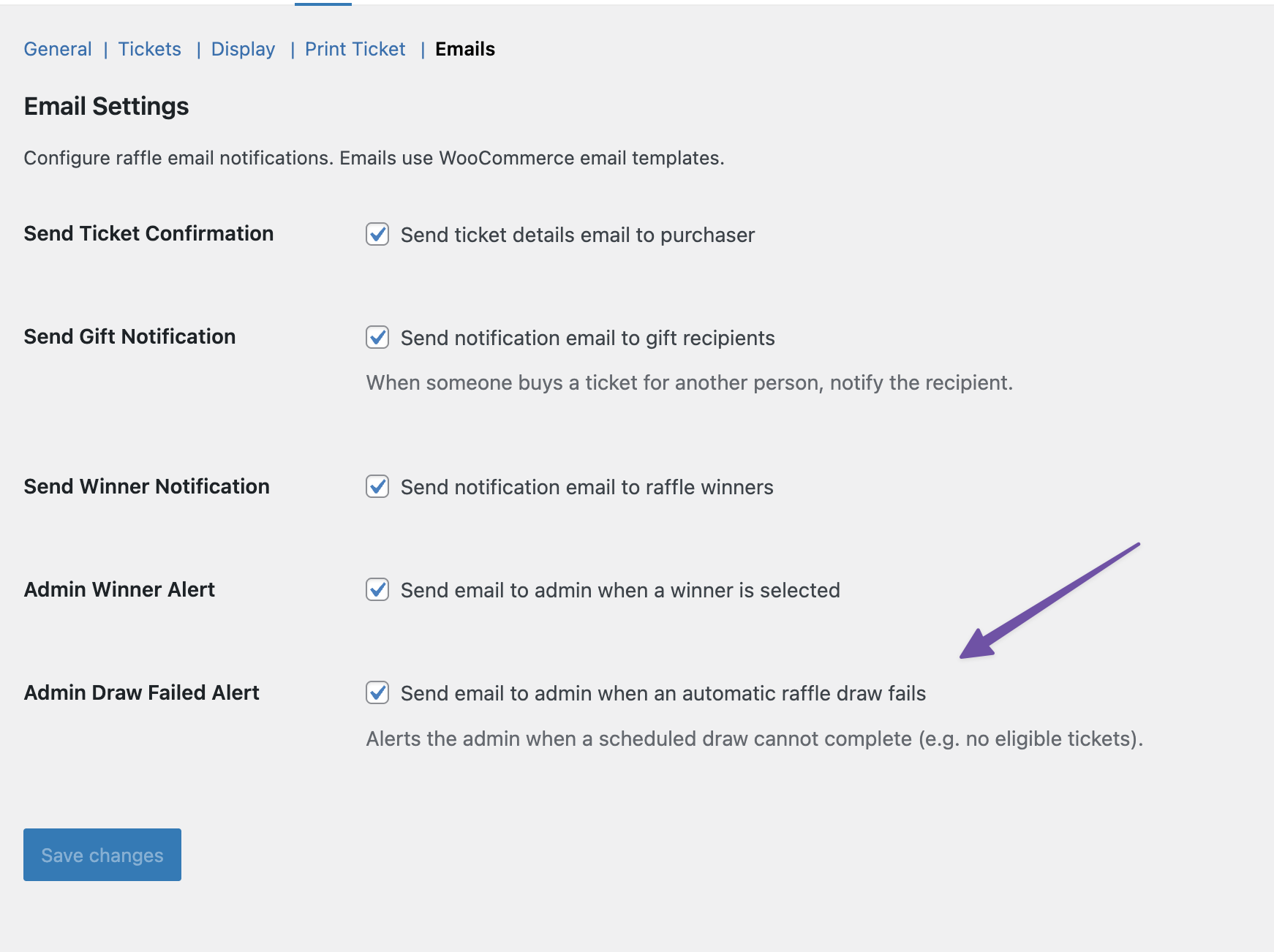
We also added a new notification: admin alert when a draw fails. If your raffle ends and the automatic draw can’t complete for any reason, you get an email telling you what happened and a link to sort it out. There’s a new checkbox in Raffle > Emails to turn it on.
Ticket search#
The Raffle Tickets page now has a search box. Type a ticket number, a name, or an email address and it finds matches across all fields. It works with the status tabs, so you can search within Active tickets, Winners, or Cancelled. The CSV export respects the search too, so you can export filtered results.
We also cleaned up the empty states. The Winners tab used to say “No tickets found” when there were no winners. Now it says “No winners have been drawn yet.” Small thing, but it matters when someone is trying to figure out if something is wrong.
Security hardening#
We ran a deep security audit and found things we didn’t like.
The QR scanner page was building HTML with unescaped data. If someone put script tags in a product name, it would execute in the admin browser. Fixed. Same issue in the analytics page with raffle and purchaser names. Fixed.
QR codes were being generated by sending ticket verification URLs, including security hashes, to a third-party API. That meant an external service had access to every hash needed to forge a valid ticket scan. We ripped that out. QR codes are now generated locally on your server using the chillerlan/php-qrcode library. Nothing leaves your site.
The public ticket validation page was showing full holder names to anyone who scanned a QR code. Now it shows masked names on public pages and full names only in the admin scanner.
Data integrity#
We found a race condition where two order status changes happening at the same time could both pass the “tickets already generated” check and produce duplicate tickets. We added a lock to prevent that.
The winner selection had a similar issue. Two concurrent draw requests could both see zero existing winners and both insert a new one. We added row-level locking to make sure only one transaction succeeds. For more on how each selection method works under the hood, see our Random.org vs built-in random comparison.
Cancelling an order was overwriting winner ticket statuses. If you cancelled an order that had a winning ticket, it would lose its winner status. Now winner tickets are protected during cancellation.
We also added proper validation for raffle dates on save, enforced ticket limits during cart updates, and made sure completed or failed raffles can no longer accept new purchases.
Gift checkout overhaul#
The gift ticket system got a major upgrade. Each ticket can now have its own recipient. If you buy four raffle tickets as gifts, you can send each one to a different person with a different message.
This works in both the Block Checkout and the Classic (shortcode) Checkout. Adding or removing recipients in Classic Checkout now updates the order summary automatically.
On the backend, order pages and the admin metabox now show all recipients with their assigned ticket numbers, not just the first one. Gift emails are sent per recipient. Each person gets their own email with only their tickets.
We also fixed a timing issue in the Block Checkout where the last recipient could be lost if you clicked Place Order too quickly. The data is now synced immediately when you add or remove a recipient, and verified one more time right before the order is submitted.
Activity log#
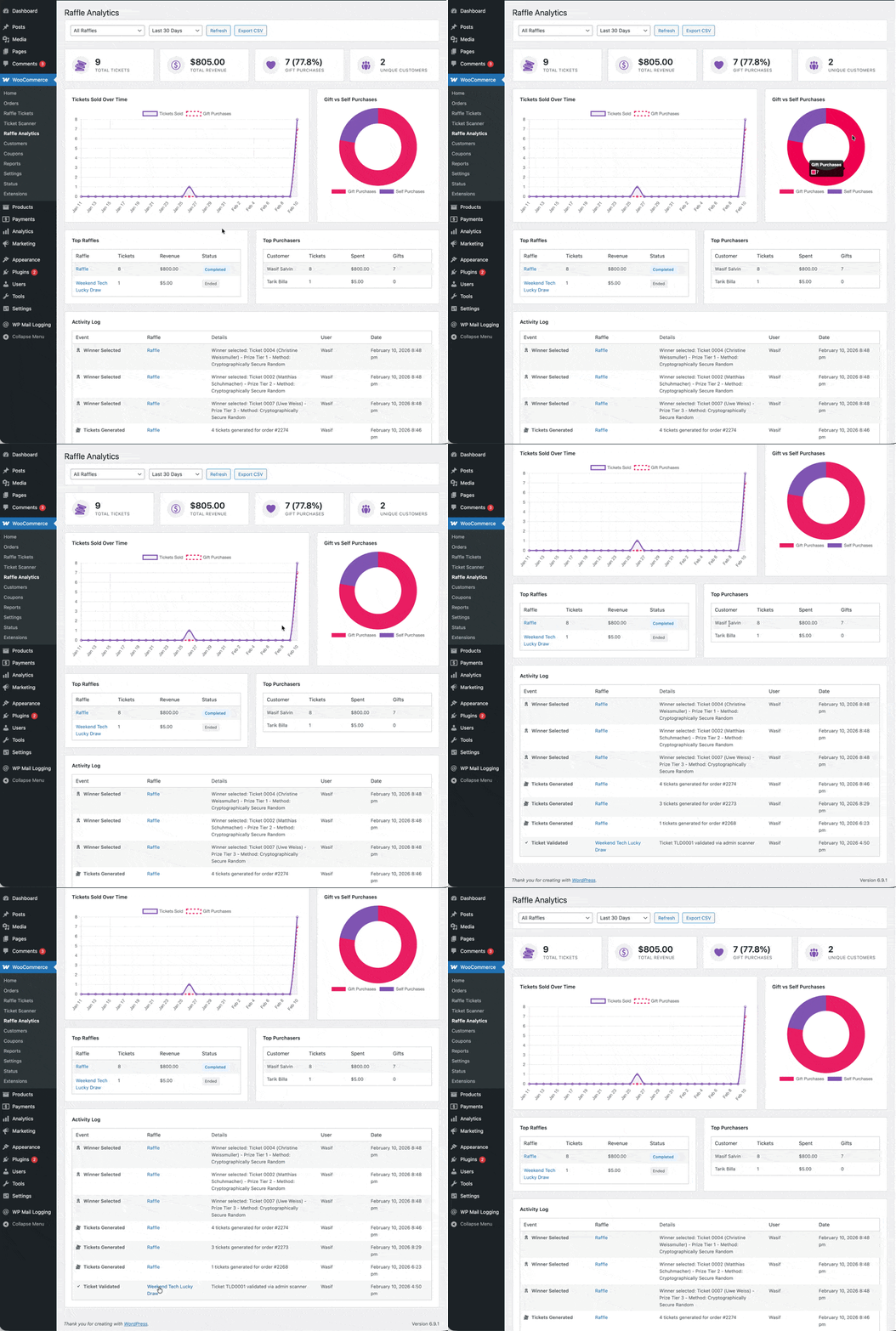
The plugin has had an audit log table in the database since version 1.0.0, but there was no way to see it without opening phpMyAdmin. We added an Activity Log section to the Analytics page. It shows recent events like ticket generation, winner draws, and errors right where you’re already looking at your raffle data.
Everything else#
There are about a dozen more changes under the hood. Duplicate code removed, dead methods cleaned up, missing database indexes added, JavaScript strings moved to translatable objects, proper caching for ticket count queries, better cleanup on uninstall. The full list is in the changelog.
More details in the changelog here.
Update now#
Go to Plugins > Installed Plugins in your WordPress admin and update to version 1.0.3. If you’re installing for the first time, grab it from the WordPress.org plugin page.
If you run into anything or have ideas for what we should build next, reach out. We’ve added a live chat to our website where you can also request access to our Telegram for direct support.
Every bug report and feature suggestion makes this plugin better for everyone. We mean that. Keep them coming.
If you’re new to running raffles on WooCommerce, our complete raffle setup guide walks through the full process from start to finish. Planning a charity raffle? Our guide to running charity raffles online covers the legal requirements across the US, UK, and Canada. If you’re running a promotional giveaway instead, the WooCommerce giveaway guide covers setup, promotion strategies, and four giveaway formats.
Already up and running? Grab Raffle for WooCommerce and check the documentation if you need help with anything specific.
Plugin we built for this
We didn't just write about it. We built something for it.
Keep reading

Buying raffle tickets as a gift: why charities need this
Most raffle platforms assume the buyer is the entrant. For charities with elderly donors and corporate sponsors, that assumption costs ticket sales.
Read more →
How to Add CAPTCHA to WooCommerce Checkout (Without Breaking Payments)
Most CAPTCHA tutorials skip the hard parts: Block Checkout compatibility, PayPal double verification, and Apple Pay conflicts. This guide covers setup for 4 CAPTCHA providers with the gotchas that break real stores.
Read more →
Random.org vs Built-in Random: Which Raffle Draw Method Is Actually Fair?
We tested three random number methods used in WooCommerce raffle plugins. One is predictable, one is secure, and one is provably fair. Here's the technical breakdown with real test data.
Read more →