
How to Price Event Tickets: 7 Proven Strategies (2026)
Most event organizers guess at ticket pricing and leave money on the table. Here are 7 pricing strategies with real numbers that fill seats and maximize revenue.

A yoga studio charges $15 for a Saturday morning class. A tech conference charges $499 for a two-day pass. A charity gala charges $150 per plate.
How did they arrive at those numbers? Most of them guessed.
Event ticket pricing is one of those things that looks simple until you start thinking about it. Charge too much and seats stay empty. Charge too little and you leave thousands on the table, or worse, you attract people who don’t show up because the ticket felt disposable.
We build WooCommerce plugins for event management, so we spend a lot of time looking at how organizers price their tickets. We’ve seen the same patterns repeat: flat pricing that doesn’t adapt, arbitrary numbers pulled from competitor events, and no strategy beyond “let’s see if people buy.”
Here are seven pricing strategies that actually work, with real numbers and examples. The goal is to help you fill more seats and earn more per attendee, regardless of what event platform you’re using.
Why most event pricing is broken#
Before the strategies, here’s why the default approach fails:
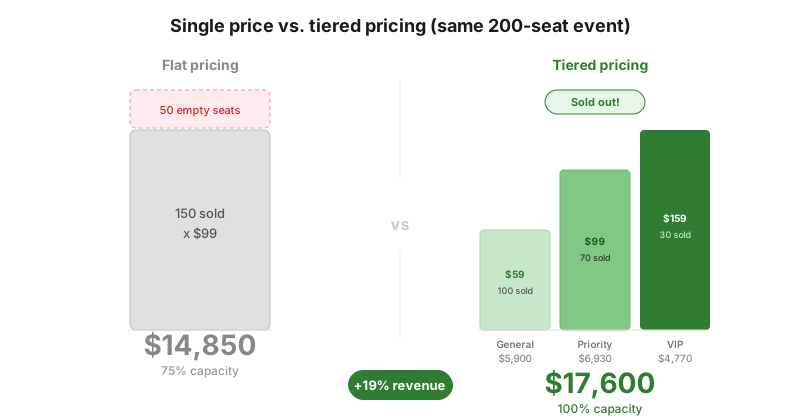
Single-price tickets leave money on the table. If you charge $50 for a workshop, some people would have paid $80 for a better experience. Others would have come at $30 but didn’t. You’re serving one price point and missing two others.
Flat pricing doesn’t create urgency. If the same ticket costs the same amount today and two weeks before the event, there’s no reason to buy now. Most people procrastinate. Empty registration lists three weeks out create panic, even when the event would have sold out eventually.
Copying competitor pricing ignores your value. Your event isn’t their event. Different speakers, different venue, different audience, different value proposition. Their price tells you nothing about what your attendees would pay.
The fix isn’t complicated. It’s using multiple pricing levers at the same time instead of picking one number and hoping.
Strategy 1: Tiered pricing (good / better / best)#
The simplest and most effective pricing structure. Create two or three ticket types at different price points.
Example, a half-day marketing workshop:
| Tier | Price | Includes |
|---|---|---|
| General Admission | $49 | Workshop access, materials |
| Priority | $89 | Workshop + front-row seating + lunch with speakers |
| VIP | $149 | Everything + 30-min 1-on-1 consultation after the event |
Why it works: People self-select into the tier that matches their budget and interest level. The middle tier typically sells the most because of the anchoring effect; it looks reasonable between the cheap and expensive options. The top tier doesn’t need to sell many units to be profitable.
The numbers: A Wharton study on event ticket pricing found that price tiers significantly affect advance purchasing behavior and total revenue. And research on concert pricing estimated multi-tier pricing increases revenue by about 4% over single-price tickets, with gains scaling higher for events where audience willingness to pay varies widely.
Rules of thumb:
- The cheapest tier should be genuinely useful, not a stripped-down experience that feels like punishment.
- The premium tier should cost 2–3x the base tier, not 10x. The gap needs to feel justifiable.
- Name your tiers descriptively. “VIP” is generic. “Speaker Dinner Pass” tells people exactly what they’re getting.
Strategy 2: Early bird pricing#
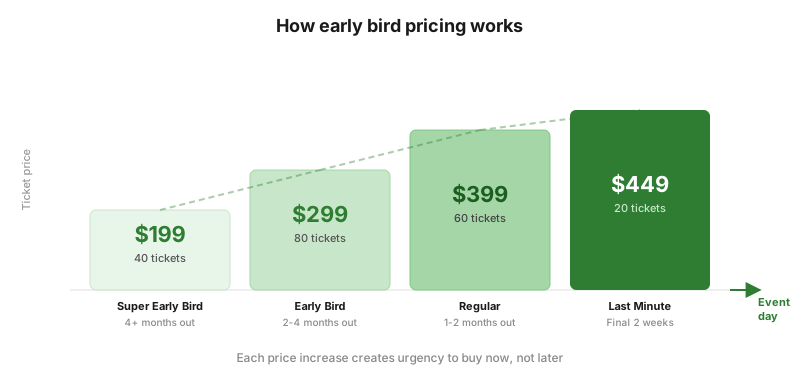
Reward people for committing early. Start with a lower price and increase it as the event date approaches.
Example, a 200-person tech conference in October:
| Phase | Dates | Price | Target Sales |
|---|---|---|---|
| Super Early Bird | June 1 – June 30 | $199 | 40 tickets |
| Early Bird | July 1 – August 31 | $299 | 80 tickets |
| Regular | September 1 – October 7 | $399 | 60 tickets |
| Last Minute | October 8 – October 14 | $449 | 20 tickets |
Why it works: It creates urgency. “This price expires June 30” is more motivating than “Buy tickets anytime.” It also gives you early revenue to cover deposits for the venue, catering, and speakers.
The psychology: Early bird pricing works because of loss aversion. People don’t experience the $199 price as a discount. They experience the $399 price as a penalty for waiting. The pain of paying more is stronger than the joy of saving.
How to execute it well:
- Announce each phase publicly. “Early bird ends Friday” is a natural email/social media prompt.
- Limit quantity per phase, not just dates. “First 40 tickets at $199” adds scarcity on top of urgency.
- The jump between phases should be noticeable but not shocking. A $50–100 increase between phases works. Doubling the price feels punitive.
Strategy 3: Group and bulk discounts#
Encourage attendees to bring colleagues, friends, or team members.
Example, a business networking dinner at $75/ticket:
| Quantity | Per-Ticket Price | Total | Savings |
|---|---|---|---|
| 1 ticket | $75 | $75 | - |
| 3 tickets | $65 | $195 | $30 |
| 5 tickets | $55 | $275 | $100 |
| 10+ tickets | $45 | $450+ | $300+ |
Why it works: Group buyers are your best marketing channel. A person who buys 5 tickets brings 4 people who might never have heard of your event. The discount isn’t a loss; it’s a customer acquisition cost that happens to be 100% effective.
When to use it:
- Corporate events where companies send teams.
- Social events where people come in groups (concerts, festivals, galas).
- Recurring events where you want to build a community (workshop series, meetups).
When to skip it: Intimate events with strict capacity limits where you’d rather have 30 high-paying individuals than 30 discounted group members.
Strategy 4: Role-based pricing#
Charge different prices based on who the attendee is, not when they buy.
Common examples:
- Students: 40–60% off standard pricing.
- Members/alumni: 15–25% off for people in your community.
- Nonprofit workers: Discounted rates for mission-aligned attendees.
- Speakers/volunteers: Free or nominal fee.
Example, an industry conference:
| Role | Price |
|---|---|
| Standard | $399 |
| Member | $299 |
| Student (with valid ID) | $149 |
| Speaker | Free |
| Nonprofit / Government | $249 |
Why it works: Price sensitivity varies dramatically between groups. Students genuinely can’t afford $399. But they’ll pay $149, and they become future standard-price attendees. Members get rewarded for their loyalty. Neither group was going to buy at full price, so the “discount” is actually new revenue.
The key: Require verification. Student discounts without ID verification get abused instantly. Member pricing should require a logged-in account or membership code. WooCommerce makes this straightforward with user roles and coupon codes.
Strategy 5: Dynamic time-based pricing#
Similar to early bird, but more granular. Price changes based on how close you are to the event and how many tickets are left.
The concept:
- Far from the event + plenty of seats = lower price.
- Close to the event + few seats left = higher price.
- Close to the event + many seats left = possibly lower price to fill seats.
This is how airlines and hotels price. It works because the value of a seat increases as the event approaches (for popular events) or needs a push (for slower sellers).
Example, a monthly comedy night with 100 seats:
| Timing | Seats Remaining | Price |
|---|---|---|
| 4 weeks out | 100 | $20 |
| 2 weeks out | 60 | $25 |
| 1 week out | 20 | $30 |
| Day of event | 5 | $35 |
Or, if sales are slow:
| Timing | Seats Remaining | Price |
|---|---|---|
| 4 weeks out | 100 | $25 |
| 2 weeks out | 85 | $25 |
| 1 week out | 60 | $20 (flash sale) |
| Day of event | 40 | $15 (fill the room) |
The honest truth: Dynamic pricing is powerful but harder to execute than fixed tiers. You need a system that can automatically adjust prices, either through scheduled price changes in your ecommerce platform or a plugin that supports it natively. If you’re using WooCommerce, our guide on managing events directly from your store covers the full setup, including dynamic pricing rules. The Events Calendar handles this through WooCommerce’s built-in sale scheduling.
Strategy 6: Bundling and add-ons#
Don’t just sell a ticket. Sell the experience around it.
Common add-on examples:
- Parking pass ($10–25)
- Meal/drinks package ($15–40)
- Exclusive after-party access ($25–50)
- Event merchandise like t-shirts and tote bags ($15–30)
- Recording/replay access ($20–40)
- Meet-and-greet ($50–100)
- Workshop materials or textbook ($20–40)
Example, a music festival:
| Item | Price |
|---|---|
| General Admission (2-day pass) | $89 |
| GA + Camping Pass | $129 |
| GA + Camping + Meal Package | $169 |
| VIP (includes everything) | $249 |
Why it works: Bundles increase average order value without raising the base ticket price. The $89 GA price stays accessible and shareable. But 60% of buyers add something, and the average order becomes $130.
The psychology of bundles: People evaluate bundles differently from individual items. A $40 parking pass feels expensive on its own. But the jump from $89 (GA) to $129 (GA + Camping) feels like a deal, even though camping access “costs” $40 either way.
Practical tip: If you’re using WooCommerce for ticket sales, add-ons work naturally as product upsells or variable product options. No special tooling needed. If you’re still deciding between self-hosted and third-party platforms, we compared the real costs in Selling Event Tickets Without Eventbrite.
Strategy 7: Free + paid model#
Offer free general access alongside premium paid tickets.
When this makes sense:
- Conferences where sponsors cover costs and you want maximum attendance.
- Community events where the goal is engagement, not revenue.
- Events where a free tier generates leads for paid services (consulting, courses, software).
- Launch events where filling the room matters more than ticket revenue.
Example, a product launch event:
| Tier | Price | Includes |
|---|---|---|
| Community (free) | $0 | Keynote + networking |
| Builder | $49 | Everything + hands-on workshop |
| Enterprise | $149 | Everything + private demo + priority support onboarding |
Why it works: The free tier fills the room and creates energy. The paid tiers capture the people who want more. Even if 80% of attendees are free, the 20% who pay often generate enough revenue to cover the entire event. And the free attendees create social proof, word-of-mouth, and future customers.
The trap: Free tickets attract no-shows. Expect 30–50% of free ticket holders to not show up. Overbook your free tier by 40% to compensate. Or charge a small refundable deposit ($5–10) to filter out casual RSVPs.
Putting it together: a real pricing model#
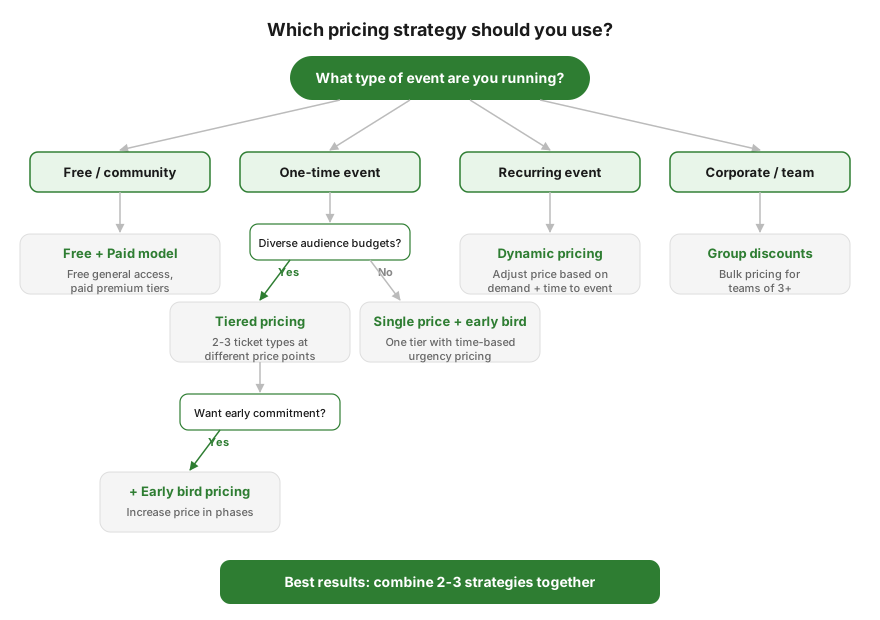
These strategies aren’t mutually exclusive. Most successful events combine several of them.
Example, a 150-person WordPress development workshop:
| Tier | Early Bird (first 30 days) | Regular | Last 2 Weeks |
|---|---|---|---|
| Standard | $79 | $99 | $119 |
| Pro (includes recording + materials) | $129 | $149 | $169 |
| Team of 3+ (per person) | $69 | $89 | $99 |
| Student | $39 | $49 | $49 |
That’s four strategies working together: tiered pricing, early bird, group discounts, and role-based pricing. Each one reinforces the others. The early bird + team discount creates urgency for corporate buyers to commit early. The student tier fills seats that would otherwise stay empty. The Pro tier captures enthusiasts willing to pay more.
How to find your starting price#
If you’re pricing an event for the first time, here’s a practical approach:
1. Calculate your hard costs per attendee. Venue + catering + speaker fees + marketing + platform costs, divided by your target attendance. This is your floor. Below this, you lose money.
2. Research comparable events. Not to copy their price, but to understand the range. If every similar workshop in your city charges $75–150, pricing at $300 requires a clear justification.
3. Ask 10 potential attendees. “We’re running a [event type] covering [topics]. What would you expect to pay?” The answers cluster around a number. That’s your market price.
4. Price above your gut feeling. Almost everyone underprices their first event. If $75 feels right, try $99. You can always discount later. You can never raise the price after publishing without looking bad.
5. Build in a discount path. Start at full price and use early bird, group, and student discounts to create lower entry points. This way, the “regular” price anchors high and every discount feels like a win.
Common mistakes to avoid#
Pricing based on cost, not value. Your event costs $30/person to run. That doesn’t mean the ticket should be $40. If attendees learn something worth $500 to their business, $149 is a bargain. Price on value delivered, not cost incurred.
Raising prices after tickets are on sale. Increasing the regular price after people have already bought at that price feels dishonest. Plan your pricing tiers before you start selling. The exception is clearly communicated phase-based pricing (early bird to regular to late) where buyers expect increases.
Too many tiers. Two or three ticket types work. Seven ticket types with confusing inclusions create decision paralysis. People who can’t decide don’t buy.
Ignoring no-show rates. Free events see 30–50% no-shows. Low-priced events see 15–25%. Factor this into your capacity planning. A $10 ticket dramatically reduces no-shows compared to a free one.
Not tracking what works. After your event, look at the numbers: which tier sold the most? When did sales spike? What percentage upgraded from the base tier? Use this data for your next event. Pricing improves with every iteration.
Frequently asked questions#
What’s the ideal price for a workshop or class?#
There’s no universal answer, but workshops typically range from $25–200 for a half-day and $100–500 for a full day. The range depends on the topic’s value (professional development commands more than hobby classes), the instructor’s reputation, and the market you’re in. Calculate your costs, research comparable events in your area, and price based on the value attendees receive, not just what it costs you to run.
Should I offer refunds on event tickets?#
Yes, with reasonable terms. A full refund up to 7–14 days before the event is standard. Within 7 days, offer a credit for a future event or allow the ticket to be transferred to someone else. No-refund policies reduce no-shows but also reduce purchases. People hesitate to buy non-refundable tickets to events they’re unsure about.
How do I handle pricing for recurring events?#
For recurring events (weekly workshops, monthly meetups), consider offering a subscription or punch-card model. “10 classes for $120” ($12 each) versus “$15 per class” encourages commitment and prepayment. Some WooCommerce event plugins support this through product bundles or subscription integrations.
When should I use dynamic pricing vs. fixed tiers?#
Fixed tiers (early bird to regular to late) are simpler and work for most events. Dynamic pricing, where the price adjusts based on remaining capacity, works best for recurring events where you have historical data on sell-through rates. Start with fixed tiers. Move to dynamic pricing once you’ve run enough events to understand your demand patterns.
Should I charge for free community events?#
Consider charging a nominal amount ($5–10) even for “free” events. It dramatically reduces no-shows without being a real barrier. You can donate the proceeds to a cause aligned with your event’s theme. “All ticket fees go to [charity]” makes the small charge feel positive.
How do I price tickets for a charity fundraiser?#
Price based on the experience, not the donation. A $150 gala ticket should feel worth $150 for the dinner, entertainment, and networking. The charitable aspect is a bonus, not the justification for the price. You can add optional donation tiers on top of the ticket price for attendees who want to give more. If your fundraiser includes a raffle, check out our guide on running online raffles with WooCommerce.
Can I use different prices for online vs. in-person attendance?#
Yes, and you should. Online tickets typically command 40–60% of the in-person price. The experience is different; no venue, no catering, no face-to-face networking. But online attendees have near-zero marginal cost, so even discounted online tickets are almost pure revenue.
The bottom line#
Event pricing isn’t a single decision; it’s a system. The best-performing events combine multiple strategies: tiers for different audience segments, time-based pricing for urgency, group discounts for organic marketing, and add-ons for higher average revenue.
Start with tiered pricing and early bird. Those two alone will outperform a flat single-price ticket. Add group discounts and role-based pricing as your events grow. Track what works, adjust for the next one. If you haven’t set up ticket sales on your site yet, our guide on selling event tickets on WordPress covers the different approaches and what you need to get started.
The goal isn’t to extract maximum money from every attendee. It’s to fill the room with people who value what you’re offering, at a price that reflects that value and keeps your event sustainable.
If you’re running events on WooCommerce and want built-in support for early bird pricing, group discounts, and dynamic pricing rules, check out Evenzo – Events Manager for WooCommerce. It’s free on WordPress.org. And if your event includes a raffle or giveaway component, we have a complete charity raffle guide covering the legal requirements and WooCommerce setup.
Plugin we built for this
We didn't just write about it. We built something for it.
Keep reading

How to Sell Event Tickets on Your WordPress Site (2026 Guide)
You don't need Eventbrite or Ticketmaster to sell event tickets. If you have a WordPress site, here's how to set up ticket sales from your own domain.
Read more →
WooCommerce Event Manager: Run Events From Your Store (2026)
Your WooCommerce store already handles payments and accounts. Here's how to add a full event calendar with ticket sales, QR check-in, and PDF tickets.
Read more →
Selling Event Tickets Without Eventbrite (2026 Guide)
Eventbrite takes up to 9.95% per ticket. Your WooCommerce store already handles payments and accounts. We tested 6 event plugins to find what actually replaces it.
Read more →