
 Nazmoon Munny 10 min read
WooCommerce proforma invoice: when you need one and which plugins make it
What a WooCommerce proforma invoice is, when B2B and bank transfer stores need one, and which plugins generate it, checked against their WordPress.org pages.
Google keeps showing my comparison of WooCommerce PDF invoice plugins to people searching for proforma invoices. I can see the searches in Search Console: “best WooCommerce proforma invoice plugin”, “customized WooCommerce proforma invoices”, “generate WooCommerce proforma invoices”. The awkward part is that our own invoice plugin, Emboss, doesn’t make proforma invoices. I checked its code to be sure.
So this post is the answer I’d want those searches to find. It covers what a proforma is, when you need one, which plugins actually generate it, and where Emboss picks up after the customer pays.
The need usually looks something like this. A company wants 40 units from your store. Their buyer is ready, but their finance team won’t release a bank transfer until they have a proforma invoice on file.
You open the order in WooCommerce and look for a button that makes one. There isn’t one, because WooCommerce has no proforma invoice. It doesn’t have PDF invoices at all, so there’s nothing to switch on.
TLDR
A proforma invoice is a preview of the final invoice, sent before payment so the buyer can approve the price, pay by bank transfer, or clear customs. WooCommerce core can’t create one. Every proforma plugin I checked on WordPress.org lists it as a paid or Pro feature. Emboss, our free plugin, doesn’t make proformas, but it handles the invoice and receipt once the order is placed and paid.
What a proforma invoice is#
A proforma invoice is a document that looks like an invoice and shows what the final invoice will say: the items, quantities, prices, tax, shipping, and payment terms.
The difference is what it means. An invoice records a sale and asks for payment. A proforma is an offer, or a “this is what you’ll be billed” notice, sent before the sale is final.
In many countries a proforma isn’t a tax document. You usually can’t claim VAT back on it, and it often doesn’t take a number from your invoice sequence. Rules vary by country, so check how your accountant wants proformas numbered and stored.
Proformas and quotes overlap. A quote is often looser, a price for a job. A proforma is usually set up exactly like the invoice that will follow, with the buyer’s details filled in. Some buyers’ finance teams ask for the proforma by name because their approval process needs it.
When a WooCommerce store needs a proforma#
Most retail stores never need one. Card payments settle at checkout and the customer gets a receipt. Proformas come up when money moves before the sale is final.
B2B quotes and purchase approvals#
A business buyer often needs internal approval before spending. They want a document with your business details, their business details, the exact items, and the total including tax. A proforma gives them that without you issuing a real invoice for a sale that might not happen.
Bank transfer orders#
When a customer picks Direct bank transfer in WooCommerce, the order goes to On hold and WooCommerce shows your bank details on the order received page and in the email. Some buyers want a formal document before they pay, not just an email with an account number. A proforma fills that gap.
Pay before dispatch#
Large or custom orders are often paid in full before you build or ship anything. The proforma confirms the price and terms. Once the money arrives, you issue the invoice and ship.
Customs and shipping samples#
Couriers and customs offices sometimes ask for a proforma invoice when goods cross a border without a sale, like free samples or replacements. Customs paperwork rules differ by country and by courier, so check your carrier’s requirements before relying on a proforma for this.
Proforma vs invoice vs receipt#
The three documents follow one order from offer to payment:
| Document | When it’s sent | What it says | Usually numbered from |
|---|---|---|---|
| Proforma invoice | Before the order is confirmed or paid | “This is what you’ll be billed” | Its own sequence, or none |
| Invoice | When the sale is made | “You owe this amount” | Your invoice sequence |
| Receipt | After payment arrives | “You paid this amount” | Often the invoice number, marked paid |
A typical B2B bank transfer order runs through all three. You send the proforma, the buyer approves it and transfers the money, you issue the invoice, and the receipt confirms payment. Some stores skip the separate receipt and mark the invoice as paid.
If money later goes back, a credit note closes the loop, which I cover in my guide to WooCommerce credit notes.
Why WooCommerce doesn’t include proforma invoices#
WooCommerce core sends order emails with an HTML summary, and that’s the only order document it produces. There’s no invoice PDF, no packing slip, and no proforma. Anything printable comes from a plugin.
Proforma support is also rarer than invoice support. Most WooCommerce invoice plugins focus on the invoice, the packing slip, and sometimes the credit note. The proforma tends to sit in a paid add-on.
Which plugins generate WooCommerce proforma invoices#
I read the WordPress.org description of each plugin below and only listed those that say they create proforma invoices. Install counts come from the WordPress.org API on October 29, 2026. I haven’t tested the proforma features of these plugins, so treat this as a map of where to look, not a review.
PDF Invoices & Packing Slips for WooCommerce (WP Overnight)#
PDF Invoices & Packing Slips for WooCommerce has 300,000+ active installs. The free plugin makes invoices and packing slips. Its description lists proforma invoices under the premium Professional extension, next to credit notes and emailed packing slips.
WebToffee#
WebToffee WooCommerce PDF Invoices, Packing Slips, Delivery Notes & Shipping Labels has 50,000+ active installs. Proformas come from a separate premium add-on, the WooCommerce Proforma Invoices plugin.
Its listed features are the most detailed of any I read: automatic creation and attachment to order status emails, a custom proforma number or the order number, a due date, products grouped by category, special notes, transport terms and sales terms, and a custom footer.
Booster for WooCommerce#
Booster for WooCommerce has 30,000+ active installs. It’s a large toolkit, and PDF invoicing is one module of many. Its description says proforma invoices need the paid Booster Elite version.
Challan by WebAppick#
PDF Invoices & Packing Slips for WooCommerce, Challan has 7,000+ active installs. “Proforma invoices” is in its Pro feature list, alongside credit notes and country-specific formats like ZATCA for Saudi Arabia and GST for India.
Flexible PDF Invoices for WooCommerce (WP Desk)#
Flexible PDF Invoices for WooCommerce & WordPress has 6,000+ active installs. Its PRO version lists three document types: invoice, proforma, and correction invoice. The free version also lets you create invoices by hand in WordPress, outside of WooCommerce orders.
Acowebs#
PDF Invoices and Packing Slips For WooCommerce by Acowebs has 1,000+ active installs. Its description lists “Proforma supported for orders” in the Pro section.
What the list tells you#
Every proforma option I found on these pages costs money. If you need the best WooCommerce proforma invoice plugin for a busy store, the choice comes down to the plugin you’d want for invoices anyway, because the proforma add-on usually ties into that plugin’s invoice numbering and templates.
Running two different plugins for proforma and invoice means two number sequences, two template systems, and two plugins attaching PDFs to the same emails.
What to look for in a custom WooCommerce proforma invoice#
Whichever plugin you pick, check these before you buy. Customized WooCommerce proforma invoices usually need more than a logo swap.
- A title that says “Proforma invoice”, so the buyer’s accounts team doesn’t book it as a real invoice.
- A numbering option that stays out of your invoice sequence, or uses the order number.
- A due date or validity date, so the price doesn’t stand forever.
- Space for payment terms and bank details.
- Your business and tax details, and the buyer’s, including their VAT number if they’re a business.
- A trigger you control: the order status that creates it, and the emails it attaches to.
- A clean handover to the real invoice once payment arrives.
Ask your accountant what a proforma has to show in your country, and whether it needs a line such as “This is not a tax invoice”. Wording requirements aren’t the same everywhere.
Where Emboss fits: the invoice and receipt after the order#
Emboss is our plugin, so I’m biased. It’s free on WordPress.org with no paid tier. It makes four documents: invoice, receipt, credit note, and packing slip.
A code search for “proforma” in version 1.0.2 found nothing, and the document factory only knows those four types. If your buyers need a proforma before they order, Emboss isn’t the tool for that step.
What Emboss does is pick up once the order exists, and it handles bank transfer orders carefully. The settings below are from a test store running Emboss 1.0.2, and the behavior comes from its code.
Bank transfer, cheque, and cash on delivery orders#
WooCommerce counts a Processing order as paid even when the customer chose cash on delivery and no money has arrived. Emboss works around that. It treats bank transfer (bacs), cheque (cheque), and cash on delivery (cod) as offline gateways. Those orders get an invoice until you mark them Completed. Then they get a receipt with a PAID badge.
That rule exists because we got it wrong first. In Emboss 1.0.0, a cash on delivery, cheque, or bank transfer order showed a PAID receipt while it was still processing, before any money had arrived. We fixed it in 1.0.2.
The “On-hold order” email setting attaches the invoice to the email WooCommerce sends while a bank transfer or cheque order waits for payment. It’s on by default. Developers can add their own offline gateways with the epdi_offline_gateways filter.
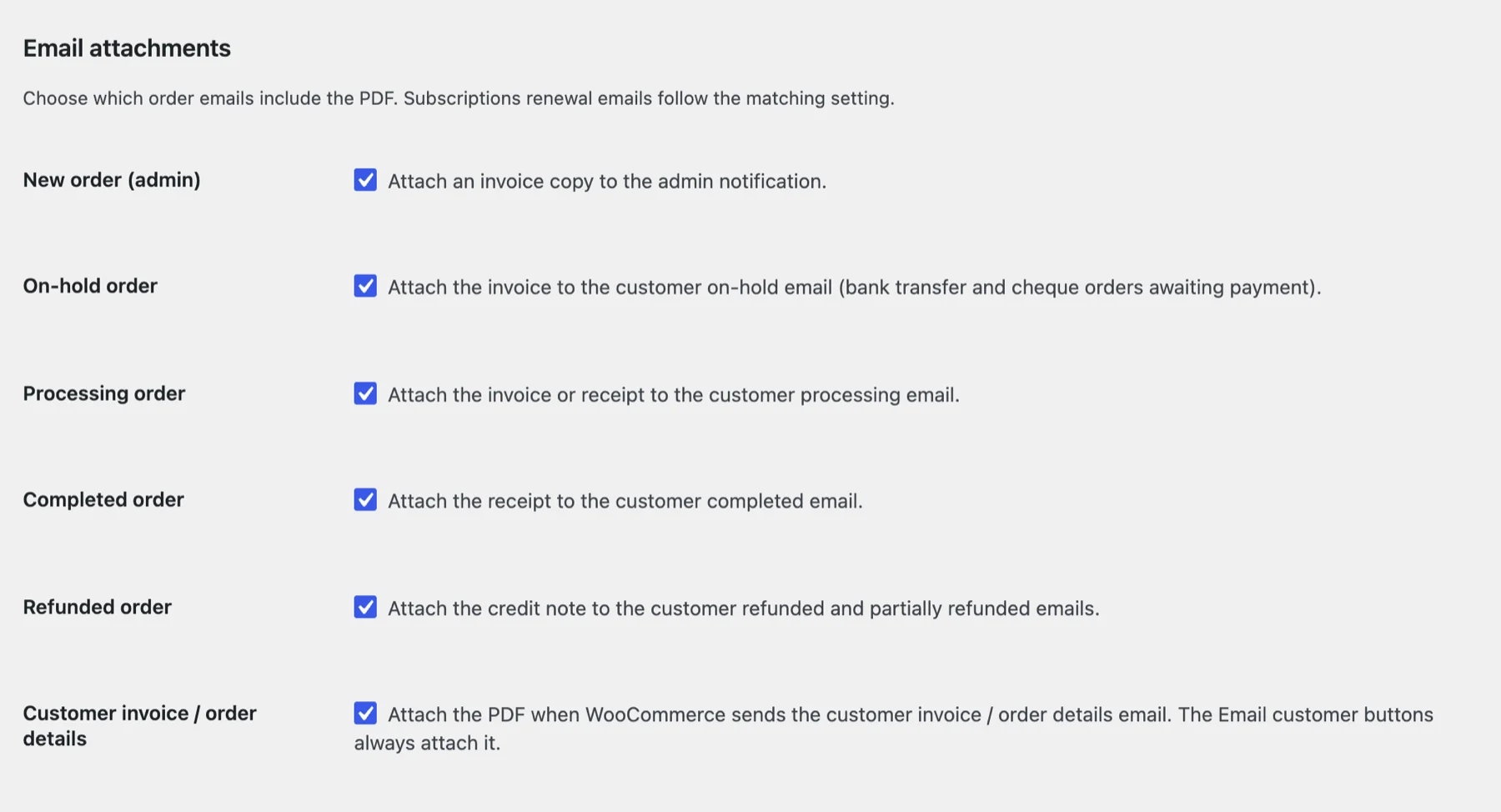
Pending orders don’t use up invoice numbers#
The “Generate on these statuses” setting defaults to Processing, Completed, and On hold. Pending is left out on purpose, so a failed payment attempt never takes an invoice number. That was another 1.0.0 bug: failed Block Checkout attempts were getting invoice numbers.
If you’d rather not issue any invoice until money arrives, remove On hold from that list. Bank transfer orders will then get their first document when you move them on. The settings reference lists every General tab option.
Payment terms on the invoice#
The Legal tab has a “Terms and conditions” field. It prints on invoices only by default, which makes it the place for payment terms or a reminder of how to pay. Tick “Show on all documents” if you want it on receipts and credit notes too.
Why an Emboss invoice isn’t a proforma#
You could override the invoice template in your theme and change the title to “Proforma”. I wouldn’t. The Emboss invoice takes a number from your real invoice sequence, and that’s the opposite of what most accountants want from a proforma. I’d use a plugin that treats the proforma as its own document.
A store that sends proformas by hand, from a quote tool or a spreadsheet, can still run Emboss for everything after checkout. The proforma goes out first, the order gets placed, and Emboss creates the invoice, the receipt once it’s paid, and the credit note if you refund.
I haven’t tested Emboss next to any of the proforma plugins above, so if you run one of them, don’t let two plugins attach invoices to the same emails.
For a side-by-side view of invoice plugins, including which ones include proformas, see my WooCommerce PDF invoice plugin comparison. The Emboss document types docs explain how it picks between invoice and receipt.
Frequently asked questions#
Does WooCommerce have proforma invoices built in?#
No. WooCommerce core doesn’t generate PDF invoices of any kind, including proformas. You need a plugin.
Is a proforma invoice a legal invoice?#
In many countries, no. A proforma is usually treated as an offer or a preview, not a tax invoice. The rules vary by country, so confirm with your accountant how to handle them.
Should a proforma invoice use my invoice numbers?#
Most stores keep proformas out of the invoice sequence, either with their own numbers or by using the order number. That way the invoice sequence only holds real sales. Your accountant can tell you what your tax office expects.
Is there a free WooCommerce proforma invoice plugin?#
Every plugin I checked lists proformas as a paid add-on or a Pro feature. That includes WP Overnight, WebToffee, Booster, Challan, Flexible PDF Invoices, and Acowebs. I didn’t find a free option among the established ones.
Does Emboss create proforma invoices?#
No. Emboss makes invoices, receipts, credit notes, and packing slips. It doesn’t make proformas.
What happens after the buyer pays a proforma?#
You issue the real invoice, from your normal invoice sequence, and the order moves on to fulfillment. With Emboss, a bank transfer order gets its invoice while it’s on hold and a receipt with a PAID badge once you mark it Completed.
Where to start#
If I were sorting this out for a store, I’d start by writing down what the buyers actually ask for. If it’s a price approval before they place an order, you need a proforma plugin, and the one that matches your invoice plugin is the easiest to live with.
If it’s a formal document after they’ve ordered by bank transfer, an invoice attached to the on-hold email may already be enough. Ask your accountant which of the two your buyers’ paperwork needs.
Shipping the order is the last step, and my guide to WooCommerce packing slips covers that part. Emboss is free on WordPress.org if you want the invoice, receipt, and credit note handled without a paid tier.
Plugin we built for this
We didn't just write about it. We built something for it.
Keep reading
WooCommerce credit notes: create them automatically on refund
WooCommerce records refunds but never creates a credit note. What a credit note needs, and how to generate WooCommerce credit notes automatically on refund.
Read more →
WooCommerce packing slips and delivery notes: what to print and how
Packing slip vs delivery note vs invoice, what a WooCommerce packing slip should show, why it leaves prices out, and how to bulk print them from your orders.
Read more →
Fix WooCommerce PayPal Payments reCAPTCHA conflicts
Your CAPTCHA plugin and the WooCommerce PayPal Payments reCAPTCHA can reject the same order. Why smart buttons and Block Checkout clash, and how to fix it.
Read more →