
 Nazmoon Munny 13 min read
Fix WooCommerce PayPal Payments reCAPTCHA conflicts
Your CAPTCHA plugin and the WooCommerce PayPal Payments reCAPTCHA can reject the same order. Why smart buttons and Block Checkout clash, and how to fix it.
Turn on the WooCommerce PayPal Payments reCAPTCHA while another CAPTCHA plugin already guards your checkout, and two plugins now verify the same order. Each one expects its own token, at its own moment, and neither knows the other exists. When one of them says no, the customer sees “CAPTCHA verification failed” next to a PayPal button that worked yesterday.
I expect more stores to hit this soon. PayPal Payments 4.2.0 adds a WooCommerce inbox note titled “Fraud protection is now required”, which tells merchants that card networks now expect fraud controls and links straight to the reCAPTCHA settings.
A store that already runs Turnstile, hCaptcha or a reCAPTCHA plugin on checkout ends up with both. The free Simple Cloudflare Turnstile plugin shipped a fix for this exact collision in version 1.38.4 (April 17, 2026), so it’s not a rare edge case.
That inbox note is why I wanted this written now. Bouncer, our CAPTCHA plugin, is one of the plugins stores will run next to PayPal’s check, so I needed to know exactly where the two meet.
I installed PayPal Payments 4.2.0 and Bouncer on a test store, turned on PayPal’s reCAPTCHA, and read both plugins’ code to map where each check runs. This post covers that map, how to tell which check failed, and the fixes.
If you still need to pick a provider and install a CAPTCHA plugin, start with my guide on how to add CAPTCHA to WooCommerce checkout and come back here once it’s running.
TLDR
PayPal Payments checks its own reCAPTCHA token on the smart button click, on the classic checkout submit, and on Block Checkout’s Store API request, but only for four PayPal gateways. A second CAPTCHA plugin breaks PayPal orders when it verifies its single-use token twice, verifies a token that expired while the customer was in the PayPal window, or loads a second copy of Google’s reCAPTCHA script. The fix is to have your CAPTCHA plugin skip PayPal’s protected gateways, use a non-reCAPTCHA provider for the rest, and test as a logged-out guest.
What PayPal Payments checks, and where#
The setting lives at WooCommerce > Settings > Integration > WooCommerce PayPal Payments reCAPTCHA. PayPal’s own fraud protection docs cover the setup. Three details from the code matter for conflicts.
It needs both key pairs. The check stays off unless you enable it and enter v3 and v2 keys. reCAPTCHA v3 scores every visitor in the background. When the score drops below the threshold (0.5 by default), a v2 “I’m not a robot” checkbox appears.
It covers four gateways. The protected list in 4.2.0 is PayPal itself (ppcp-gateway), Advanced Card Processing (ppcp-credit-card-gateway), the standalone card button (ppcp-card-button-gateway), and Fastlane (ppcp-axo-gateway). Local methods like iDEAL, BLIK or Bancontact aren’t on it. Neither are Apple Pay and Google Pay through PayPal. Developers can change the list with the woocommerce_paypal_payments_recaptcha_payment_methods filter.
It skips logged-in customers by default. The Guest Orders Only option ships switched on. That matters when you test, because you’re probably logged in as an admin.
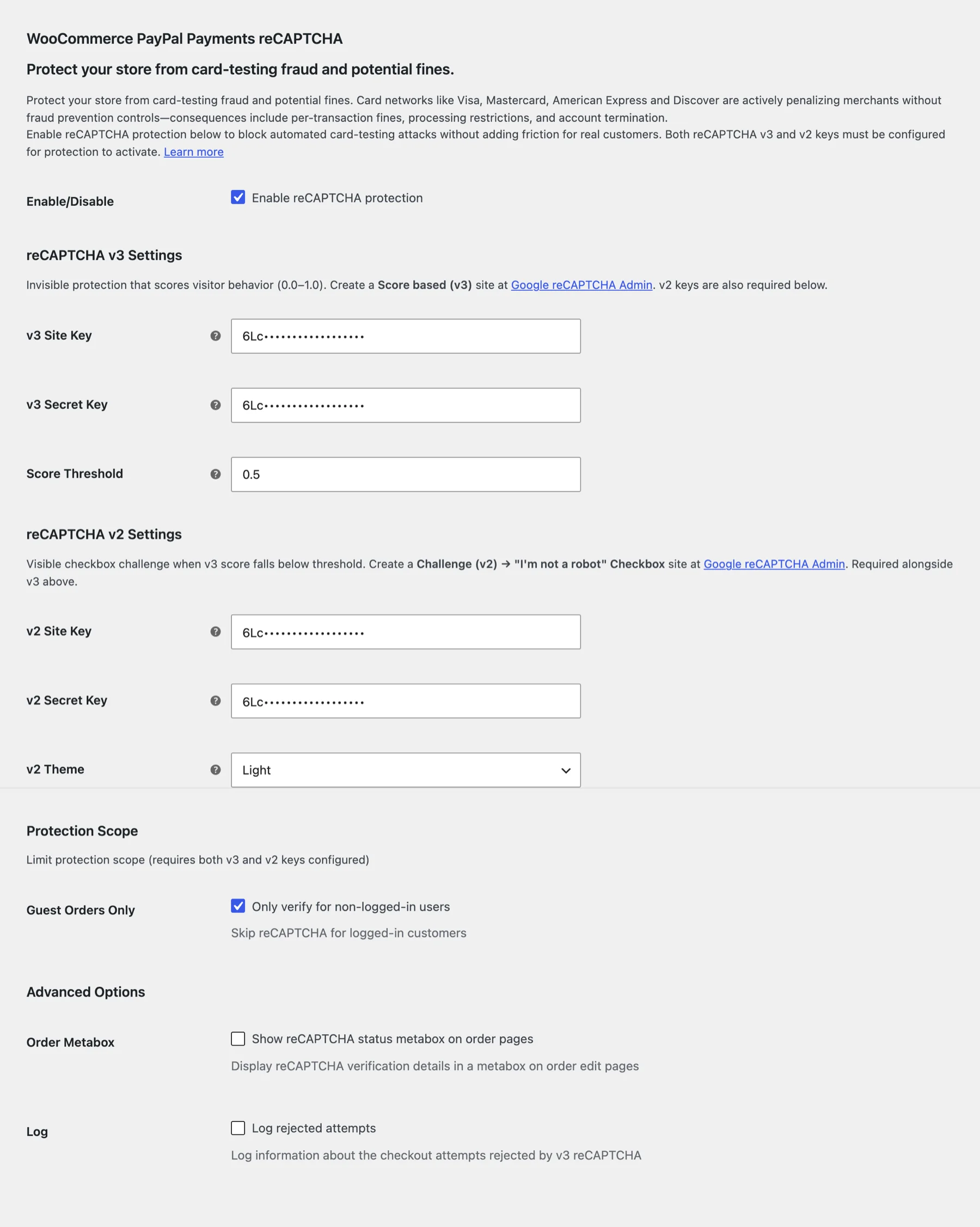
Inside those limits, PayPal verifies its token at three points:
- When a shopper clicks a smart button. The button sends a create-order request to
?wc-ajax=ppc-create-orderbefore the PayPal window opens, and PayPal rejects it if the token is missing or fails. This runs on product pages and the cart as well as checkout. - When the classic checkout form is submitted, on WooCommerce’s
woocommerce_checkout_processhook. - When Block Checkout places the order, on the Store API’s
woocommerce_store_api_checkout_update_order_from_requesthook. The token travels in the request’sextensionsdata under theppcp_recaptchakey.
All of this lives in one module of the PayPal plugin: modules/ppcp-fraud-protection/src/FraudProtectionModule.php registers the hooks, and src/Recaptcha/Recaptcha.php does the checks.
Why a second CAPTCHA plugin collides with it#
Four different failures sit behind this conflict, and they all end in a CAPTCHA error on a PayPal order.
Smart buttons run WooCommerce validation early#
On the classic checkout, clicking the PayPal button, the card button or Advanced Card Processing does more than create a PayPal order.
PayPal Payments also runs WooCommerce’s own checkout validation on the form data inside that create-order request, so missing billing fields show up as errors before the PayPal window opens instead of after. This is on by default and can be turned off with the woocommerce_paypal_payments_early_wc_checkout_validation_enabled filter.
That early validation fires the woocommerce_after_checkout_validation hook. Any CAPTCHA plugin that verifies its token on that hook verifies it right there, during the button click.
The token is then spent. Google says each reCAPTCHA response token is valid for two minutes and can be verified once. Cloudflare says a Turnstile token lasts 300 seconds and is single-use.
When the customer comes back from PayPal and the order is placed, the CAPTCHA plugin verifies the same token a second time, and the provider answers timeout-or-duplicate. The customer can approve the payment in PayPal and still get an error on your site.
This is the bug Simple Cloudflare Turnstile fixed in 1.38.4: payment gateways (PayPal Commerce among them) using up the single-use token during pre-checkout AJAX validation. A CAPTCHA plugin that only verifies on woocommerce_checkout_process avoids it, because WooCommerce fires that hook in process_checkout() and not in the validation step PayPal calls early.
The PayPal window outlives the token#
A CAPTCHA token is created when the widget loads or when the shopper solves it. Then the shopper clicks the PayPal button, logs in to PayPal, maybe picks a different card, and comes back.
If your CAPTCHA plugin checks its token when the order is placed after that, a reCAPTCHA token older than two minutes or a Turnstile token older than five is already dead.
Retries make it worse. A failed first attempt can spend the token, and the second attempt sends the same one again. Simple Cloudflare Turnstile 1.44.0 fixed Block Checkout orders that were rejected after a failed attempt, with PayPal as the example in its changelog.
Two copies of Google’s reCAPTCHA script#
PayPal Payments loads https://www.google.com/recaptcha/api.js with its v3 site key on pages where its buttons or protected gateways can show. A CAPTCHA plugin that also uses Google reCAPTCHA loads the same script with a different key. Our own plugin’s code carries a comment on this exact case, noting that two reCAPTCHA instances with different site keys break both.
If PayPal’s reCAPTCHA is on, give your other CAPTCHA plugin a different provider. Cloudflare Turnstile and hCaptcha load their own scripts from their own domains, so they don’t fight over Google’s.
Express buttons that never touch the form#
PayPal Payments ships its own Apple Pay (ppcp-applepay) and Google Pay (ppcp-googlepay) gateways. They aren’t on PayPal’s reCAPTCHA list, and they open a wallet sheet instead of using your checkout form.
The wallet asks for Face ID, a fingerprint or a device PIN. A CAPTCHA plugin that still demands its own token for these orders has no way to get one, so the order fails. Your CAPTCHA plugin should skip them.
How to tell which check failed#
Several plugins use the same sentences. PayPal Payments says “Please complete the CAPTCHA verification.” and “CAPTCHA verification failed. Please try again.”, and so do other CAPTCHA plugins, ours included. The error text alone won’t tell you who said no. These checks will.
- Note when the error shows up. If it appears the moment the shopper clicks the PayPal button, before the PayPal window opens, the create-order request was rejected. If it appears after the shopper comes back from PayPal, the final order request was rejected.
- Open your browser’s developer tools on the Network tab and click the PayPal button. Find the request to
?wc-ajax=ppc-create-order. A 400 response with the codeppcp_recaptcha_missing_tokenor a 403 withppcp_recaptcha_verification_failedis PayPal’s own check. If the response carries your CAPTCHA plugin’s error message instead, that plugin is running inside PayPal’s early validation. - On Block Checkout, find the POST to
/wp-json/wc/store/v1/checkoutand open its payload. Underextensions,ppcp_recaptchaholds PayPal’s token. Your CAPTCHA plugin’s token sits next to it under its own key. If one of them is empty, you know which side is missing a token. - Turn on Log rejected attempts in PayPal’s reCAPTCHA settings, then check WooCommerce > Status > Logs for the source
woocommerce-paypal-payments-recaptcha. The settings page also shows a count of requests rejected by reCAPTCHA v3. Both cover v3 rejections only. The optional Order Metabox setting adds a reCAPTCHA status box to each order. - Turn on your CAPTCHA plugin’s debug log and look for
timeout-or-duplicate. That code means the token expired or was already verified once, which is the double verification signature from the sections above. - View the checkout page source and search for
recaptcha/api.js. Two matches with different keys mean two reCAPTCHA setups on one page.
Rule out a known PayPal bug before you blame either plugin. PayPal Payments 4.2.0 fixed reCAPTCHA blocking PayPal checkout when a theme or page builder renders a different checkout type than the one saved in the page content. If your checkout page is built with a page builder and you’re on an older version, update first.
How to fix it#
Which fix fits depends on which gateways you take. If I had to give one rule, it would be this: each order gets checked by one CAPTCHA, not two.
PayPal is your only gateway#
Use PayPal’s reCAPTCHA on its own at checkout. It’s free, it’s built in, and it covers the smart buttons on product pages and the cart, which a checkout-only CAPTCHA doesn’t cover. Turn off checkout protection in your other CAPTCHA plugin.
Keep the other plugin for the forms PayPal doesn’t touch: login, registration and lost password. Bots attack those too, and my guide on how to stop fake orders in WooCommerce covers what else to put around checkout.
PayPal plus Stripe, bank transfer or other gateways#
Here you need both, so the job is keeping them out of each other’s way. Set your CAPTCHA plugin to skip PayPal’s four protected gateway IDs:
ppcp-gateway
ppcp-credit-card-gateway
ppcp-card-button-gateway
ppcp-axo-gateway
Add PayPal’s Apple Pay and Google Pay (ppcp-applepay, ppcp-googlepay) and any other express methods to the same skip list. Stripe and your other gateways keep the CAPTCHA, and PayPal orders get PayPal’s check.
If you want to stay free, Simple Cloudflare Turnstile (200,000+ active installs on WordPress.org) has a setting for payment methods that skip Turnstile on checkout and on the Pay for order page. Enter the IDs above there. Then use Turnstile as the provider, so Google’s script only loads once.
Keep both plugins current#
Both sides have fixed parts of this in the last few months. PayPal Payments 4.2.0 (October 21, 2026) fixed the page builder checkout-type bug and a case where the v3 token was verified twice on the classic checkout with PayPal’s newer v6 SDK, which pushed shoppers to the v2 checkbox.
Simple Cloudflare Turnstile fixed the pre-checkout token use in 1.38.4 and the failed-retry case in 1.44.0. If your store runs older versions, update both on staging and test again before changing any settings.
Decide about logged-in customers#
With Guest Orders Only on, a logged-in customer who pays with PayPal skips PayPal’s check. Your other CAPTCHA plugin skips PayPal methods too, so that order has no CAPTCHA at all.
For most stores that’s an acceptable trade, since a bot has to create an account and log in first. If you see fake accounts placing PayPal orders, switch Guest Orders Only off.
How Bouncer handles PayPal Payments#
Bouncer is our CAPTCHA plugin, and I run the company that sells it, so factor in my bias here. It costs $29 a year and has no free version. Everything below comes from its code, and the notice in the screenshot is what Bouncer showed on my test store once PayPal’s reCAPTCHA was on.
Bouncer reads PayPal’s saved settings (the woocommerce_ppcp-recaptcha_settings option) and treats PayPal’s reCAPTCHA as active only when it’s enabled and both the v3 and v2 keys are filled in. That’s the same rule PayPal uses to switch its check on. When it’s active, Bouncer shows a notice on its own settings page saying it will skip PayPal payment methods.

When a customer picks one of PayPal’s methods, Bouncer skips its verification on both checkouts. On the classic checkout, the skip runs on woocommerce_checkout_process, the hook that fires once at final submit, not on the validation hook PayPal calls early.
On Block Checkout, it runs inside Bouncer’s Store API check. Bouncer sends its token under its own captcha-for-woocommerce key in the Store API extensions data, so it never overwrites PayPal’s ppcp_recaptcha token.
On the classic checkout, Bouncer also doesn’t load its own copy of Google’s reCAPTCHA script when PayPal’s reCAPTCHA is active. On Block Checkout it still loads its provider script, which is one more reason to pick Turnstile or hCaptcha as Bouncer’s provider when PayPal’s reCAPTCHA is on. Bouncer uses one provider for every form it protects.
Express methods are skipped whether or not PayPal’s reCAPTCHA is on. Bouncer matches payment method IDs that contain Apple Pay, Google Pay or Amazon Pay, so PayPal’s ppcp-applepay and ppcp-googlepay are covered along with Stripe’s and WooPayments’ versions. With Bouncer’s reCAPTCHA v3 provider on Block Checkout, the token is refreshed every 90 seconds, inside Google’s two-minute limit.
Bouncer has two gaps here. Its PayPal skip list is longer than PayPal’s protected list: besides the four gateways above, it skips nine local methods (ppcp-oxxo-gateway, ppcp-ideal, ppcp-bancontact, ppcp-eps, ppcp-blik, ppcp-p24, ppcp-multibanco, ppcp-mybank, ppcp-trustly).
PayPal’s reCAPTCHA in 4.2.0 doesn’t check those, so neither plugin does. And Bouncer’s detection doesn’t read PayPal’s Guest Orders Only setting, so the logged-in gap from the section above applies.
If you take local methods and want Bouncer to check them, take them off the skip list with the cfwc_paypal_protected_methods filter. Add this to your child theme’s functions.php or a code snippets plugin like WPCode:
add_filter( 'cfwc_paypal_protected_methods', function( $methods ) {
	// Let Bouncer verify local PayPal methods that PayPal's own reCAPTCHA doesn't cover.
	$local_methods = array(
		'ppcp-oxxo-gateway',
		'ppcp-ideal',
		'ppcp-bancontact',
		'ppcp-eps',
		'ppcp-blik',
		'ppcp-p24',
		'ppcp-multibanco',
		'ppcp-mybank',
		'ppcp-trustly',
	);

	return array_values( array_diff( $methods, $local_methods ) );
} );
Then place a test order with each local method on staging, because each local method has its own payment flow. The Bouncer compatibility docs list the other skip filters, and the developer guide covers the rest of the hooks.
If you’re still comparing plugins, my WooCommerce CAPTCHA plugin comparison puts Bouncer next to the free and paid alternatives. Whatever you pick, the last step is the same: open a private window, stay logged out, and pay with PayPal once on the classic or block checkout you actually use.
Frequently asked questions#
Does WooCommerce PayPal Payments have its own CAPTCHA?#
Yes. It has a built-in Google reCAPTCHA at WooCommerce > Settings > Integration > WooCommerce PayPal Payments reCAPTCHA. It uses v3 in the background and falls back to a v2 checkbox for low scores, and it only switches on when you enter both v3 and v2 keys.
Do I still need a CAPTCHA plugin if PayPal’s reCAPTCHA is on?#
Only if you take other gateways or want to protect other forms. PayPal’s check covers its four gateways and nothing else, so Stripe, bank transfer, login and registration stay open without a separate plugin. If PayPal is your only gateway, its reCAPTCHA is enough for checkout.
Why does the PayPal button fail with “CAPTCHA verification failed” before the PayPal window opens?#
The create-order request was rejected. Check the ?wc-ajax=ppc-create-order response in your browser’s Network tab. PayPal’s own rejection comes with the code ppcp_recaptcha_verification_failed. A missing token shows up as ppcp_recaptcha_missing_token. A CAPTCHA error with any other wording points to a second CAPTCHA plugin verifying during PayPal’s early checkout validation, which uses up its token.
Can I use Cloudflare Turnstile alongside PayPal’s reCAPTCHA?#
Yes, and it’s the setup I’d pick for stores with PayPal and other gateways. Turnstile loads its script from Cloudflare, so it doesn’t clash with PayPal’s Google script. Set your Turnstile plugin to skip PayPal’s gateway IDs so each order is checked once.
Does PayPal’s reCAPTCHA protect Apple Pay and Google Pay through PayPal?#
Not in version 4.2.0. Its protected list is PayPal, Advanced Card Processing, the card button and Fastlane. Apple Pay and Google Pay rely on the wallet’s own Face ID, fingerprint or PIN check, and your CAPTCHA plugin should skip them as well.
Why does PayPal checkout work for me but fail for customers?#
You’re probably testing while logged in. PayPal’s Guest Orders Only option is on by default, so a logged-in admin skips PayPal’s check entirely. Test in a private window as a guest, and see the Bouncer FAQ for other checkout troubleshooting steps.
Plugin we built for this
We didn't just write about it. We built something for it.
Keep reading
HPOS and Block Checkout: what store owners need to know
What HPOS and Block Checkout change in WooCommerce, how to check your plugins before you switch, and the safe way to move your orders without losing data.
Read more →
How to Add CAPTCHA to WooCommerce Checkout (Without Breaking Payments)
How to add CAPTCHA to WooCommerce checkout step by step, with the Block Checkout, PayPal Payments and Apple Pay checks that keep real payments working.
Read more →
WooCommerce proforma invoice: when you need one and which plugins make it
What a WooCommerce proforma invoice is, when B2B and bank transfer stores need one, and which plugins generate it, checked against their WordPress.org pages.
Read more →