
How to Stop Fake Orders in WooCommerce (7 Proven Methods)
Fake orders drain your time, trigger chargebacks, and mess up analytics. Here are 7 ways to stop spam bots and carding attacks on your WooCommerce store.

You open your WooCommerce dashboard and there they are. Dozens of orders from names like “asdfgh” with addresses in cities that don’t exist. Or worse, your order list is full of “Failed” and “Cancelled” entries, each one a stolen credit card bouncing off your checkout. That’s not bad luck. That’s a carding attack.
Fake orders are one of the most common problems WooCommerce store owners face. They waste your time, mess up your inventory, inflate your analytics, and in the case of carding attacks, lead to chargebacks that cost $20–100 each on top of the fraudulent transaction. Even failed orders aren’t harmless. They clog your database, trigger unnecessary payment processor alerts, and can get your merchant account flagged if the volume is high enough.
We build WooCommerce plugins, so we see this firsthand in support tickets and community forums. Stores of every size deal with it. Here’s how to actually stop it.
Why bots target your store#
Before jumping to solutions, it helps to understand what you’re fighting. Fake orders come from a few different sources, and each one needs a different response.
Carding attacks#
This is the most damaging type. Fraudsters steal credit card numbers in bulk and need to test which ones still work. Your checkout page becomes their testing ground. They submit small orders ($0.50–$5.00) to see which cards go through. The ones that work get used for bigger purchases elsewhere.
Here’s what makes carding tricky to spot: many of these orders never complete. They show up as “Failed” or “Cancelled” in your order list. If you only check for completed fake orders with gibberish names, you might miss an active carding attack entirely. A sudden spike in failed orders is often the first sign.
WooCommerce’s official documentation on preventing card testing attacks is worth reading if you’re actively under attack.
Spam bot registrations#
Bots create fake accounts to test credentials, inject spam into review sections, or exploit any logged-in user perks like discounts or free shipping. If your store offers different pricing for registered users, this becomes a real problem fast.
Competitor or nuisance attacks#
Less common, but it happens. Bots flood your store with fake orders to waste your time, skew your data, or tie up limited-stock inventory. Some attackers do this for fun. Others want to hurt a competitor.
AI-powered checkout bots (2026 trend)#
This is the newest threat. Generative AI tools now create synthetic identities that look realistic — properly formatted names, matching addresses, and automated checkout sessions that mimic human browsing behavior. Traditional CAPTCHA alone won’t catch these because they’re designed to pass surface-level validation. Stopping AI-powered fraud requires layered defenses: CAPTCHA to block basic bots, behavioral analysis to flag synthetic patterns, and anti-fraud scoring to catch the ones that look human.
SEO spam injection#
Some bots submit orders or reviews containing links to scam websites. If those show up anywhere public facing on your site, they can hurt your search rankings.
How to spot fake orders#
Not every weird order is fake. But these patterns are red flags:
- A sudden spike in “Failed” orders. This is the most overlooked sign. Carding bots test dozens or hundreds of stolen cards. Most will decline, flooding your order list with failed entries. Don’t ignore these just because no money changed hands.
- Perfectly formatted but fake identities. In 2026, AI-generated orders use realistic names and matching addresses. If the order data looks too clean but the customer has no purchase history and the IP is suspicious, flag it.
- Mismatched billing and shipping addresses with different countries or states.
- Gibberish names or email addresses like
qwerty@example.comortest123@mailinator.com. - Multiple small orders ($0.50–$5.00) from the same IP address in a short time window.
- Disposable email domains like mailinator.com, guerrillamail.com, or tempmail.com.
- Impossible addresses with random strings instead of real street names.
- Repeated failed payment attempts followed by small successful ones (classic carding pattern).
- Orders placed at 3 AM in rapid succession with no browsing activity beforehand.
If you’re seeing these patterns, especially a wave of failed orders you didn’t expect, you’re likely dealing with automated attacks, not just the occasional prankster.
7 ways to stop fake orders#
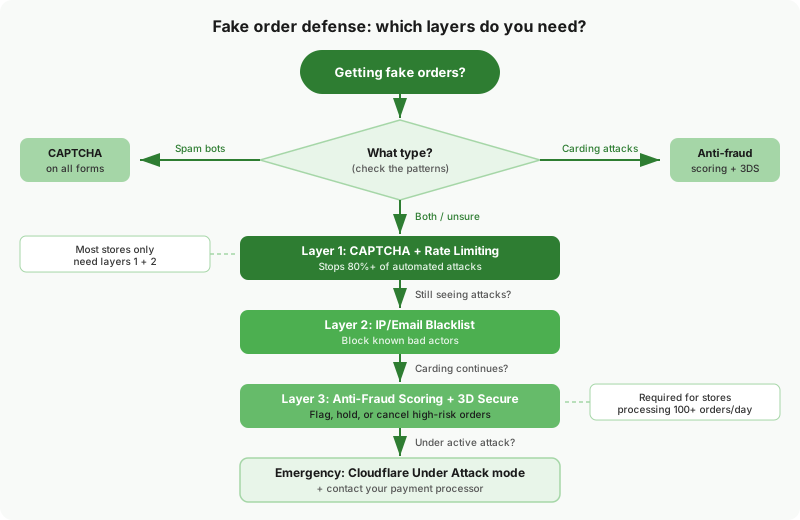
There’s no single fix. The most effective approach combines multiple layers so that bots need to bypass several defenses, not just one.
1. Add CAPTCHA to your checkout and forms#
This is the most impactful single step you can take. A CAPTCHA challenge on your checkout page stops most automated bots before they can submit an order.
The key word is “most”. Basic bots get stopped. Sophisticated ones use CAPTCHA-solving services. That’s why CAPTCHA works best as part of a layered approach, not as your only defense.
What to look for in a WooCommerce CAPTCHA plugin:
- Block Checkout support. WooCommerce’s new default checkout is React-based. Many older CAPTCHA plugins don’t work with it. If you’ve upgraded to Block Checkout (or plan to), verify compatibility first. Our HPOS and Block Checkout guide explains why this matters.
- Express payment handling. Apple Pay, Google Pay, and Amazon Pay use their own JavaScript flows with built-in fraud protection. A CAPTCHA that hooks into standard form submission will break these. The plugin needs to detect express payments and skip gracefully.
- WooCommerce PayPal Payments compatibility. This is a specific problem that trips up many stores. The WooCommerce PayPal Payments plugin now has its own built-in reCAPTCHA. If your CAPTCHA plugin also runs on checkout, you get double verification that often breaks the payment flow. Your CAPTCHA plugin needs to detect PayPal Payments’ reCAPTCHA and skip for PayPal methods automatically.
- Invisible options. Cloudflare Turnstile and Google reCAPTCHA v3 are invisible to most users. They verify in the background without forcing customers to click checkboxes or identify traffic lights. This matters because visible CAPTCHAs reduce conversions by 3–5%.
We did a full comparison of 7 CAPTCHA plugins in Best WooCommerce CAPTCHA Plugins in 2026. The short version: for most stores, Simple Cloudflare Turnstile is the best free option. If you use WooCommerce PayPal Payments or run a multi-vendor marketplace, Bouncer — reCAPTCHA & Fraud Protection for WooCommerce handles those compatibility issues (full disclosure, it’s our plugin).
2. Enable rate limiting#
CAPTCHA stops individual bot submissions. Rate limiting stops the volume.
If someone submits 50 checkout attempts from the same IP in 10 minutes, that’s not a real customer. Rate limiting blocks the IP after a configurable threshold. Even if a bot somehow passes CAPTCHA, it can’t hammer your checkout hundreds of times.
Where to implement rate limiting:
- At the plugin level. Some CAPTCHA and security plugins include built-in rate limiting. This is the simplest option.
- At the server level. If you use Cloudflare, you can set up rate limiting rules that block excessive requests to
/checkout/or/?wc-ajax=checkoutbefore they even reach WordPress. This is more effective because the requests never hit your server. - At the hosting level. Managed WordPress hosts like Pressable and WordPress VIP often include DDoS protection and request throttling. Check what your host offers before adding another layer.
Rate limiting complements CAPTCHA well. CAPTCHA filters individual bots. Rate limiting stops brute force volume.
3. Block suspicious emails and IPs#
Some attack patterns are obvious. The same disposable email domain submitting order after order. The same IP range hitting your checkout every night. You can block these directly.
Free plugins that help:
- WC Blacklist Manager lets you blacklist specific email addresses, email domains, IP addresses, and phone numbers. Orders from blacklisted entries are automatically blocked. It also supports wildcard patterns, so you can block entire disposable email services like
*@mailinator.com. - Fraud Prevention for WooCommerce (formerly Woo Blocker Lite) offers similar blacklisting plus the ability to block by state or zip code, useful if you’re seeing clusters of fake orders from specific regions.
If you’re already using a CAPTCHA plugin with built-in IP management, you may not need a separate blacklist plugin for IPs. For example, Bouncer includes an IP blocklist with CIDR notation and wildcard support that runs before CAPTCHA validation, blocking known bad actors from even reaching your forms. You’d still want a dedicated blacklist plugin if you need email domain and phone number blocking, which CAPTCHA plugins don’t cover.
Consider a Web Application Firewall (WAF) too. Services like Cloudflare, Sucuri, and Wordfence include WAF features that filter malicious traffic before it reaches WordPress. A WAF won’t replace form-level defenses like CAPTCHA, but it blocks a significant chunk of bot traffic at the network level. If you use Cloudflare (even the free plan), enabling their Bot Fight Mode adds another layer.
The limitation: Blacklisting is reactive. You’re blocking threats after you’ve already seen them. Sophisticated attackers rotate IPs and email addresses. This works best combined with proactive defenses like CAPTCHA and rate limiting.
4. Use anti-fraud scoring#
Anti-fraud plugins analyze each order against multiple risk signals and assign a fraud score. High-risk orders get flagged, held for review, or automatically cancelled.
Risk signals these plugins check:
- IP geolocation vs. billing address mismatch.
- Known proxy or VPN usage.
- Email address reputation (disposable domains, recently created accounts).
- Order velocity (too many orders too fast).
- Billing/shipping address consistency.
- Device fingerprinting.
YITH WooCommerce Anti-Fraud is one of the more established options in this space. It scores orders based on configurable risk rules and can automatically cancel high-risk ones. WooCommerce Anti-Fraud from OPMC is another option available on the WooCommerce Marketplace.
When to use this: If you’re dealing with carding attacks specifically, anti-fraud scoring catches what CAPTCHA misses. Carding bots can solve CAPTCHAs (using human solving services), but they can’t fake a consistent IP geolocation, email reputation, and billing address all at once.
5. Require verified payment methods#
The easiest way to stop fake orders is to make payment mandatory and use a gateway with built-in fraud detection.
Practical steps:
- Disable Cash on Delivery unless your business model requires it. COD orders bypass all payment verification, making them a favorite for spam bots.
- Remove “Check Payments” and “Bank Transfer” for new customers. These payment methods don’t validate anything at checkout.
- Use a gateway with fraud screening. Stripe Radar, PayPal’s fraud protection, and WooPayments all analyze transactions in real time. They catch a lot of carding attempts before the charge even processes.
- Enable Address Verification System (AVS). AVS checks whether the billing address entered at checkout matches the address on file with the card issuer. Most payment gateways (Stripe, PayPal, WooPayments) support AVS and let you configure how strictly to enforce mismatches. Carding bots often use random addresses that fail AVS checks.
- Enable 3D Secure (SCA). For European customers, this is already required by PSD2 regulation. For everyone else, enabling 3D Secure adds an extra verification step that bots can’t bypass. Most major payment gateways support it.
If your store currently accepts COD and you’re seeing fake orders, disabling it (even temporarily) will eliminate a huge chunk of the problem immediately.
6. Tighten guest checkout settings#
Guest checkout reduces friction for legitimate buyers, which is why WooCommerce enables it by default. But it also reduces friction for bots.
Don’t disable guest checkout entirely. That’s an overreaction that hurts conversions. Instead:
- Require an email verification step before processing the order. Some anti-fraud plugins add this as an option.
- Add CAPTCHA specifically to guest checkout. Logged-in users with purchase history are lower risk. Focus your friction on unknown visitors.
- Set minimum order values. Carding bots typically test with very small amounts ($0.50–$2.00). Setting a minimum order of $5–$10 blocks the most common testing pattern without affecting real customers.
This is about making guest checkout harder for bots without making it harder for humans.
7. Monitor, respond, and adapt#
No defense is permanent. Bot operators adapt. What works today might get bypassed next month.
Build a monitoring routine:
- Check WooCommerce orders daily for patterns (same IP, same email domain, unusual times).
- Set up email alerts for failed payment attempts. A spike in failures often signals the start of a carding attack.
- Review your payment gateway’s fraud reports. Stripe, PayPal, and WooPayments all provide fraud dashboards. Use them.
- Keep plugins updated. CAPTCHA providers update their algorithms frequently. Outdated plugins miss new bot techniques.
If you’re under active attack, your fastest response options are:
- Enable Cloudflare’s “Under Attack” mode (if you use Cloudflare). This adds a JavaScript challenge to every visitor.
- Temporarily enable maintenance mode on checkout while you implement defenses.
- Contact your payment processor. Stripe and PayPal have dedicated fraud teams that can help during active carding attacks.
Which approach should you start with?#
If you’re not sure where to begin, here’s a practical starting point based on what you’re seeing:
| What you’re seeing | Start here |
|---|---|
| Spam bot registrations and junk orders | CAPTCHA on checkout + registration forms |
| Wave of “Failed” orders (carding attack) | CAPTCHA + anti-fraud scoring + 3D Secure |
| Small completed orders testing stolen cards | CAPTCHA + anti-fraud scoring + 3D Secure |
| Same email/IP submitting repeatedly | Rate limiting + IP/email blacklisting |
| Fake COD orders | Disable COD, require online payment |
| AI-generated synthetic orders (realistic data) | Anti-fraud scoring + AVS + behavioral monitoring |
| Everything at once | All of the above, layered together |
Most stores should start with CAPTCHA + rate limiting. That combination stops the majority of automated attacks. Add anti-fraud scoring and blacklisting if you’re dealing with more sophisticated threats.
Frequently asked questions#
Will CAPTCHA stop all fake orders?#
No. CAPTCHA stops automated bots, which account for the majority of fake orders. But sophisticated attackers use human CAPTCHA-solving services. That’s why layering multiple defenses matters. CAPTCHA handles volume. Anti-fraud scoring catches the ones that slip through.
Should I disable guest checkout?#
Probably not. Guest checkout significantly reduces cart abandonment. Instead, add CAPTCHA to guest checkout and use anti-fraud scoring to flag suspicious orders. Only disable guest checkout as a temporary emergency measure during active attacks.
Do chargebacks count as fake orders?#
Not exactly, but they’re often connected. Carding attacks lead to chargebacks when stolen cards are used. Each chargeback costs you the transaction amount plus a $20–100 fee from your payment processor. Multiple chargebacks can get your merchant account flagged or terminated.
How do I know if I’m under a carding attack?#
The clearest sign is a sudden wave of “Failed” orders in your WooCommerce order list. Bots test stolen cards rapidly, and most attempts get declined by your payment processor. You’ll also see small-value orders (under $5), rapid submissions from the same IP range, and names or addresses that don’t match. Check your payment gateway’s fraud dashboard too. Stripe, PayPal, and WooPayments all show increased decline rates during an attack.
Does Cloudflare stop fake orders?#
Cloudflare’s Bot Management blocks network-level threats, but form-level bots that pass Cloudflare’s checks can still submit fake orders. Think of Cloudflare as your perimeter security and CAPTCHA as your checkout-level security. They complement each other; neither replaces the other.
Will adding CAPTCHA slow down my checkout?#
Modern invisible CAPTCHA providers like Cloudflare Turnstile and Google reCAPTCHA v3 add minimal overhead. They verify in the background without visible delays. Just make sure your CAPTCHA plugin only loads scripts on pages that need protection. If checkout performance is already a concern, our post on why most WooCommerce stores feel slow covers the bigger picture.
What about AI-powered fraud in 2026?#
Generative AI is making fake orders harder to catch. Bots now create synthetic identities with realistic names, matching addresses, and human-like checkout behavior. Basic CAPTCHA still blocks the automated volume, but you need anti-fraud scoring to catch the ones that look legitimate. Combine CAPTCHA with a fraud scoring plugin and gateway-level checks like AVS and 3D Secure. No single layer catches everything. The layered approach matters more than ever.
Are free CAPTCHA plugins good enough?#
For most stores, yes. Simple Cloudflare Turnstile is free and handles the basics well. You only need a premium option if you have specific requirements like WooCommerce PayPal Payments compatibility, multi-vendor marketplace support, or built-in rate limiting. We compared all the options in our WooCommerce CAPTCHA plugin comparison.
The bottom line#
Fake orders won’t stop on their own. Bots are cheap to run and they target every WooCommerce store they can find. The good news is that a few straightforward defenses, especially CAPTCHA plus rate limiting, block the vast majority of attacks.
Start with CAPTCHA on your checkout and registration forms. Our step-by-step CAPTCHA setup guide walks through the full process including Block Checkout and PayPal compatibility. Add rate limiting to prevent volume attacks. If you’re seeing carding specifically, enable 3D Secure on your payment gateway and consider an anti-fraud scoring plugin. Then monitor and adjust as patterns change. For a complete walkthrough of every security layer your store needs, from infrastructure to monitoring, see our WooCommerce security checklist for 2026.
If you need CAPTCHA that works alongside WooCommerce PayPal Payments, handles express payments (Apple Pay, Google Pay, Amazon Pay), and includes built-in fraud scoring, rate limiting, and geo-blocking, check out Bouncer — reCAPTCHA & Fraud Protection for WooCommerce.
Plugin we built for this
We didn't just write about it. We built something for it.
Keep reading

How to Add CAPTCHA to WooCommerce Checkout (Without Breaking Payments)
Most CAPTCHA tutorials skip the hard parts: Block Checkout compatibility, PayPal double verification, and Apple Pay conflicts. This guide covers setup for 4 CAPTCHA providers with the gotchas that break real stores.
Read more →
7 Best WooCommerce CAPTCHA Plugins (2026 Tested)
We installed 7 CAPTCHA plugins on a WooCommerce store with Block Checkout and HPOS enabled. Only 3 worked without breaking something. Here's the full breakdown.
Read more →
WooCommerce Security Checklist 2026 (What Actually Matters)
Most WooCommerce security guides rehash generic WordPress tips. This checklist covers what actually matters: checkout bot protection, REST API lockdown, and HPOS.
Read more →