Raffle for WooCommerce Pro
Premium addon for Raffle for WooCommerce. Ticket picker grids, lucky wheel, winner reveal, recurring raffles, wallet prize credit, bonus tickets, and 17 countdown styles.Features
Your raffle system already works. Tickets sell, winners get drawn, compliance is handled. But what if buying a raffle ticket felt exciting instead of transactional?
Raffle for WooCommerce Pro is a premium addon that transforms the standard raffle experience into something interactive and visual. Customers pick their own lucky numbers from a grid, spin a wheel for prizes, and watch live winner reveal animations. It's the same reliable raffle system underneath, with a new layer of engagement on top.
This addon requires the free Raffle for WooCommerce plugin (available on WordPress.org). For installation and license activation, see the Pro addon documentation.
Why upgrade to Pro?
Pick Your Own Ticket
Replace the standard quantity input with a visual ticket grid where customers choose their own lucky numbers. Each numbered tile shows availability in real-time — available tickets are selectable, sold tickets are greyed out, and reserved tickets show a countdown.
Customers click the numbers they want, see their selections highlighted, and proceed to checkout with exactly those tickets. This is the traditional raffle experience that people expect from physical ticket books, brought online.
The grid adapts to your raffle size and works on mobile with touch-friendly tile sizing. See the Ticket Picker setup guide.
Lucky Dip
Not everyone wants to pick specific numbers. Lucky Dip adds a one-click button that randomly selects available tickets for the customer. Set the quantity and hit the button — the grid animates as random numbers are selected, adding a moment of excitement before checkout.
Works alongside the ticket picker grid, so customers can choose between picking their numbers or going random. Lucky Dip documentation.
Advanced Instant Win
The free plugin includes basic Instant Win (probability-based and guaranteed interval). Pro takes it further:
This gives you complete control over which tickets win and what they win, while customers still experience the thrill of an instant reveal. Full Advanced Instant Win docs.
Lucky Wheel / Spin to Win
An interactive spinning wheel animation that customers spin to win prizes. Configure segments with different prizes, probabilities, and colors. The wheel spins with realistic physics and lands on a result.
Raffle-linked wheels
Attach a wheel to a raffle product. After purchasing tickets, customers get a spin as a bonus reward. Prizes can include extra raffle entries, discount codes, or custom prizes.
Standalone wheels
Create wheels as their own content type, independent of any raffle. Place them on any page using a shortcode or configure them as popups. Standalone wheels are perfect for:
Wheel placements
Display standalone wheels as:
For the complete setup including segment configuration, coupon generation, and display rules, see the Lucky Wheel documentation.
Email gate
Require visitors to enter their email address before spinning. Collected emails integrate with your existing WooCommerce customer list. Configurable win/lose messaging and coupon delivery.
Winner Reveal Page
Turn your winner announcement into an event. The Winner Reveal page shows a live draw animation with confetti effects when the winner is revealed. Share the URL with your audience and stream the reveal live.
The reveal page includes:
Perfect for live-streamed charity draws, social media events, or any raffle where the announcement is part of the experience. Winner Reveal documentation.
Entry / Participant List
Display a public list of participants on the raffle product page or any page via shortcode. Privacy controls let you configure how much information is shown:
This builds social proof and excitement as people see the participant list grow.
Alphabet Ticket Format
Switch from numeric ticket numbers (0001, 0002) to an alphabet format (A01–Z99) for a traditional raffle feel. Each ticket gets a letter-number combination that's easy to read aloud during live draws and looks great on printed tickets.
Ticket Reservation
When a customer selects tickets from the picker grid, those tickets are held for a configurable time period (e.g., 10 minutes). A countdown timer shows how long their selection will be reserved. If they don't complete checkout in time, the tickets are released back to the pool.
This prevents the frustration of selecting numbers, going to checkout, and finding they've been taken by someone else.
IP Purchase Restriction
Limit ticket purchases per IP address to prevent multi-account abuse. When someone creates multiple accounts to bypass per-customer ticket limits, IP restriction catches it. Configurable limit per IP per raffle.
Bonus Tickets
Automatically award extra draw entries to encourage larger purchases and early buying:
Bonus entries appear as separate tickets in the draw, increasing the customer's chances of winning without additional cost.
Reward Points (WooRewards)
Integration with the WooRewards loyalty program. Customers earn points when purchasing raffle tickets and can redeem points toward ticket purchases. Configurable earn and redeem rates per raffle.
Recurring Raffle
Run raffles on autopilot. When a raffle ends and winners are drawn, the plugin waits a configurable delay (so prize notifications go out first), then creates a fresh copy of the raffle with new start and end dates. The completed raffle is preserved with its full winner history.
Configure per product:
Each copy inherits all settings from the original: pricing, ticket limits, prize configuration, instant win rules, bonus tickets, and wallet credit settings. A lineage link connects each copy back to its source for easy tracking.
Combine with auto-draw and you get a fully hands-off weekly raffle that draws winners, credits prizes, and spins up the next round without anyone touching the admin. Recurring Raffle documentation.
Wallet Prize Credit
When a store credit raffle completes, the prize amount goes directly into the winner's wallet balance instead of generating a WooCommerce coupon. Supports TeraWallet and WooWallet.
Wallet credits show up immediately in the winner's account. They can spend it on their next purchase or save it for a future raffle. Every credit is logged in the raffle audit trail with the exact amount, wallet plugin, and ticket number.
If the winner is a guest (no WordPress account), the system falls back to creating a coupon and emailing it, so nobody misses their prize. Per-product toggle lets you disable wallet crediting for specific raffles if needed. Wallet Prize Credit documentation.
Email PDF Ticket
Automatically attach a branded PDF raffle ticket with QR code to the WooCommerce order confirmation email. Customers get their ticket delivered straight to their inbox without needing to log in and download it from My Account.
PDFs are generated using DOMPDF with your store branding, ticket details, and scannable QR codes.
Countdown and Badge Styles
Replace the default countdown timer and Instant Win badge with premium styled versions:
Preview each style in the settings panel and select the one that matches your brand. Browse all styles.
For developers
The Pro addon follows WordPress coding standards and extends the core plugin's hook system. All Pro features register their own actions and filters. Template files can be overridden in your theme. The addon uses the core plugin's extensibility layer (rfwc_loaded action) to initialize.
Technical compatibility
Running events alongside your raffles? Events Manager for WooCommerce handles ticketed events, attendee management, and QR check-in from the same WooCommerce store. For checkout security, reCaptcha for WooCommerce protects your forms from spam bots and carding attacks.
Frequently asked questions
Does this plugin work on its own?
No. Raffle for WooCommerce Pro is an addon that requires the free Raffle for WooCommerce plugin to be installed and activated. The free plugin handles all core raffle functionality. Pro adds the interactive visual features on top.
What do I get with the free plugin vs Pro?
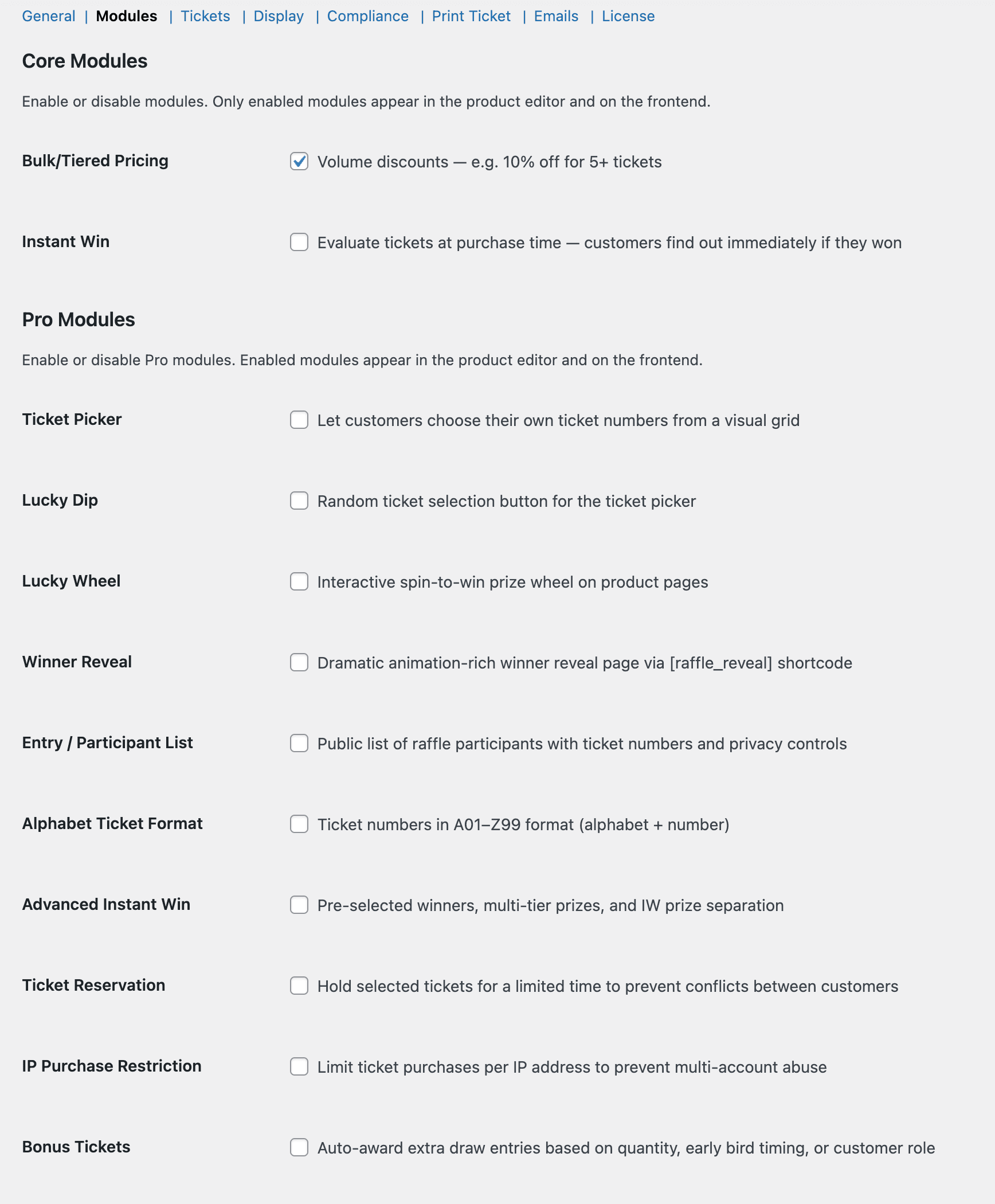
The free plugin is a complete raffle system: ticket sales, gift purchasing, winner selection (manual, automatic, Random.org), Instant Win, skill-testing questions, free entry compliance, mass refunds, bulk pricing, 7 shortcodes, 6 email notifications, analytics, and more. Pro adds visual engagement and automation features: ticket picker grids, lucky dip, lucky wheel, winner reveal animations, recurring raffles, wallet prize credit, alphabet tickets, ticket reservation, bonus tickets, loyalty points, and premium styles.
Can I try the free plugin first?
Absolutely. Install Raffle for WooCommerce from WordPress.org and run your raffles. If you later want the interactive features, install Pro and activate your license. All your existing raffles, tickets, and data carry over seamlessly.
How does the license work?
Your purchase includes one year of updates and support. After the first year, your plugin continues to work — you just won't receive new updates or support unless you renew.
Can I use the lucky wheel without a raffle?
Yes. Standalone lucky wheels are independent of raffle products. Create a wheel, configure prizes and probabilities, and place it on any page. Use the email gate to collect leads before spinning.
Does the ticket picker work on mobile?
Yes. The ticket grid uses responsive tile sizing that adapts to screen width. Touch interactions are fully supported for selecting and deselecting tickets.
What happens if a reserved ticket expires?
The ticket is released back to the available pool and can be purchased by anyone. The customer who held it sees a "reservation expired" message and can select new tickets.
Can I use alphabet tickets and the ticket picker together?
Yes. The ticket picker grid displays alphabet-formatted tiles (A01, A02, B01, etc.) instead of numeric ones when alphabet format is enabled.
Do bonus tickets count toward ticket limits?
Bonus entries are separate draw entries and do not count against per-customer ticket purchase limits. A customer limited to 10 tickets who earns 2 bonus entries has 10 purchased tickets plus 2 bonus entries in the draw.
Is there a limit on lucky wheel spins?
Standalone wheels can be configured with spin limits per user (by email or IP). Raffle-linked wheels typically allow one spin per purchase.
Which wallet plugins are supported for prize credit?
TeraWallet and WooWallet. The module detects which one is active and credits accordingly. If neither is installed, store credit prizes fall back to WooCommerce coupons automatically.
Can I limit how many times a raffle recurs?
Yes. Set a max recurrence count per product. When the limit is reached, the chain stops. Set it to 0 for unlimited recurrences. Each copy tracks its lineage back to the original.
Already running raffles with the free plugin? Add Pro to give your customers an interactive experience that drives more ticket sales and keeps them coming back. Check the Pro addon documentation for installation and setup.