Raffle for WooCommerce
Free WooCommerce raffle plugin. Unlimited raffles, gift tickets, QR codes, Random.org winner selection, Instant Win, and compliance tools.Features
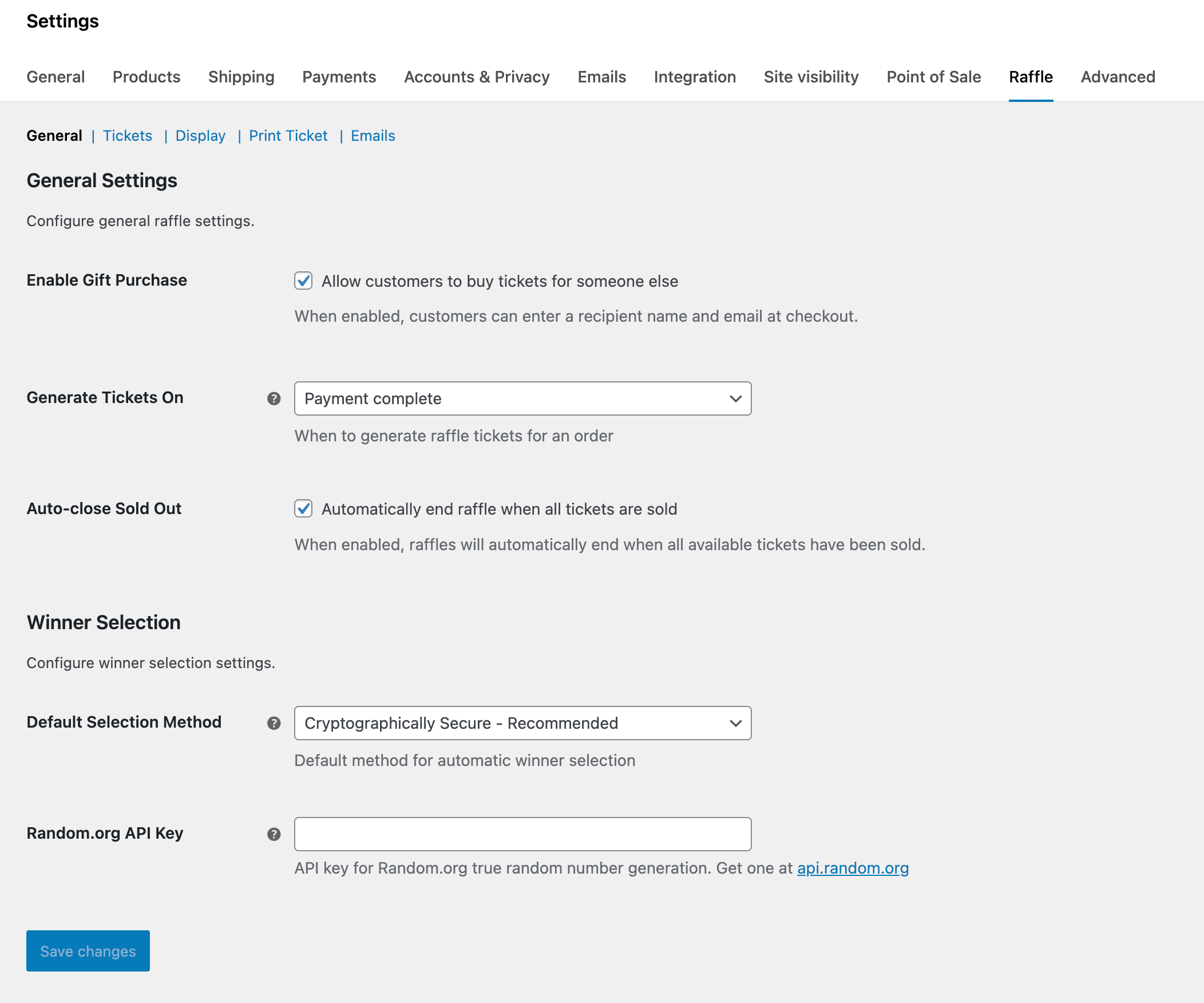
Raffle for WooCommerce is the most complete free raffle plugin for WooCommerce. Whether you're running a charity fundraiser, club prize draw, or promotional giveaway, it handles everything from ticket sales to winner selection, compliance, and refunds.
Every feature on this page works out of the box. The free plugin is a complete raffle system on its own — most stores will never need anything more. If you want interactive visual features like ticket picker grids, lucky wheels, and winner reveal animations, those are available in the separate Raffle for WooCommerce Pro addon.
New to the plugin? Check the getting started guide to set up your first raffle in minutes.
Buy tickets for someone else
This is the feature that sets this plugin apart. Customers can purchase raffle tickets as a gift for friends, family, or colleagues. Each ticket can have its own unique recipient with a separate name, email, and personal gift message. The recipient receives an email notification with their ticket details, and their name goes into the draw instead of the buyer's name.
This works perfectly for:
Gift purchasing works with both WooCommerce Block Checkout and Classic Checkout, including dynamic add/remove recipient fields and automatic quantity adjustment. See the gift purchases documentation for the full setup walkthrough.
Use cases
Charities and nonprofits
Running online fundraising raffles has never been easier. The gift purchasing feature lets donors buy tickets for supporters who may not be able to purchase online themselves. A complete audit trail ensures compliance with charity regulations, and Random.org integration provides provably fair draws that donors can trust. Skill-testing questions and a free entry route help meet legal requirements in jurisdictions like Canadian provinces.
Clubs and organizations
Golf clubs, sports clubs, and social clubs can run member prize draws with confidence. Set ticket limits per person, use custom ticket numbering with prefixes and suffixes, and generate printable tickets for physical events. The QR code scanner makes checking in attendees quick and straightforward.
Schools and churches
Parent associations and community groups can raise funds without technical complexity. Create a raffle in minutes, share the link with your community, and let the plugin handle ticket management, payments, and winner selection. Mass refund everything in one click if a raffle needs to be cancelled.
E-commerce promotions
Online stores can engage customers with giveaways and contests. Offer product prizes from your catalog, store credit rewards, or cash prizes. Use Instant Win mode to let customers find out if they won immediately after purchase. Winners receive automatic email notifications with prize claim instructions.
If you also run ticketed events alongside raffles, our free Evenzo – Events Manager for WooCommerce plugin handles event ticketing, attendee management, and QR check-in from the same WooCommerce store.
Key features
Gift ticket purchasing
The standout feature that no other plugin offers. Customers choose to buy tickets for themselves or as a gift at checkout. Each ticket can have its own unique recipient with a personal message. Gift recipients receive professional email notifications with their ticket details and entry confirmation.
Unlimited raffles
Create as many raffles as you need with no restrictions. Each raffle is a separate WooCommerce product with its own settings, dates, and prize information. Run multiple raffles simultaneously without any limitations.
Instant Win
Let customers find out if they won immediately after purchase instead of waiting for the raffle to end. Two modes are available: probability-based (configurable odds, e.g., 1 in 50 chance per ticket) and guaranteed interval (one winner every N tickets). Results appear on the order thank-you page and in the customer's My Account ticket list. An Instant Win ribbon overlay displays on product images across your shop. Learn more about Instant Win setup.
Winner selection
Choose how you want to pick winners. Manual selection lets you browse all tickets and choose yourself. Automatic selection picks a random winner when the raffle end date passes. Random.org integration provides certified random numbers for verified fair draws that stand up to scrutiny. Enable unique winner enforcement to prevent the same person from winning multiple prizes in a single draw. See the winner selection guide for setup details and our Random.org vs built-in random comparison for the technical breakdown of each method.
Winner management
A centralized management area with three tabs — All Tickets, Winners, and Claimed — gives you a cross-raffle overview without navigating to individual product pages. Quick "Mark Claimed" and "Resend Notification" buttons are available on each winner row, with bulk claim actions for processing multiple winners at once. Winner announcement banners display the winner's Gravatar, city, ticket number, and a link to the raffle product.
Extend and relist raffles
Completed, failed, or cancelled raffles can be extended or relisted. Extend pushes the end date forward while keeping all tickets and winners. Relist resets the raffle to a fresh state — clears winners and terminal status but preserves existing ticket data.
Printable tickets
Every ticket comes with a unique ticket number (with configurable prefix and suffix) and QR code. Customers can view and print their tickets from their account dashboard. The QR codes make event check-in fast and reliable. Customize the primary color, badge text, and footer message on printed tickets.
Live countdown timer
A countdown timer on the product page shows exactly how long remains before the raffle closes. An urgency color shift activates when less than 3 days remain. Enable compact countdown badges on shop and archive pages to show "Ends in" pills below the price for every raffle product.
Progress bar
A visual progress bar displays how many tickets have been sold compared to the total available. This social proof encourages participation and shows customers that others are entering. Auto-close raffles when all tickets are sold, with an optional early draw trigger.
7 embeddable shortcodes
Display raffle information anywhere on your site — not just product pages:
[raffle_card id="123"] — Full product card with image, countdown, prize, and buy button.[raffle_cards status="active" columns="3"] — Multiple raffle cards in a responsive grid, filterable by IDs, category, or status.[raffle_countdown id="123"] — Live countdown timer (compact or full format).[raffle_progress id="123"] — Ticket sales progress bar.[raffle_prize id="123"] — Prize information display.[raffle_status id="123"] — Status badge (Active, Ended, Winner Selected, Cancelled, Failed, Coming Soon, Sold Out).[raffle_winners id="123"] — Winner announcement with Gravatar, city, ticket number, and product link.All shortcodes support id="latest" and id="active" keywords to auto-pick the most relevant running raffle. See the shortcodes reference for all attributes and examples.
Bulk and tiered ticket pricing
Define up to 5 percentage-based volume discount tiers per raffle (e.g., "5+ tickets = 10% off"). Discounts are calculated from the total ticket quantity in the cart and applied automatically at checkout with a live price preview on the product page. View bulk pricing setup.
Skill-testing questions
Build a question pool with text and multiple choice questions for legal compliance. When enabled, customers must answer correctly before adding tickets to the cart. Questions are pinned per product for consistency, with optional countdown timers and max attempt limits. Multiple choice answers can display as radio buttons or a dropdown.
Free entry route
A "Paid Entry" / "Free Entry" tab interface on the product page satisfies "no purchase necessary" requirements for jurisdictions like Canadian provinces. Write your own instructions and use the [Your Address] placeholder to auto-insert your WooCommerce store address. Override the global setting per product.
Mass and selective refund system
When a raffle fails or is cancelled, refund all ticket orders in batch with a live progress bar and confirmation dialog. Or select individual tickets and refund just those. Three refund methods are available: standard WooCommerce refund records, automated refund via payment gateway (Stripe, PayPal, etc.), and refund to wallet via TeraWallet. Persistent tracking shows color-coded badges for each order's refund status, and a "Mark Done" button for manual refund processing.
Guest access control
Three-way global setting: "Allow" (default), "Block" (show login-required message on the product page), or "Force login" (redirect to the login page). Enforced on both the product page and add-to-cart validation.
Payment gateway restrictions
Hide specific payment gateways per raffle product. Useful for disabling Cash on Delivery or bank transfer for raffle purchases. When Instant Win is enabled with "require instant payment," offline gateways are hidden automatically.
Full WooCommerce integration
The plugin works with every payment gateway that WooCommerce supports. Customers check out through the standard WooCommerce process, and orders appear in your regular order management area. Mixed checkout restriction can optionally prevent raffle and non-raffle products from being purchased together. Skip cart page redirects customers directly to checkout after adding a raffle.
Email notifications
Six built-in email notifications keep everyone informed:
All emails are configurable in WooCommerce Settings and use your existing email customizations and branding.
Analytics dashboard
Track your raffle performance with built-in analytics. View sales charts, ticket status distribution, and an activity log showing ticket generation, winner draws, prize claims, failures, and cancellations. Export all ticket data to CSV for external reporting.
Global module toggles
Enable or disable features from WooCommerce > Settings > Raffle > Modules. Disabled modules are hidden from the product editor and frontend. All newer features default to off so existing stores are unaffected after updating.
Compliance ready
A complete audit trail records every action for charity compliance and regulatory reporting. Skill question compliance data (question text, answer type, pass result, timestamp) is saved as order item meta. Full GDPR compliance includes personal data export and erasure tools that integrate with WordPress privacy features. Read the compliance and privacy guide for jurisdiction-specific setup.
Technical compatibility
The plugin is built for modern WooCommerce stores. It works with High Performance Order Storage out of the box, supports block-based checkout, and includes a REST API for custom integrations. An addon extensibility layer provides action and filter hooks for third-party extensions. Developers will find hooks and filters throughout the codebase for customization, and the plugin is fully translation-ready for any language.
Running a WooCommerce store? Protect your checkout from spam bots and carding attacks with reCaptcha for WooCommerce — it works alongside Raffle with full Block Checkout compatibility.
Free vs Pro comparison
The free plugin is a complete raffle system. Raffle for WooCommerce Pro is a separate addon that adds interactive visual features on top.
| Feature | Free | Pro |
|---|---|---|
| Unlimited raffles | ✅ | ✅ |
| Gift ticket purchasing | ✅ | ✅ |
| Instant Win (probability & interval) | ✅ | ✅ |
| Winner selection (manual, auto, Random.org) | ✅ | ✅ |
| Printable tickets with QR codes | ✅ | ✅ |
| 7 shortcodes | ✅ | ✅ |
| Bulk/tiered ticket pricing | ✅ | ✅ |
| Skill-testing questions & free entry | ✅ | ✅ |
| Mass and selective refund system | ✅ | ✅ |
| 6 email notifications | ✅ | ✅ |
| Analytics dashboard | ✅ | ✅ |
| HPOS & Block Checkout | ✅ | ✅ |
| Pick Your Own Ticket grid | — | ✅ |
| Lucky Dip random selection | — | ✅ |
| Advanced Instant Win (pre-selected tickets, multi-tier) | — | ✅ |
| Lucky Wheel / Spin to Win | — | ✅ |
| Winner Reveal page with confetti | — | ✅ |
| Entry / Participant list | — | ✅ |
| Alphabet ticket format (A01–Z99) | — | ✅ |
| Ticket reservation with countdown | — | ✅ |
| Bonus tickets (quantity, early bird, role) | — | ✅ |
| Email PDF ticket attachment | — | ✅ |
| 17 countdown styles & 9 badge styles | — | ✅ |
| IP purchase restriction | — | ✅ |
| WooRewards loyalty points integration | — | ✅ |
Frequently asked questions
Is Raffle for WooCommerce really free?
Yes, completely free. Every feature listed on this page works out of the box. The plugin is open source and hosted on WordPress.org. If you want interactive visual features like ticket picker grids, lucky wheels, winner reveal animations, and more, those are available in the separate Raffle for WooCommerce Pro addon. But the free plugin is a complete raffle system on its own.
Can customers buy raffle tickets for someone else?
This is the feature that sets this plugin apart from every other WooCommerce raffle plugin. Customers can purchase tickets as a gift during checkout. Each ticket can have its own recipient with a personal message. The recipient gets an email with their ticket details, and their name goes into the draw instead of the buyer's name.
How does winner selection work?
You have three options. Manual selection lets you browse all tickets and pick a winner yourself. Automatic selection picks a random winner when the raffle end date passes. For maximum transparency, Random.org integration provides certified random numbers so your draw is provably fair. You can also enable unique winner enforcement to prevent the same person from winning multiple prizes.
What is Instant Win?
Instant Win lets customers find out if they won immediately after purchasing a ticket, rather than waiting for the raffle to end. Two modes: probability-based (e.g., 1 in 50 chance per ticket) or guaranteed interval (one winner every N tickets). Results appear on the order thank-you page and in the customer's My Account ticket list.
Can I extend or relist an expired raffle?
Yes. Extend pushes the end date forward while keeping all tickets and winners. Relist resets the raffle to a fresh state — clears winners and terminal status but preserves existing ticket data. Both options are available on the product edit screen.
How do refunds work for failed or cancelled raffles?
Go to the Mass Refund tab. Select a raffle and click "Refund All Tickets" to process everything in batch. Or select individual tickets from the All Tickets tab for selective refund. Three methods are available: standard refund, refund via payment gateway (Stripe, PayPal, etc.), and refund to wallet (via TeraWallet). Color-coded badges track each order's refund status.
Does it work with WooCommerce HPOS?
Yes. The plugin fully supports WooCommerce's High-Performance Order Storage (HPOS) and the new block-based checkout. It's built for modern WooCommerce stores.
Can I run multiple raffles at the same time?
Absolutely. Create as many raffles as you need with no restrictions. Each raffle is a separate WooCommerce product with its own settings, dates, ticket limits, and prize information.
Can I display raffle countdowns or cards on any page?
Yes. The plugin includes seven shortcodes you can use on any page, post, or landing page. Use [raffle_card] for a full product card, [raffle_cards] for a responsive grid, [raffle_countdown] for a timer, [raffle_progress] for the progress bar, [raffle_prize] for prize info, [raffle_status] for a status badge, or [raffle_winners] for the winner announcement. All shortcodes support id="latest" and id="active" keywords.
How do skill-testing questions work?
Enable Skill-Testing Questions in WooCommerce > Settings > Raffle > Compliance. Build a question pool with text or multiple choice questions. Customers must answer correctly to add tickets to the cart. Optional enhancements include a countdown timer and max attempt limits per customer.
What is the free entry route?
It adds a "Paid Entry" / "Free Entry" tab on the raffle product page. This satisfies "no purchase necessary" requirements in jurisdictions like Canadian provinces. Write your own instructions and use the [Your Address] placeholder to auto-insert your store address.
Is this plugin GDPR compliant?
Yes. Full GDPR compliance includes personal data export and erasure tools that integrate with the WordPress privacy features. A complete audit trail records every action for charity compliance and regulatory reporting.
What payment gateways does it support?
Every gateway that WooCommerce supports. Stripe, PayPal, bank transfers, and dozens of others. You can also restrict specific gateways per raffle product.
Can I use this for charity fundraising raffles?
This is one of the most popular use cases. The gift ticket feature is perfect for charity supporters buying tickets for relatives who can't purchase online. The Random.org integration provides provably fair draws that donors can trust, and the audit trail helps with charity compliance reporting. Skill-testing questions and free entry routes handle legal compliance.
Does it generate printable tickets?
Yes. Every ticket comes with a unique ticket number and QR code. Customers can view and print their tickets from the My Account page in WooCommerce. The QR codes also work for event check-in scanning. Customize the primary color, badge text, and footer message on printed tickets.
Does it work with WordPress multisite?
Yes. The plugin is compatible with WordPress multisite installations and is fully translation-ready for any language.
What is the difference between the free plugin and Pro?
The free plugin is a complete raffle system covering ticket sales, gift purchasing, winner selection, compliance, refunds, analytics, and everything else listed on this page. Raffle for WooCommerce Pro is a separate addon that adds interactive visual features: ticket picker grids, lucky dip, lucky wheel, winner reveal animations, alphabet ticket format, ticket reservation, bonus tickets, and more.
Ready to run your first raffle? Download Raffle for WooCommerce free from WordPress.org and set up your first raffle in minutes. No account needed, no credit card, no catch. Follow the getting started guide to create your first raffle, or explore the full documentation for every feature.